> For the complete documentation index, see [llms.txt](https://docs.ovaledge.com/llms.txt). Markdown versions of documentation pages are available by appending `.md` to page URLs; this page is available as [Markdown](https://docs.ovaledge.com/connectors/connector-repositories/reporting-tool/oracle-analytics-server-obiee-oas.md).

# Oracle Analytics Server (OBIEE OAS)

This article outlines the integration with the Oracle Analytics Server (OBIEE OAS) connector, enabling streamlined metadata management through features such as crawling and lineage (Auto & Manual). It also ensures secure authentication via Credential Manager.

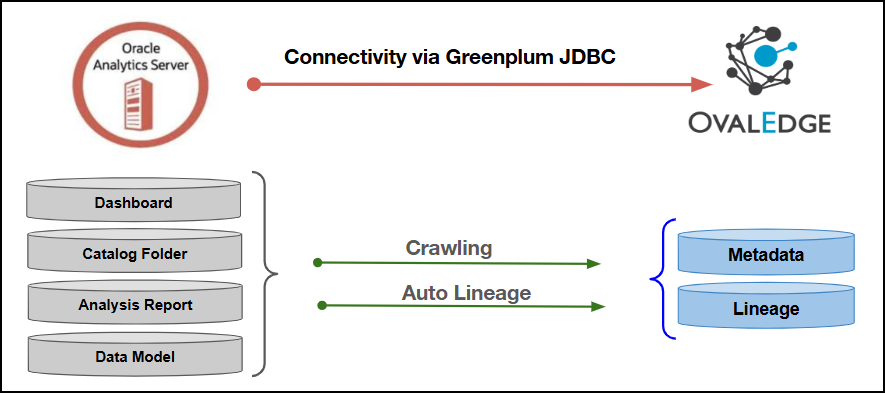
The connector establishes connectivity to the Oracle Analytics Server (OBIEE OAS) database through the Greenplum JDBC Driver. Access to the OBIEE OAS server is established using the configured username and password to crawl reports and report columns, map the metadata to the corresponding Data Catalog assets, and build lineage.

<figure><img src="/files/yn4InV5QRQmXFZqYe4D4" alt=""><figcaption></figcaption></figure>

## Overview

### Connector Details

| Connector Category                                                            | Reporting Tools        |
| ----------------------------------------------------------------------------- | ---------------------- |
| OvalEdge Release Supported                                                    | Release6.3.x and later |
| <p>Connectivity</p><p>\[How the connection is established with OBIEE OAS]</p> | GreenPlum JDBC Driver  |

### Connector Features

<table data-search="false"><thead><tr><th>Feature</th><th align="center">Availability</th></tr></thead><tbody><tr><td>Crawling</td><td align="center">✅</td></tr><tr><td>Delta Crawling</td><td align="center">❌</td></tr><tr><td>Profiling</td><td align="center">NA</td></tr><tr><td>Query Sheet</td><td align="center">NA</td></tr><tr><td>Report Preview</td><td align="center">❌</td></tr><tr><td>Auto Lineage</td><td align="center">✅</td></tr><tr><td>Manual Lineage</td><td align="center">✅</td></tr><tr><td>Secure Authentication via Credential Manager</td><td align="center">✅</td></tr><tr><td>Data Quality</td><td align="center">❌</td></tr><tr><td>DAM (Data Access Management)</td><td align="center">NA</td></tr></tbody></table>

{% hint style="info" %}
'NA' indicates that the respective feature is 'Not Applicable.'
{% endhint %}

### Metadata Mapping

The following objects are crawled from OBIEE OAS and mapped to the corresponding UI assets.

<table><thead><tr><th width="186.88885498046875">OBIEE OAS Object</th><th width="330.3333740234375">OBIEE OAS Attribute</th><th width="179.5555419921875">OvalEdge Attribute</th><th width="171.5555419921875">OvalEdge Category</th><th width="179.5555419921875">OvalEdge Type</th></tr></thead><tbody><tr><td>Dashboard (Domain)</td><td>catalog_dashboardpages_data.folder</td><td>Report Group</td><td>Reports</td><td>Report Group</td></tr><tr><td>Dashboard (Domain)</td><td>catalog_dashboardpages_data.type</td><td>Report Group Type</td><td>              -</td><td>              -</td></tr><tr><td>Catalog Folder (Domain)</td><td>rpt_catalog_fold_data_table.folder</td><td>Report Group</td><td>Reports</td><td>Report Group</td></tr><tr><td>Catalog Folder (Domain)</td><td>rpt_catalog_fold_data_table.type</td><td>Report Group Type</td><td>              -</td><td>              -</td></tr><tr><td>Catalog Analysis Folder (Domain)</td><td>rpt_catalog_analy_data_table.folder</td><td>Report Group</td><td>Reports</td><td>Report Group</td></tr><tr><td>Catalog Analysis Folder (Domain)</td><td>rpt_catalog_analy_data_table.type</td><td>Report Group Type</td><td>              -</td><td>              -</td></tr><tr><td>Dashboard (Report)</td><td>Name: derived from catalog_dashboardpages_data.folder (last segment after /_portal/, Scheduled_Reports/, /shared/Templates/, /shared/Custom Made Reports/)</td><td>Report</td><td>Reports</td><td>Report Name</td></tr><tr><td>Dashboard (Report)</td><td>Type: literal “Dashboard”</td><td>Report Type</td><td>Reports</td><td>Dashboard</td></tr><tr><td>Analysis Report</td><td>rpt_catalog_analy_data_table.name</td><td>Report</td><td>Reports</td><td>Report Name</td></tr><tr><td>Analysis Report</td><td>Analysis Report' literal</td><td>Report Type</td><td>Reports</td><td>Analysis Report'</td></tr><tr><td>Subject Area Report</td><td>CONCAT(name,'.',subject_area) from rpt_catalog_analy_data_table</td><td>Report</td><td>Reports</td><td>Report Name</td></tr><tr><td>Subject Area Report</td><td>Subject Area Report' literal</td><td>Report Type</td><td>Reports</td><td>Subject Area Report</td></tr><tr><td>Data Model (.xdm)</td><td>rpt_catalog_fold_data_table.name (like '%.xdm')</td><td>Report</td><td>Reports</td><td>Report Name</td></tr><tr><td>Data Model (.xdm)</td><td>Data Model' literal</td><td>Report Type</td><td>Reports</td><td>Data Model</td></tr><tr><td>Publisher Report (.xdo)</td><td>vw_publisher_reports_data.report_name</td><td>Report</td><td>Reports</td><td>Report Name</td></tr><tr><td>Publisher Report (.xdo)</td><td>Publisher Report' literal</td><td>Report Type</td><td>Reports</td><td>Publisher Report</td></tr><tr><td>Analysis Field</td><td>rpt_catalog_analy_data_table.column_name</td><td>Report Columns</td><td>Report Columns</td><td>Report Column Name</td></tr><tr><td>Analysis Field</td><td>analysis' literal</td><td>Type</td><td>Report Columns</td><td>analysis</td></tr><tr><td>Analysis Field</td><td>rpt_catalog_analy_data_table.formula</td><td>Source Description</td><td>Report Columns</td><td>Source Description</td></tr><tr><td>Data Model Field</td><td>catalog_datamodel_fileds.fieldname (via joins)</td><td>Report Columns</td><td>Report Columns</td><td>Report Column Name</td></tr><tr><td>Data Model Field</td><td>datamodel' literal</td><td>Type</td><td>Report Columns</td><td>datamodel</td></tr><tr><td>Access Control List (Custom Field)</td><td>rpt_catalog_fold_data_table.acl / rpt_catalog_analy_data_table.acl</td><td>Custom Field</td><td>Report</td><td>Access Control List</td></tr><tr><td>Access Control List (Custom Field)</td><td>tcf1def = "Access Control List"</td><td>Custom Field Label</td><td>Report</td><td>Access Control List</td></tr><tr><td>Access Control List (Custom Field)</td><td>tcf1 = principal names joined by newline</td><td>Custom Field Label</td><td>Report</td><td>Access Control List</td></tr><tr><td>Access Control List (Custom Field)</td><td>tcf1 = principal names joined by newline</td><td>Custom Field Value</td><td>Report</td><td>String (newline-separated)</td></tr></tbody></table>

## Set up a Connection

### Prerequisites

The prerequisites to establish a connection:

#### **Whitelisting Ports**

Whitelist the inbound port 5432 to allow OvalEdge to connect to the OBIEE OAS database.

{% hint style="warning" %}
OBIEE OAS uses port 5432 by default. When a different port is configured, specify the updated port number during connection setup, whitelist the port, and establish proper communication between the system and the OBIEE OAS Server.
{% endhint %}

#### Service Account User Permissions

{% hint style="warning" %}
It is recommended to use a dedicated service account to establish the connection to the data source, configured with the following minimum set of permissions.
{% endhint %}

{% hint style="info" %}
**👨‍💻 Who can provide these permissions?** The OBIEE OAS administrator grants these permissions, since users may not have sufficient access to assign them.
{% endhint %}

<table data-search="false"><thead><tr><th width="324.22216796875">Objects</th><th>Access Permission</th></tr></thead><tbody><tr><td>Connector Validation</td><td>DB user with read access to the OBIEE/OAS metadata repository database</td></tr><tr><td>Crawling</td><td>Read access to the repository tables</td></tr><tr><td>Lineage</td><td>Read access to analysis, publisher, datamodel, and repository mapping tables</td></tr><tr><td>Catalog Folder (Domain)</td><td>Read repo tables</td></tr><tr><td>Catalog Analysis Folder (Domain)</td><td>Read repo tables</td></tr><tr><td>Dashboard (Domain)</td><td>Read repo tables</td></tr><tr><td>Dashboards (Reports under Dashboard Domain)</td><td>Read repo tables</td></tr><tr><td>Analysis Reports (Report)</td><td>Read repo tables</td></tr><tr><td>Subject Area Reports (Report)</td><td>Read repo tables</td></tr><tr><td>Data Models (.xdm) (Report)</td><td>Read repo tables</td></tr><tr><td>Publisher Reports (.xdo) (Report)</td><td>Read repo tables</td></tr><tr><td>Dashboard Pages (optional)</td><td>Read repo tables</td></tr><tr><td>ACL (Access Control List) metadata</td><td>Read repo tables</td></tr></tbody></table>

### Connection Configuration Steps

{% hint style="warning" %}
Users must have the Connector Creator role to configure a new connection.
{% endhint %}

1. Log into OvalEdge, go to Administration > Connectors, click + **(New Connector)**, search for **OBIEE OAS**, and enter the required parameters.

{% hint style="info" %}
Fields marked with an asterisk (\*) are mandatory for establishing a connection.
{% endhint %}

<table><thead><tr><th width="219.3333740234375">Field Name</th><th>Description</th></tr></thead><tbody><tr><td>Connector Type</td><td>By default, "OBIEEOAS" is displayed as the selected connector type.</td></tr><tr><td>Credential Manager*</td><td><p>Select the desired credentials manager from the drop-down list. Relevant parameters will be displayed based on the selection.</p><p>Supported Credential Managers:</p><ul><li>OE Credential Manager</li><li>AWS Secrets Manager</li><li>HashiCorp</li><li>Azure Key Vault</li></ul><p>For more details, click <a href="https://docs.ovaledge.com/connectors/additional-requirements/credential-manager-configuration">here</a>.</p></td></tr><tr><td>License Add-On</td><td>Select the Auto Lineage Add-On checkbox to automatically build data lineage.<br>For more details, click <a href="https://docs.ovaledge.com/connectors/introduction-to-connectors/setup-and-connectivity/license-types-and-add-ons">here</a>.</td></tr><tr><td>Connector Name*</td><td><p>Enter a unique name for the OBIEE OAS connection              </p><p>(Example: "OAS_Prod").</p></td></tr><tr><td>Connector Environment</td><td>Select the environment (Example: PROD, STG) configured for the connector.<br>For more details, click <a href="https://docs.ovaledge.com/connectors/introduction-to-connectors/setup-and-connectivity/prerequisites#connector-environment">here</a>.</td></tr><tr><td>Connector Description</td><td>Enter a brief description of the connector.</td></tr><tr><td>Server*</td><td>Enter the Oracle Analytics Server hostname or IP address where the OAS instance is hosted.</td></tr><tr><td>Port*</td><td>Enter the port number configured for the Oracle Analytics Server (OBIEE OAS) instance.</td></tr><tr><td>Database*</td><td>Enter the service name or SID of the Oracle Analytics Server (OBIEE OAS) database.</td></tr><tr><td>Driver*</td><td>By default, OBIEE OAS uses ‘com.pivotal.jdbc.GreenplumDriver.’ This field is not editable.</td></tr><tr><td>Username*</td><td>Enter the username to access the OBIEE OAS server.</td></tr><tr><td>Password*</td><td>Enter the password associated with the OBIEE OAS username.</td></tr><tr><td>Connection String</td><td><p>Configure the connection string for the OBIEE OAS database:</p><ul><li>Automatic Mode: The system generates a connection string based on the provided credentials.</li><li>Manual Mode: Enter a valid connection string manually.</li></ul><p>Replace placeholders with actual database details.</p><p>{sid} refers to Database Name.</p></td></tr><tr><td>Plugin Server</td><td>Enter the server name when running as a plugin server.</td></tr><tr><td>Plugin Port</td><td>Enter the port number on which the plugin is running.</td></tr></tbody></table>

**Default Governance Roles**

<table data-header-hidden><thead><tr><th width="220.22222900390625"></th><th></th></tr></thead><tbody><tr><td>Default Governance Roles*</td><td>Select the appropriate users or teams for each governance role from the drop-down list. All users and teams configured in OvalEdge Security are displayed for selection.</td></tr></tbody></table>

**Admin Roles**

<table data-header-hidden><thead><tr><th width="219.33331298828125"></th><th></th></tr></thead><tbody><tr><td>Admin Roles*</td><td>Select one or more users from the dropdown list for Integration Admin and Security &#x26; Governance Admin. All users configured in OvalEdge Security are available for selection.</td></tr></tbody></table>

**No of Archive Objects**

<table data-header-hidden><thead><tr><th width="221.11114501953125"></th><th></th></tr></thead><tbody><tr><td>No Of Archive Objects*</td><td><p>This shows the number of recent metadata changes to a dataset at the source. By default, it is off. To enable it, toggle the Archive button and specify the number of objects to archive.</p><p>Example: Setting it to 4 retrieves the last four changes, displayed in the 'Version' column of the 'Metadata Changes' module.</p></td></tr></tbody></table>

**Bridge**

<table data-header-hidden><thead><tr><th width="220.22222900390625"></th><th></th></tr></thead><tbody><tr><td>Select Bridge*</td><td><p>If applicable, select the bridge from the drop-down list.</p><p>The drop-down list displays all active bridges configured in OvalEdge. These bridges enable communication between data sources and OvalEdge without altering firewall rules.</p></td></tr></tbody></table>

2. After entering all connection details, the following actions can be performed:
   1. Click **Validate** to verify the connection.
   2. Click **Save** to store the connection for future use.
   3. Click **Save & Configure** to apply additional settings before saving.
3. The saved connection will appear on the Connectors home page.

## Manage Connector Operations

### Crawl

{% hint style="warning" %}
To perform crawl operations, users must be assigned the Integration Admin role.
{% endhint %}

The **Crawl/Profile** button allows users to select one or more reports/report columns for crawling.&#x20;

1. Navigate to the **Connectors** page and click **Crawl/Profile**.
2. Select the reports/report columns to crawl.
3. Click **Run** to collect metadata from the connected source and load it into the Data Catalog.
4. After a successful crawl, the information appears in the **Data Catalog > Report / Report Column** tab.

The **Schedule** checkbox allows automated crawling for a selected timeframe, from a minute to a year.

1. Click the **Schedule** checkbox to enable the **Select Period** drop-down.
2. Select a time period for the operation from the drop-down menu.
3. Click **Schedule** to initiate metadata collection from the connected source.
4. The system will automatically execute the crawl operation at the scheduled time.

### Other Operations

The Connectors page provides a centralized view of all configured connectors and their health status.

**Managing connectors includes:**

* **Connectors Health**: Displays the current status of each connector, with a **green** icon for active connections and a **red** icon for inactive connections, helping monitor connectivity to data sources.
* **Viewing**: Click the **Eye** icon next to the connector name to view connector details, including Reports and Report Columns.

**Nine Dots Menu Options:**

To view, edit, validate, build lineage, configure, or delete connectors, click on the **Nine Dots menu**.

* **Edit Connector**: Update and revalidate the data source.
* **Validate Connector**: Check the integrity of the connection.
* **Settings**: Modify connector settings.
  * **Crawler**: Configure data extraction.
  * **Query Policies**: Define query execution rules based on roles.
  * **Access Instructions**: Add notes on how data can be accessed.
  * **Business Glossary Settings**: Manage term associations at the connector level.
  * **Connection Pooling**: Configure database connection pool parameters to optimize database connectivity and resource utilization. For more details, click [here](https://docs.ovaledge.com/connectors/introduction-to-connectors/setup-and-connectivity/connector-settings#connection-pooling).
  * **Lineage**: Select server dialects for parsing and setting connector priority for table lineage.
  * **Others**: Configure notification recipients for metadata changes.
* **Build Lineage**: Automatically build data lineage using source code parsing.
* **Delete Connector**: Remove a connector with confirmation.

For more details on connector settings, click [here](https://docs.ovaledge.com/connectors/introduction-to-connectors/setup-and-connectivity/connector-settings).

## Connectivity Troubleshooting

If incorrect parameters are entered, error messages may appear. Ensure all inputs are accurate to resolve these issues. If issues persist, contact the assigned support team.

<table><thead><tr><th width="86" align="right">S. No</th><th width="217">Error Message</th><th>Error Description &#x26; Resolution</th></tr></thead><tbody><tr><td align="right">1</td><td><code>java.lang.ClassNotFoundException: org.postgresql.Driver</code> (or similar missing driver error)</td><td><p><strong>Description:</strong> The required Greenplum/PostgreSQL JDBC driver is missing or is not available in the expected location.</p><p><strong>Resolution:</strong></p><ul><li>Download the required Greenplum JDBC driver JAR file.</li><li>Place the JAR file in the appropriate driver directory.</li><li>Restart the OvalEdge application after placing the JAR file.</li></ul></td></tr><tr><td align="right">2</td><td><code>Connection to &#x3C;host>:&#x3C;port> refused. Check that the hostname and port are correct and that the postmaster is accepting TCP/IP connections.</code></td><td><p><strong>Description:</strong> The application cannot establish a connection to the Greenplum server because the specified host or port is unavailable, or the connection is blocked.</p><p><strong>Resolution:</strong></p><ul><li>Verify that the Greenplum server is running and listening on the specified port.</li><li>Verify that the configured hostname and port are correct.</li><li>Check network and firewall rules to ensure that connections from the application server are allowed.</li></ul></td></tr><tr><td align="right">3</td><td><code>FATAL: permission denied for database "&#x3C;dbname>"</code> (or missing <code>pg_hba.conf</code> entry)</td><td><p>The configured Greenplum user does not have the required access to the specified database, or the connection is not permitted by the Greenplum <code>pg_hba.conf</code> configuration.</p><p><strong>Resolution:</strong></p><ul><li>Verify that the configured user has <code>CONNECT</code> privileges for the specified database.</li><li>Check the Greenplum <code>pg_hba.conf</code> file and ensure that the connection is permitted for the application server.</li><li>Apply the required access changes and retry the connection.</li></ul></td></tr><tr><td align="right">4</td><td><code>FATAL: database "&#x3C;dbname>" does not exist</code></td><td><p>The database specified in the connection details does not exist on the Greenplum server.</p><p><strong>Resolution:</strong></p><ul><li>Verify the database name provided in the connection string or connector configuration.</li><li>Confirm that the database exists on the Greenplum server.</li><li>Correct the database name and retry the connection.</li></ul></td></tr><tr><td align="right">5</td><td>Missing Greenplum JDBC driver JAR error</td><td><p>When the required Greenplum JDBC driver JAR file is missing or is not placed in the expected directory, the Greenplum connector returns the corresponding missing-driver error.<br><strong>Resolution:</strong></p><ul><li>Verify that the required Greenplum JDBC driver JAR file is available.</li><li>Place the JAR file in the appropriate directory used by the connector.</li><li>Restart the application and retry the connection.</li></ul></td></tr><tr><td align="right">6</td><td>Error while validating OBIEEOAS connection Error while validating Database Connection in GreenPlumConnection : Failed to obtain JDBC Connection</td><td><p>The system failed to establish a JDBC connection to the Greenplum database during validation of the OBIEE OAS connector, due to incorrect connection details or an unavailable database service.</p><p><strong>Resolution</strong>: Verify the JDBC connection string, database credentials, and network connectivity to the Greenplum server, then reattempt the validation.</p></td></tr></tbody></table>

***

Copyright © 2025, OvalEdge LLC, Peachtree Corners, GA, USA.


---

# Agent Instructions
This documentation is published with GitBook. GitBook is the documentation platform designed so that both humans and AI agents can read, navigate, and reason over technical content effectively. Learn more at gitbook.com.

## Querying This Documentation
If you need additional information that is not directly available in this page, you can query the documentation dynamically by asking a question.

Perform an HTTP GET request on the current page URL with the `ask` query parameter, and the optional `goal` query parameter:

```
GET https://docs.ovaledge.com/connectors/connector-repositories/reporting-tool/oracle-analytics-server-obiee-oas.md?ask=<question>&goal=<endgoal>
```

`ask` is the immediate question: it should be specific, self-contained, and written in natural language.
`goal` is optional and describes the broader end goal you are ultimately trying to accomplish on behalf of the user. GitBook uses it to tailor the answer towards what is most useful for that goal.

The response will contain a direct answer to the question and relevant excerpts and sources from the documentation.

Use this mechanism when the answer is not explicitly present in the current page, you need clarification or additional context, or you want to retrieve related documentation sections.
