> For the complete documentation index, see [llms.txt](https://docs.ovaledge.com/llms.txt). Markdown versions of documentation pages are available by appending `.md` to page URLs; this page is available as [Markdown](https://docs.ovaledge.com/data-products/data-product-marketplace.md).
# Data Product Marketplace
The Data Product Marketplace is a central location where the User can discover, request, and consume governed Data Products. It supports self-service access with approvals, quality indicators, ownership details, and usage insights while maintaining governance and compliance. The Marketplace shows all published Data Products that the User can access based on role and domain permissions.
Data Products are consumed by Data Consumers, including analysts, business users, and downstream application teams, who:
* Browse the catalog of available Data Products
* Review metadata such as descriptions, schema, data quality scores, ownership, tags, and contracts
* Determine whether a Data Product fits their use case
## Marketplace
The Marketplace provides a centralized interface for discovering and accessing Data Products. It is organized into four sections: Banner Navigation, Summary Metrics, Browse Data Domains, and Discover Data Products.
### Banner Navigation
The top banner provides navigation between the Marketplace (Home) and the Explore view.
* **Home**: Navigates to the Marketplace.
* **Explore**: Opens the Search page and displays Data Products as a list.
### Summary Metrics
The Summary Metrics section displays values based on user access, including:
* **Available Data Domains**: Shows the number of Data Domains that the User can access, compared to all Data Domains in the Marketplace.
* **Available Data Products**: Shows the number of published Data Products the User can access, compared to all published Data Products in the Marketplace.
* **My Subscriptions**: Shows the total number of Data Products the User is currently subscribed to.
* **Average Rating**: Displays the average rating of accessible published Data Products.
{% hint style="info" %}
These values are calculated based on the Data Products and Data Domains accessible to the user’s assigned role.
{% endhint %}
### Browse Data Domains
The Browse Data Domains section displays domains as scrollable chips. Each chip shows the domain name and the number of accessible Data Products.
Users can:
* Scroll through domains
* Select a domain to filter Data Products
* View full domain names using tooltips when names are truncated
Click the **View All** option to navigate to the Search Page, which opens and displays relevant Data Products as a list.
Each card shows key details such as:
* Business Description
* Ratings
* Status
* Tags
* Governance Roles
### Discover Data Products
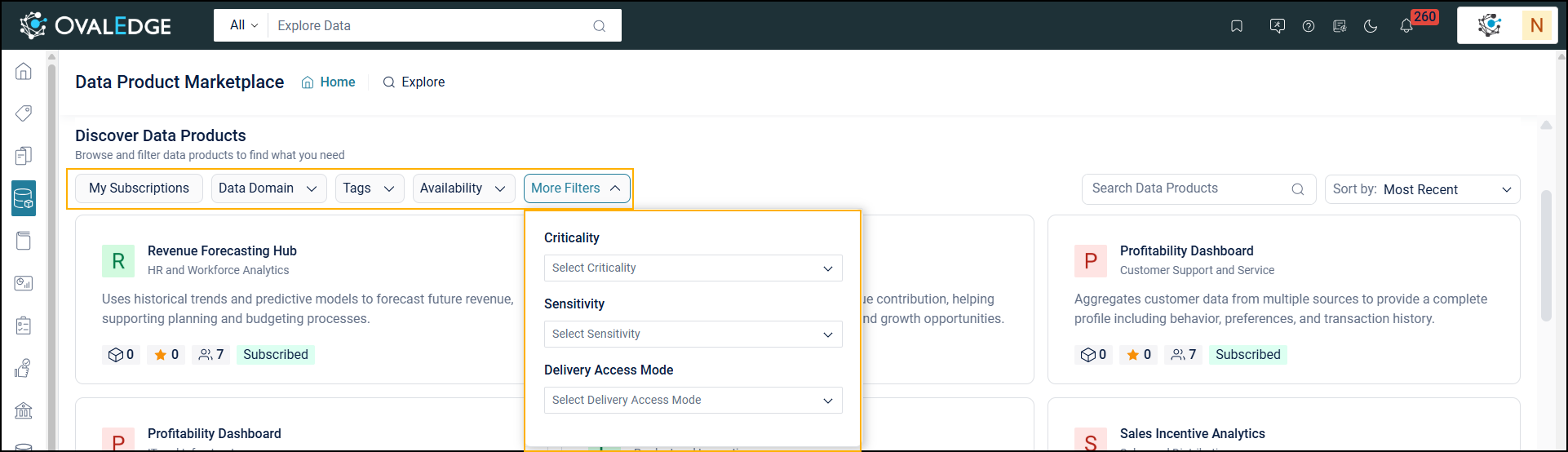
This section displays Data Products as cards and supports browsing and filtering based on access.
Users can filter Data Products using:
* **My Subscriptions**: Shows Data Products the User is subscribed to
* **Data Domain**: Filters Data Products by domain
* **Tags**: Filters by assigned tags
* **Availability**: Filters by access type
* **More Filters**: Includes Criticality, Sensitivity, and Delivery Access Mode.
* **Criticality**: Filter Data Products based on criticality, such as low, medium, high, or critical.
* **Sensitivity**: Filter Data Products based on sensitivity, such as public, internal, confidential, or restricted.
* **Delivery Access Mode**: Filter Data Products based on delivery access mode, such as data preview or data read.
The other options include:
* **Search**: Use the Search bar to find a specific Data Product.
* **Sort**: Sort results using options such as:
* **Most Recent**: Shows Data Products added most recently.
* **Most Popular**: Shows Data Products ranked by their Popularity Score.
* **Most Subscribed**: Lists the Data Products ranked by their subscription.
{% hint style="info" %}
Discover Data Products are selected based on system-defined usage criteria. The system highlights them based on popularity, recent additions, and the User’s subscriptions, helping Data Browsers discover relevant published Data Products.
{% endhint %}
Each Featured Data Product card displays the following details:
* **Name & Domain**: The Data Product title and associated domain (for example, Data Insights – Marketing).
* **Business Description**: A brief summary of the Data Product and its intended use (e.g., Leverage real-time data to enhance marketing strategies).
* **Total Objects**: Objects associated with the Data Product.
* **Rating**: The average score provided by Data Consumers. (e.g., 4.2 stars).
* **Number of Subscribers**: The total number of Data Consumers subscribed to the Data Product (e.g., 36).
* **Availability**: The access mode showing how the User can obtain the Data Product (By Request, Instantly Available, or Subscribed).
{% hint style="info" %}
A By Request status in the Featured Data Products section means the Data Product is not instantly accessible. The Data Browser must submit an access request to view and use it.
{% endhint %}