Data Domain
A Data Domain provides the business and governance context for a Data Product Manager to create and manage Data Products. The Data Product Manager registers Data Products under an assigned Data Domain, ensuring that each Data Product inherits the domain’s predefined governance roles, policies, and default access controls.
From this domain context, the Data Product Manager is authorized to curate Data Product metadata, associate supporting data objects, define business descriptions, and manage delivery access modes in alignment with domain standards. By operating within a Data Domain, the Data Product Manager ensures consistent metadata, enforces governance requirements, and maintains clear ownership and accountability, enabling scalable, controlled Data Product management across the enterprise.

Create a Data Domain
The Data Product Manager can create a Data Domain to define a logical business or functional boundary for organizing and governing Data Products. During creation, the Data Product Manager assigns domain-level ownership, stewardship, custodianship, and default access roles. All Data Products created within the domain automatically inherit these governance settings, ensuring consistent access control, clear accountability, and scalable Data Product management across the organization.

To create the Data Domain, the Data Product Manager adds the following details:
Data Domain Name: Defines the name of the business or functional domain. It acts as the primary identifier for grouping and managing related data products.
Choose an Avatar: Allows users to select a visual icon to represent the data domain. This improves recognition and usability across domain listings and navigation.
Description: Captures the purpose and scope of the data domain. It helps users understand the type of data covered and its business relevance.
Owner (Governance Role): Specifies the governance role accountable for the data domain. The Owner is responsible for strategic oversight and policy decisions.
Steward (Governance Role): Identifies the role responsible for maintaining metadata quality and standards. Stewards ensure accuracy, consistency, and compliance within the domain.
Custodian (Governance Role): Defines the role responsible for technical operations and infrastructure. Custodians manage access, integrations, and system-level support.
Data Product Manager: Assigns the default role that manages data products under the domain. This role can curate metadata, manage objects, and control governance settings.
Data Product Browser: Defines the default role with browse or consumption access to data products. It controls visibility and ensures appropriate access for consumers.
Data Product Registry
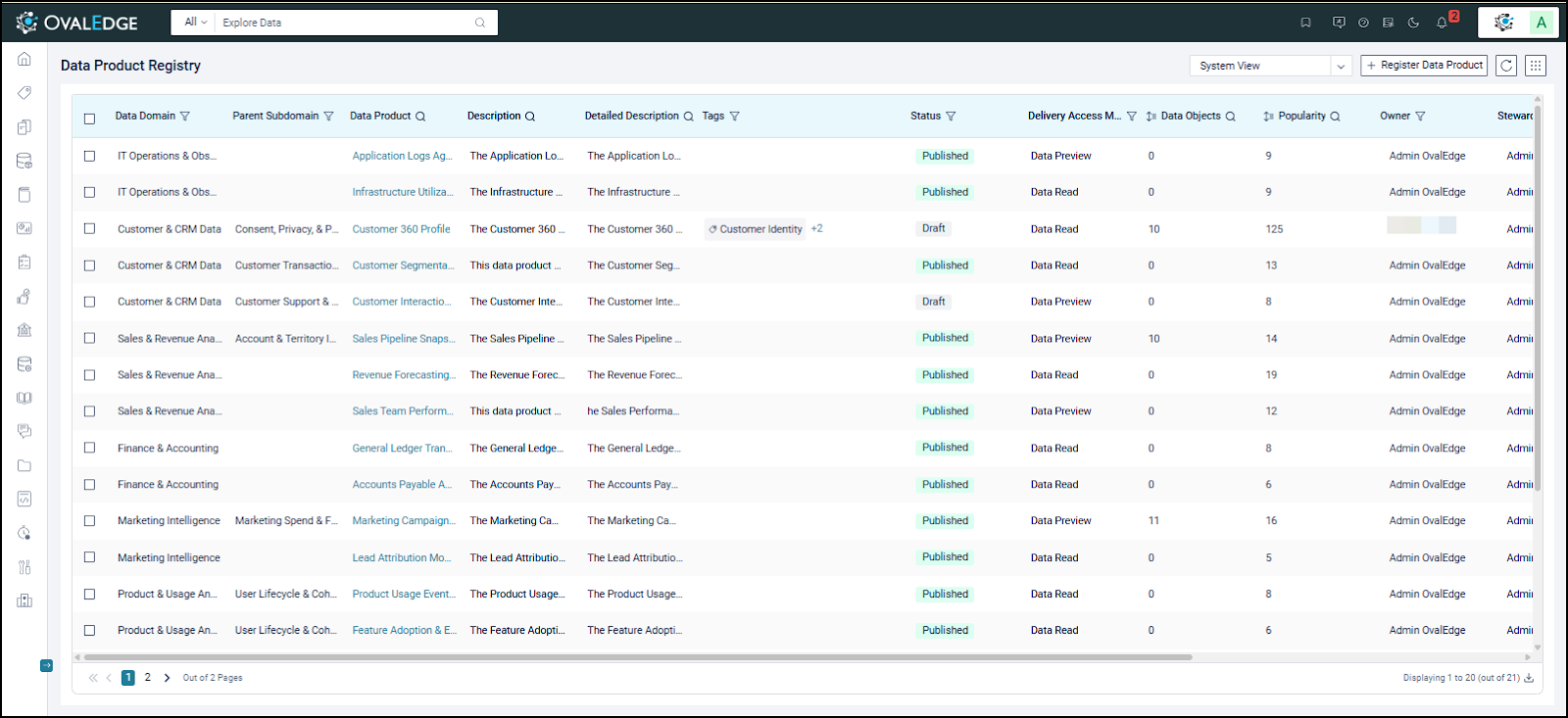
The Data Product Registry serves as the centralized workspace for registering, curating, and managing Data Products before they are published to the Marketplace. Data Product Managers have the required access to define core metadata, assign governance roles, associate supporting data objects, configure delivery access modes, and initiate publishing workflows, ensuring each Data Product meets governance and quality standards before consumption.
The Data Registry column includes the following:
Data Domain: Indicates the business domain under which the data product is categorized.
Parent Subdomain: Shows the immediate subdomain hierarchy associated with the data product.
Data Product: Displays the name of the registered data product.
Description: Provides a brief summary describing the purpose of the data product.
Detailed Description: Contains an extended explanation of the data product’s scope and usage.
Tags: Lists classification or business tags assigned to improve search and discoverability.
Status: Indicates the current lifecycle state of the data product (Draft, Published, etc.).
Delivery Access Mode: Defines the level of access available to consumers (Data Preview or Data Read).
Data Objects: Shows the count of data objects associated with the data product.
Popularity: Reflects relative usage or engagement based on subscriptions and interactions.
Owner: Identifies the governance role accountable for the data product.
Steward: Represents governance roles responsible for metadata quality and standards.
Custodian: Indicates the governance role responsible for technical and operational management.
Governance Role (4,5,& 6): Displays assigned governance roles involved in approval and oversight workflows.
Data Product Manager: Lists users or roles responsible for managing and curating the data product.
Quick & Easy Data Discovery

Streamline data discovery with the Global Search feature, which is conveniently accessible from any page within the application. Utilize the List View in the Registry page to improve the search experience with filter, sort, and search options based on data object attribute details.
Filter to narrow the search results based on a group of selected options from a drop-down with pre-defined filter options. Use the search bar in the filter window to refine your search and find the desired attributes. The Data Product Registry offers object filtering options based on Data Domain, Parent Subdomain, Tags, Status, Delivery Access Mode, and Governance Roles.
Sort to arrange the results in a specific order, such as alphabetical, ascending, or descending. Based on the first-column sort results, the remaining columns can be further sorted. If a field contains both letters and numbers, sorting is based on the alphanumeric characters rather than the numeric values.
Search for specific data objects using keywords or phrases. It helps precisely identify data objects within the vast data ecosystem. Also, a Conditional search icon
, represented by an eight-dot icon, is enabled next to the search field to further refine results by excluding/including keywords.
Configure View

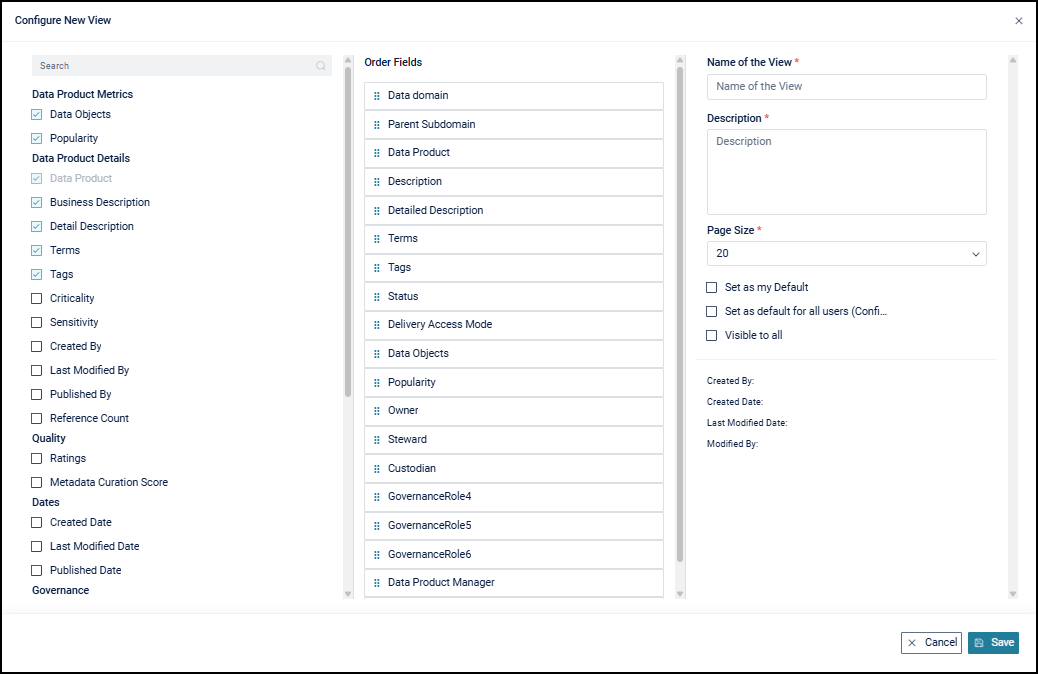
The Configure View allows users to customize how Data Product attributes are displayed in the List View. Users can select attributes and prioritize crucial columns to appear first in the List View for a tailored experience. In the left panel, users can select the preferred attributes; in the center panel, they can arrange the order (specifying which items appear first); then save the configuration. Once saved, users can access the created view in the Views section for future use. Users have three options: Set as my default (makes the view the user's default view), Set as default for all users (sets the view as the default for other logged-in users), and Visible to all (displays the view to everyone in View options).
Register Data Product
The Register Data Product capability enables Data Product Managers to create and onboard a new Data Product within the governed catalog. With appropriate access, the Data Product Manager is responsible for formally defining the Data Product and ensuring it aligns with domain-specific governance standards before publication or consumption.
During registration, the Data Product Manager provides essential metadata to classify and control the Data Product, including the Data Domain, Data Product Name, Delivery Access Mode, Criticality, and Sensitivity. The Data Product Manager also establishes governance ownership by assigning roles such as Owner, Steward, Custodian, and additional configured governance roles, ensuring clear accountability throughout the Data Product lifecycle.
In addition, the Data Product Manager captures the Business Description to clearly communicate the purpose and value of the Data Product. Where permitted, the Data Product Manager can choose to make the Data Product instantly available, enabling immediate, governed access and accelerating availability for Data Browsers.

Data Product Registry Nine Dots
The following are the Data Registry nine dots options:

Manage My Watchlist: Allows users to add or remove selected data products from their personal watchlist for quick tracking.
Manage Status: Enables bulk updating of the lifecycle status (such as Draft or Published) for selected data products.
Manage Tags: Allows adding, removing, or updating tags for selected data products to improve classification and discoverability.
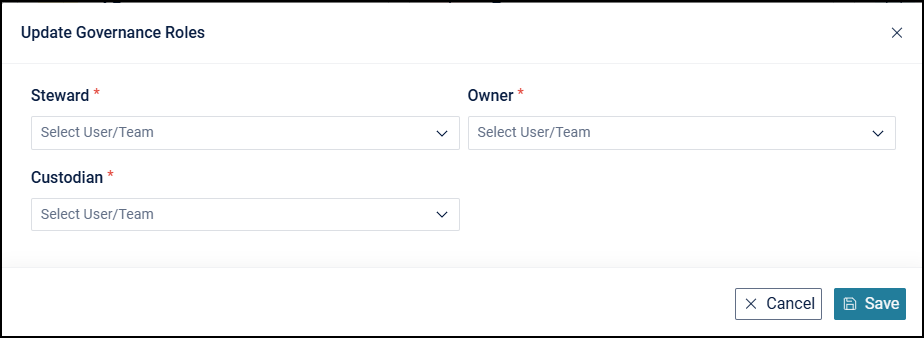
Update Governance Roles: Enables bulk assignment or modification of governance roles (Owner, Steward, Custodian) for selected data products.
Update Data Product Managers: Allows updating the users or roles responsible for managing and curating selected data products.
Update Data Product Browsers: Enables updating the users or roles who have browse or consumption access to selected data products.
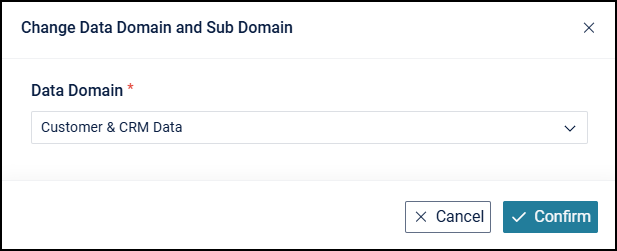
Change Data Domain and Sub Domain: Allows moving selected data products to a different data domain or subdomain.
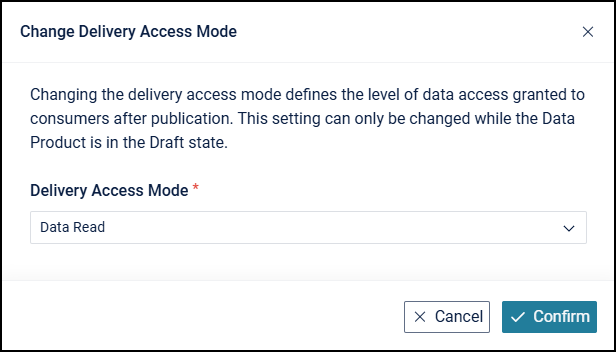
Change Delivery Access Mode: Enables changing the delivery mode (such as Data Preview or Data Read) for selected data products.
Delete Data Products: Permanently deletes the selected data products from the registry, subject to authorization and governance rules.
Data Product Curation
Summary
After creating a Data Product, the Data Product Manager continues to curate and govern it to ensure it is ready for consumption. The Data Product Manager navigates to the newly created Data Product Summary to enrich the Data Product with Business Description and Detailed Description, providing clear context and intended usage. The Data Product Manager then assigns relevant tags to improve discoverability and associates the required data objects—such as tables, files, APIs, and reports—that collectively support the business use case.
To establish context and governance, the Data Product Manager defines related data objects and relationships, and updates the Data Domain, criticality, and sensitivity to reflect business importance and data classification. As curation progresses, the Data Product Manager manages the Data Product lifecycle by initiating actions such as requesting publication, publishing, or moving the Data Product back to draft for further updates, ensuring the Data Product remains governed, accurate, and ready for controlled consumption.
Manage sections
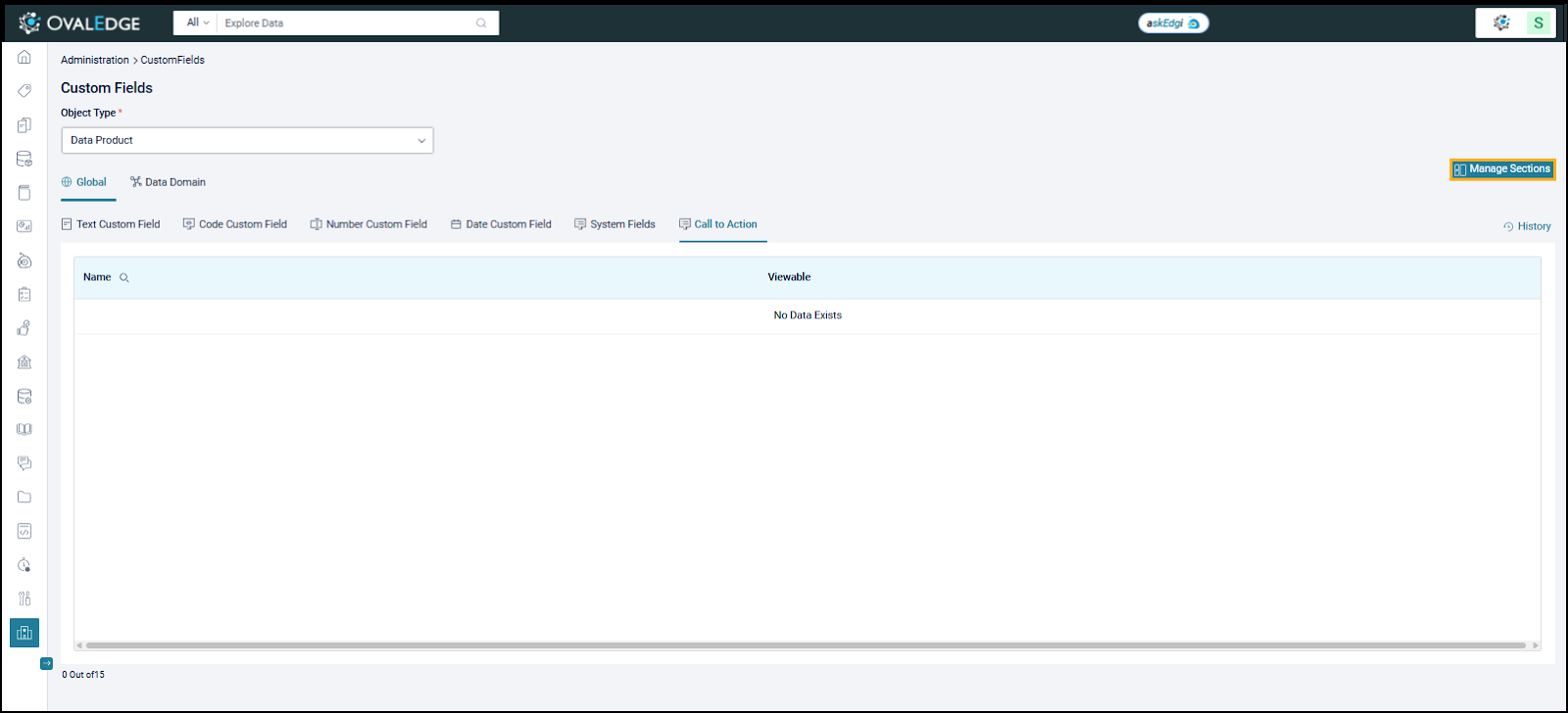
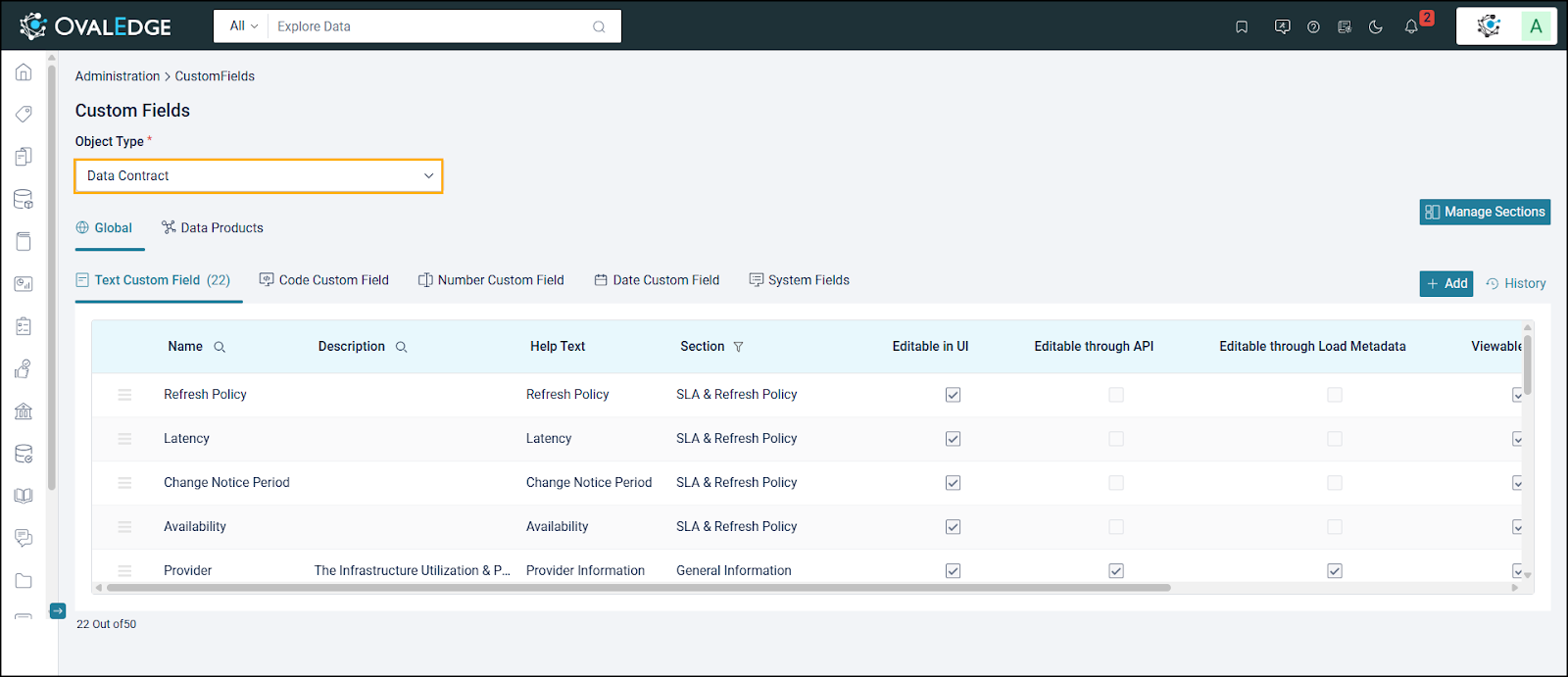
From the Custom Fields > Manage Sections, manage the left and right sections for all the Data Products.

Manage Left and Right Section Layouts
Use Manage Section Layout to add, edit, or delete custom sections, drag the specified section name position, and hide any section name based on the requirement.

Data Contract
For a Data Product Manager, the Data Contract serves as the authoritative definition of how a Data Product is structured, governed, refreshed, and consumed. The Data Product Manager is responsible for curating and maintaining the Data Contract attributes, ensuring that business definitions, data quality expectations, refresh policies, service-level commitments, and usage guidelines are clearly documented and kept up to date.
The Data Product Manager has access to create, edit, manage, restore, and export the Data Contract. This includes defining Service Level Agreements, data availability windows, expected latency, retention policies, and access or compliance constraints. By actively curating these attributes, the Data Product Manager ensures consistency, trust, and alignment with domain governance standards, enabling Data Browsers to confidently evaluate and consume the Data Product in accordance with clearly defined contractual expectations.
Restore Empty Template
The Data Product Manager can reset the Data Contract to an empty template, removing all previously defined sections, fields, and values. This action permanently clears the existing contract configuration and is intended for scenarios where the contract must be rebuilt from scratch.

Manage Data Contract
The Manage Data Contract capability allows the Data Product Manager to define, maintain, and govern the Data Contract associated with a Data Product. Through this access, the Data Product Manager can create, edit, and organize contract-specific fields that capture agreed-upon metadata, usage rules, service expectations, and governance requirements, ensuring consistent and reliable data consumption.

The Data Product Manager, with the required authorization, can manage and curate the Data Contract by defining and maintaining contract-specific custom fields, ensuring that contractual metadata, governance expectations, and usage standards are accurately captured and kept up to date.

Lineage & Relationships
The Lineage & Relationships capability enables Data Product Managers to curate and govern how a Data Product is connected to upstream and downstream assets within the enterprise data ecosystem. With appropriate meta-write access, Data Product Managers can view, define, and maintain lineage and relationship information to ensure accuracy, transparency, and business alignment.
From a lineage standpoint, Data Product Managers validate and curate upstream source objects and downstream dependent assets that contribute to or consume the Data Product. This includes ensuring that data origins, transformations, and dependencies are correctly represented, enabling reliable impact analysis and maintaining trust in the Data Product as changes occur across source or dependent assets.
From a relationships standpoint, Data Product Managers actively establish and manage logical relationships between the Data Product and related tables, files, reports, APIs, and other Data Products. These curated relationships represent business context and conceptual associations beyond technical data flow, helping standardize definitions, reduce duplication, and improve reuse across domains.
Through continuous curation of lineage and relationships, Data Product Managers ensure that the Data Product remains well-governed, accurately contextualized, and aligned with enterprise standards. This curated visibility supports downstream consumers by providing clear dependency awareness, consistent business meaning, and confidence in using the Data Product for analytics and operational needs.
Related Objects
Related Objects enable the identification and management of synonymous and related Data Products to ensure consistent business definitions, accurate relationships, and improved data quality. By establishing and maintaining these relationships, the Data Product Manager provides clear context, supports lineage understanding, and ensures that related Data Products are governed cohesively across the data ecosystem.

Synonym Relationship
A synonym relationship signifies that two Data Products, For Example, "Medical Practitioner" and "Healthcare Provider," share the same meaning and are interchangeable. When users establish a synonym relationship, they can use either Data Product to refer to the same concept. Thus, data associated with "Medical Practitioner" or "Healthcare Provider" can be governed similarly because these Data Products represent identical concepts.
Related Relationship
A related relationship indicates that two Data Products are connected or associated but do not represent the same concept. For example, the Data Products Car and Gasoline are related because gasoline is commonly used to operate a car, even though both have distinct meanings and are not interchangeable. This relationship helps users understand how different Data Products are contextually linked within the data ecosystem, enabling better discovery, greater awareness of dependencies, and more informed use of related data.
Listed below are the different relation types that OvalEdge supports
Contains
"Contains" is a relational Data Product denoting that Data Product1 encompasses or includes Data Product2, indicating a hierarchical or compositional relationship between the two entities. This relationship implies that Data Product2 is a constituent or part of Data Product1. Example: Folder "Contains" Documents
Is Contained in
The “Is Contained In” relationship indicates that a Data Product’s data is included within a specific data object, such as a table, file, or dataset. It indicates that the data object stores or represents information about the Data Product, making the Data Product a logical subset of that object.
Example: ‘Customer Profile’ Data Product “Is contained in” ‘Customer_Master’ table
Is related to
Establishes a general connection between the Data Product and the data object, highlighting a shared association. Example: Customer "Is related to" Consumer
Is synonym to
Links the Data Product and data object as synonyms, signifying interchangeable usage and meaning. Example: Software Developer "Is synonym to" Programmer
Calculates
Depicts that the Data Product derives its value from a data object or another Data Product.
Example: Selling price calculates Profits
Calculates from
Denote a connection in which data or values are derived through systematic computations, enabling precise analysis and informed decision-making.
Example: Profit is calculated from the selling price and the cost price
Replaced by
Demonstrates that the Data Product has been
replaced by the referenced data object. Example: Traditional Hard Disk Drives (HDDs)
Replaced by Solid State Drives (SSDs)
Replaced from
Indicates that the Data Product has replaced the referenced data object in usage or significance. Examples: Manual Data Entry "Replaced from" Automated Data Integration
Filtered by
Specifies that the Data Product is influenced or affected by the filtering process of the data object. Example: Candidates "Filtered by" Qualifications
Filters
Specifies that the Data Product influences or filters another Data Product or a data object from a larger set.
Example: Patient "Filters" Healthcare Provider
Is before
Details the chronological or sequential relationships between the Data Product and the data object.
Example: Research "Is before" Publication
Is after
Details the chronological or sequential relationships between the Data Product and the data object.
Example: Launch "Is After" Development
duplicates
Highlights that the Data Product shares identical or overlapping content with the referenced data object.
Example: Customer Data duplicates Customer Info
defines
This indicates that the Data Product defines or is a component of another Data Product's or related object's definition.
Example: Algorithm defines a Step-by-step procedure
Contrasts with
This indicates that two Data Products represent opposing or mutually exclusive concepts within the same business context. It is used to highlight differences where understanding one Data Product requires awareness of another that represents an alternative or contrasting scenario.
Example: Profit “Contrasts with” Loss — both are related financial outcomes, but represent opposite business results
Is a type of
This indicates that a Data Product represents a specific category or subtype within a broader classification of related Data Products or data objects. It defines a hierarchical relationship where the Data Product inherits the general characteristics of the higher-level concept.
Example: Python “Is a type of” Programming Language
Has types
This indicates that a Data Product represents a broad concept that can be categorized into multiple specific types. The related Data Products represent distinct subtypes within the same overall category.
Example: Electronic device “Has types” Smartphone, Laptop, and Tablet.
Is of
This indicates that the Data Product is a member of another Data Product or a data object.
Example: iOS “is of” Apple
Qualifies
This indicates that the Data Product recognizes another Data Product or a data object based on specific criteria.
Example: Candidate "Qualifies" for a Job Position
Is qualified by
This indicates that the Data Product is recognized by another Data Product or data object based on specific criteria.
Example: Candidate "Is qualified by" Experience
Custom Relationships
OvalEdge defines the above relationship types for use in determining relationships. However, if the system-defined relationship types are insufficient, the admin can configure custom relationship types that the meta-write user can utilize while curating the Data Product.
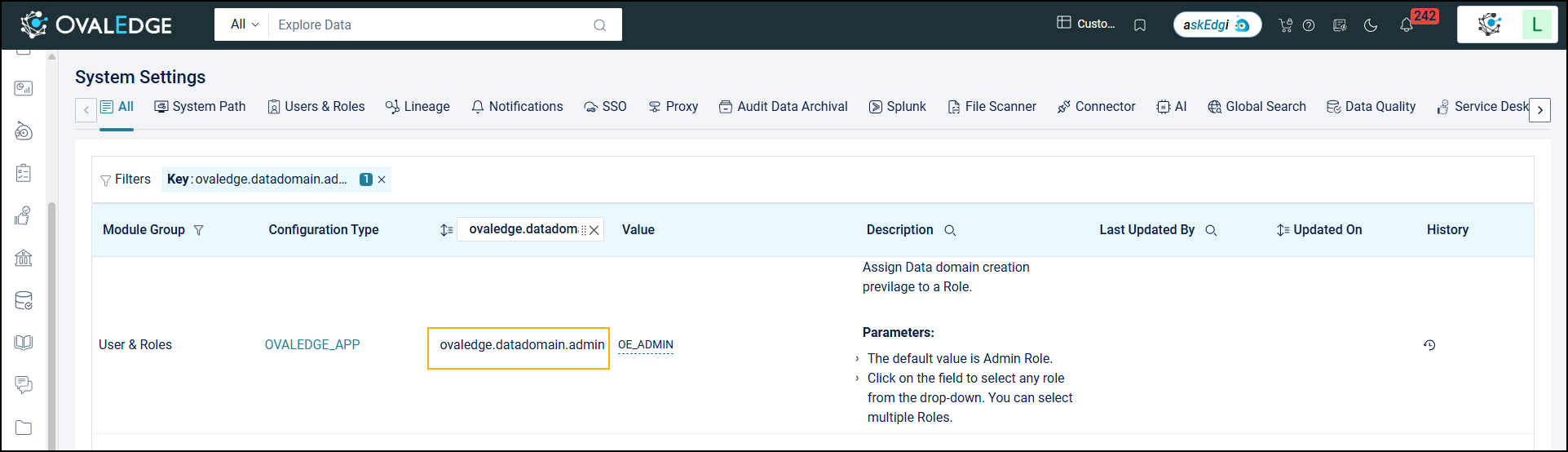
The authorized user can now configure custom relationships by navigating through Administration > System Settings > Data Product. When adding a custom relationship type, users must add the ‘Relation’ and ‘Opposite Relation’ text field options and later click the Save button to save the relationship type.

The newly added relationship type will be reflected in the ‘Related Object’ section of the Data Product summary. Users can add this relationship type to the existing related objects added to the Data Product.

Users can also control the visibility of specific relationship types (system and custom) from System Settings. Go to Administration > System Settings > Data Product and use the 'Viewable' column to show or hide each type. Disabled relationship types will not appear from the relationship edit search icon within the Data Product Summary. For example, 'defines' and 'is synonym to' will be hidden if they are unchecked.


Nine Dots Action Menu
The Nine Dots Action Menu provides Data Product Owners with centralized control to govern, manage, and maintain a Data Product throughout its lifecycle. Through these actions, the owner can curate metadata, manage governance assignments, control access and subscriptions, maintain data contracts, and ensure the Data Product remains compliant with domain standards.

Add/Remove from Watchlist: Allows users to bookmark a data product for quick access and ongoing monitoring.

Custom Fields History: A chronological audit trail of all changes to the data product’s custom fields. It records updates such as field additions, modifications, and value changes along with the user and timestamp.

Update Governance Roles: Allows authorized users to modify governance role assignments for an existing data product. Using this option, users can update roles such as Data Product Owner, Steward, Custodian, or other governance roles without changing the data product’s core metadata or structure.

Update Data Product Managers: Allows administrators to assign or modify the individuals or roles responsible for managing a specific Data Product. This action updates governance ownership by selecting the appropriate Access Type (users or roles) and License Type, and then selecting the corresponding roles/users from the dropdown.

Update Data Product Browsers: Allows authorized users to manage which users or roles can browse and access a specific Data Product. This section lets you configure the Access Type (Users/Roles), assign appropriate License Types, and map users or roles based on the selected permissions. It ensures the right stakeholders have controlled, compliant access to the Data Product.

Revoke Subscription: Allows Data Product Owners, Stewards, or authorized users to remove a user’s access to a Data Product that they were previously subscribed to. Once revoked, the user will no longer be able to view or consume the Data Product’s details or associated assets. This action helps maintain controlled, compliant access by ensuring that only valid, approved users retain subscriptions.

Change Data Domain and Sub Domain: Allows users to update the Data Product’s classification by assigning it to a different Domain and Subdomain. This helps ensure the Data Product remains accurately grouped within the organization’s data hierarchy.

Remove All Associated Data Objects: Allows authorized users to disassociate all currently linked data objects—such as tables, files, reports, and APIs—from the data product in a single action.

Change Delivery Access Mode: Allows authorized users to control how Data Browsers access data after subscribing to a data product. It defines the level of data exposure granted to consumers and can be switched between Data Preview and Data Read based on governance approval.

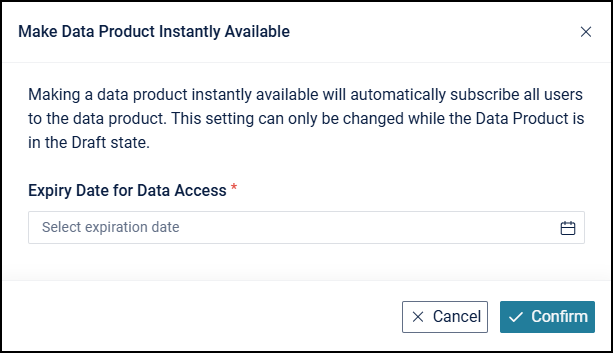
Make Product Instantly Available: Allows authorized users to publish a data product, making it immediately available to all users without requiring a subscription approval workflow. When this option is enabled, all users are automatically subscribed to the data product, and an expiry date for data access must be specified to control access duration.

Publish Data Product
Publishing a Data Product by the designated governance role is a critical control step that ensures the Data Product meets enterprise governance, quality, and compliance standards before it is made available for consumption. After completing metadata curation, the Data Product Manager raises a request to publish the Data Product, which is reviewed and approved by the associated governance role. This separation of responsibilities enforces accountability, prevents premature exposure, and ensures that only approved, well-curated Data Products are published for trusted enterprise use.

Copyright © 2025, OvalEdge LLC, Peachtree Corners, GA, USA.
Last updated
Was this helpful?