

IBM DB2
The OvalEdge JCC Driver for IBM Db2 connector facilitates connectivity between OvalEdge and IBM Db2 databases. This connector uses the JDBC Type 4 driver architecture, commonly known as the JCC (Java Common Connector) driver, to establish connections and interact with Db2 databases.
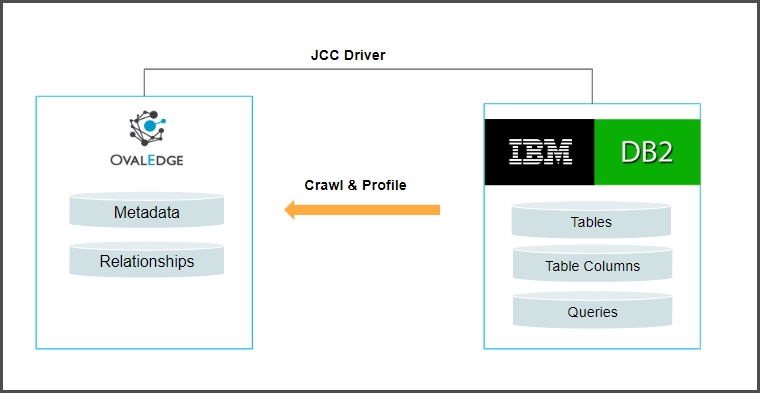
The drivers used by the connector are given below:
Driver/API
Version
Details
JDBC driver
10.1
https://ovaledge-jars.s3.amazonaws.com/third_party_jars/db2jcc4-10.1.jar
Note: Latest version is 11.1.1.1
Technical Specifications
Technical Specifications typically refer to detailed information about the technical characteristics, requirements, and capabilities of a product, system, or service. These specifications provide essential details that help users, developers, or purchasers understand the product's capabilities and compatibility with other systems.
The connector capabilities are shown below:
Crawling
Feature
Supported Objects
Remarks
Crawling
Tables
Table columns
Supported Data types:
Varchar, longvarchar, char, bigint, integer, decimal, smallint, float, date, time, timestamp.
Views
Stored procedures
Functions
Triggers
Relationships
Profiling
Please see Profiling Data for more details on profiling.
Feature
Support
Remarks
Table Profiling
Row count, Columns count, View sample data
View Profiling
Row count, Columns count, View sample data
View is treated as a table for profiling purposes
Column Profiling
Min, Max, Null count, distinct, top 50 values
Full Profiling
Supported
Sample Profiling
Supported
Lineage Building
Lineage entities
Details
Table lineage
Not Supported
Column lineage
Not Supported
Lineage Sources
NA
Querying
By default the service account provided for the connector will be used for any query operations.
Operation
Details
Select
Supported
Insert
Supported
Update
Supported
Delete
Supported
Joins within database
Supported
Joins outside database
Supported
Aggregations
Supported
Group By
Supported
Order By
Supported
Pre-requisites
To use the connector, the following need to be available:
Connection details as specified in the following section should be available.
A User account with read privileges.
Add DB2 drivers into the OvalEdge Jar path to communicate with the DB2 database.
For more detailed information on adding the drivers to the JAR path, please refer to the Configuration section.
Connection Details
The following connection settings should be added for connecting to a DB2 database:
Property
Details
Connector Type
DB2
License Add On
OvalEdge offers a default Base Connector License for all connectors, allowing users to crawl and profile data sources to obtain metadata and statistical information. Additionally, OvalEdge provides various Add-Ons to cater to different connector functionality requirements:
Auto Lineage Add-On: To enable the automatic construction of data Lineage for a connector, choose the Auto Lineage Add-On license, which supports the Lineage feature.
Data Quality Add-On: To identify, report, and resolve data quality issues for a connector that requires data quality support, opt for the Data Quality Add-On license. This license provides features such as Data Quality Rules/functions, Anomaly detection, Reports, and more.
Data Access Add-On: For connector access management via OvalEdge with the Remote Data Access Management (RDAM) feat
Connection Name
Select a Connection name for the DB2 database. The name that you specify is a reference name to easily identify your DB2 database connection in OvalEdge. Example: DB2 Connection
Connector Environment
Select the desired environment for the connector from the dropdown list. The environment field provides information about the specific environment in which the connector is established, such as UAT, NON-PROD, etc.
Server
Database instance URL (on-premises/cloud-based) Example: 3.138.187.1
Port
By Default the port number is 50005. If there is any change users can change the port number.
Database
Name of the database to connect.
Driver Name
JDBC driver name for DB2. It will be auto-populated. Example: com.ibm.db2.jcc.DB2Driver
Username
User account login credential
Password
Password
Connection String
DB2 connection string. Set the Connection string toggle button to automatic, to get the details automatically from the credentials provided. Alternatively, you can manually enter the string. Format: jdbc:db2://{server}:50005/{sid}
Example: jdbc:db2://3.138.187.2:50005/test
Plugin Server/Port
NA
Default Governance Roles
Steward*: Select the Steward from the drop-down options.
Admin Roles
Custodian*: Select the Custodian from the drop-down options.
No of Archive Objects
Owner*: Select the Owner from the drop-down options.
Select Bridge
The OvalEdge Bridge component enables seamless connectivity between cloud-hosted servers and on-premise or public cloud data sources without requiring modifications to firewall rules. It offers real-time control, simplifying the management of data movement between different sources and destinations.
For more information, refer to Bridge Overview
Once connectivity is established, additional configurations for crawling and profiling can be specified:
Property
Details
Profile Settings
Order
Priority of the rule
Start time and End time
Used when crawling/profiling are to be scheduled
No. of threads
No. of threads used to perform profiling
Profile Type
Disabled/Auto/Sample/Query
Row count Constraint
No. of rows to be fetched
Sample profile size
Sample profile row limit
Sample data count
Sample amount of data to profile
Query Timeout
Time to wait for response
Crawler options
Procedures, Functions, Triggers & Views Source Code/Tables, Views & Columns/Relationship.
Profile options
Tables and Columns/Views and Columns
Crawler Rules
Include and Exclude Regex for table/column/procedures
Profile Rules
Include and Exclude Regex for table/column
FAQ's
How much does the driver cost?
The Microsoft JDBC Driver for DB2 is available at no additional charge.
Copyright © 2025, OvalEdge LLC, Peachtree Corners GA USA
Was this helpful?