> For the complete documentation index, see [llms.txt](https://docs.ovaledge.com/llms.txt). Markdown versions of documentation pages are available by appending `.md` to page URLs; this page is available as [Markdown](https://docs.ovaledge.com/release8.3/connectors/connector-repositories/data-warehouse/delta-lake.md).

# Delta Lake

This article outlines the integration with Delta Lake, enabling streamlined metadata management through features such as crawling, profiling, querying, data preview, and lineage building (both automatic and manual). It also ensures secure authentication via Credential Manager.

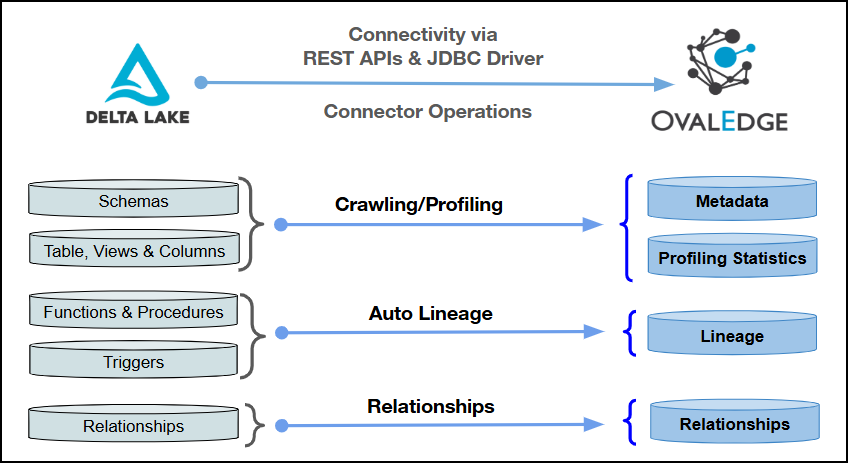
The connector uses REST APIs and a JDBC driver for connectivity. Authentication is supported through Service Principal and Personal Access Token, with access to Delta Lake metadata objects established using the configured credentials and connection parameters.

Within the OvalEdge Delta Lake integration, two distinct Database Types are supported:

1. **Delta Lake Regular**: The standard (legacy) Hive Metastore–based workspace database.
2. **Delta Lake Unity Catalog**: A Databricks-governed database managed through Unity Catalog.

<figure><img src="https://content.gitbook.com/content/8fgltewNgYZ8ucAp7Svt/blobs/TOf640dhUsEwpeSPR8EG/image.png" alt=""><figcaption></figcaption></figure>

## **Overview**

### **Connector Details**

<table data-header-hidden><thead><tr><th width="407.3333740234375"></th><th></th></tr></thead><tbody><tr><td>Connector Category</td><td>RDBMS System-Data Warehouse</td></tr><tr><td>Connector Version</td><td>Release6.1 and later</td></tr><tr><td><p>Connectivity</p><p><em>[How the connection is established with Delta Lake]</em></p></td><td>REST APIs &#x26; JDBC driver</td></tr><tr><td>Verified Delta Lake Version</td><td>2.6.40</td></tr></tbody></table>

{% hint style="info" %}
The Delta Lake connector has been internally verified with the above Delta Lake versions and is expected to be compatible with other supported Delta Lake versions. If there are any issues with validation or metadata crawling, please submit a support ticket for investigation and feedback.
{% endhint %}

### **Connector Features**

<table data-search="false"><thead><tr><th>Feature</th><th align="center">Availability</th></tr></thead><tbody><tr><td>Crawling</td><td align="center"> ✅</td></tr><tr><td>Delta Crawl</td><td align="center"> ❌</td></tr><tr><td>Profiling</td><td align="center"> ✅</td></tr><tr><td>Query Sheet</td><td align="center"> ✅</td></tr><tr><td>Data Preview</td><td align="center"> ✅</td></tr><tr><td>Auto Lineage </td><td align="center"> ✅</td></tr><tr><td>Manual Lineage</td><td align="center"> ✅</td></tr><tr><td>Authentication via Credential Manager</td><td align="center"> ✅</td></tr><tr><td>Data Quality</td><td align="center"> ✅</td></tr><tr><td>DAM (Data Access Management)</td><td align="center"> ❌</td></tr><tr><td>Bridge</td><td align="center"> ✅</td></tr><tr><td><a href="https://docs.ovaledge.com/home/browser-extension/features-and-operations#view-certification-status">Chrome Extension Supported</a></td><td align="center"> ✅</td></tr></tbody></table>

### **Metadata Mapping**

The following objects are crawled from Delta Lake and mapped to the corresponding UI assets.

<table data-search="false"><thead><tr><th width="116.41668701171875">Delta Lake Object</th><th width="153.5">Delta Lake Attribute</th><th width="146.91668701171875">OvalEdge Attribute</th><th width="157">OvalEdge Category</th><th width="129.0001220703125">OvalEdge Type</th></tr></thead><tbody><tr><td>Schema</td><td>DatabaseName</td><td>Schema</td><td>Databases</td><td>Schema</td></tr><tr><td>Table</td><td>Table Name</td><td>Table</td><td>Tables</td><td>Table</td></tr><tr><td>Table</td><td>Table Data Type</td><td>Table Type</td><td>Tables</td><td>Table</td></tr><tr><td>Columns</td><td>Column Name</td><td>Column</td><td>Table Columns</td><td>Columns</td></tr><tr><td>Columns</td><td>Column Datatype</td><td>Column Type</td><td>Table Columns</td><td>Columns</td></tr><tr><td>Columns</td><td>Column Comment</td><td>Source Description</td><td>Table Columns</td><td>Columns</td></tr><tr><td>Views</td><td>View Name</td><td>View</td><td>Tables</td><td>Views</td></tr></tbody></table>

## **Set up a Connection**

### **Prerequisites**

The following are the prerequisites to establish a connection:

**Whitelisting Ports**

Ensure the inbound port “443” is whitelisted to enable successful connectivity with the Delta Lake database.

{% hint style="warning" %}
The default port number for the Delta Lake data source is 443. If a different port is used, ensure that the updated port number is specified during connection setup, the port is whitelisted, and communication between the system and Delta Lake is properly established.
{% endhint %}

#### **Service Account User Permissions**

{% hint style="warning" %}
It is recommended to use a dedicated service account to establish the connection to the data source, configured with the following minimum set of permissions.
{% endhint %}

{% hint style="info" %}
**👨‍💻Who can provide these permissions?** These permissions are typically granted by the Microsoft SQL Server administrator, as users may not have the required access to assign them independently.
{% endhint %}

<table><thead><tr><th width="137.58343505859375">Operations</th><th width="138.83331298828125">Objects</th><th width="359.0833740234375">System Tables</th><th width="129.9998779296875">Access Permissions</th></tr></thead><tbody><tr><td>Crawling &#x26; Profiling</td><td>Schemas</td><td>Schemas</td><td>USAGE</td></tr><tr><td>Crawling &#x26; Profiling</td><td>Tables / Views</td><td>Tables</td><td>USAGE</td></tr><tr><td>Crawling &#x26; Profiling</td><td>Table / View Columns</td><td>On the Table</td><td>SELECT</td></tr><tr><td>Crawling &#x26; Lineage Building</td><td>Lineage related source codes</td><td>System.Access.Table_Lineage, System.Access.Column_Lineage</td><td>SELECT</td></tr><tr><td>Crawling</td><td>Column Relations</td><td>Information_Schema.Table_Constraints, Information_Schema.Key_Column_Usage, Information_Schema.Referential_Constraints</td><td>SELECT</td></tr></tbody></table>

### Connection Configuration Steps

{% hint style="warning" %}
Users are required to have the Connector Creator role in order to configure a new connection.
{% endhint %}

1. Log into OvalEdge, navigate to **Administration > Connectors**, click **+ (New Connector)**, search for **Delta Lake**, and complete the specific parameters.

{% hint style="info" %}
Fields marked with an asterisk (**\***) are mandatory for establishing a connection.
{% endhint %}

<table><thead><tr><th width="219">Field Name</th><th>Description</th></tr></thead><tbody><tr><td>Connector Type</td><td>By default, "Delta Lake" is displayed as the selected connector type.</td></tr><tr><td>Authentication</td><td><p>Delta Lake supports the following two types of authentications:</p><ul><li>Service Principal</li><li>Personal Access Token</li></ul></td></tr></tbody></table>

{% tabs %}
{% tab title="Service Principal" %}

<table><thead><tr><th width="215.25">Field Name</th><th>Description</th></tr></thead><tbody><tr><td>Credential Manager*</td><td><p>Select the desired credentials manager from the drop-down list. Relevant parameters will be displayed based on the selection.</p><p>Supported Credential Managers:</p><ul><li>OE Credential Manager</li><li>AWS Secrets Manager</li><li>HashiCorp</li><li>Azure Key Vault</li></ul><p>For more details, click <a href="https://docs.ovaledge.com/connectors/additional-requirements/credential-manager-configuration">here</a>.</p></td></tr><tr><td>License Add Ons</td><td><ul><li>Select the checkbox for the Auto Lineage Add-On to build data lineage automatically.<br><strong>Note:</strong> In API mode for Unity Catalog, lineage data availability depends on the Databricks REST API response and may be limited to recent activity.</li><li>Select the checkbox for the Data Quality Add-On to identify data quality issues using data quality rules and anomaly detection.</li></ul><p>For more details, click <a href="https://docs.ovaledge.com/connectors/introduction-to-connectors/setup-and-connectivity/license-types-and-add-ons">here</a>.</p></td></tr><tr><td>Connector Name*</td><td><p>Enter a unique name for the Delta Lake connection              </p><p>(Example: "Delta Lakedb").</p></td></tr><tr><td>Connector Environment</td><td>Select the environment (Example: PROD, STG) configured for the connector.<br>For more details, click <a href="https://docs.ovaledge.com/connectors/introduction-to-connectors/setup-and-connectivity/prerequisites#connector-environment">here</a>.</td></tr><tr><td>Connector Description</td><td>Enter a description to identify the purpose of the connector.</td></tr><tr><td>Client Id*</td><td>Enter the Client ID configured for accessing the Delta Lake database.</td></tr><tr><td>Client Secret*</td><td>Enter the Client Secret associated with the provided Client ID.</td></tr><tr><td>Server*</td><td>Enter the Delta Lake server name or IP address (Example: xxxx-sxxxxxx.xxxx4ijxxxl.xx-south-1.rxs.xxxxx.com or 1xx.xxx.1.xx).</td></tr><tr><td>Port*</td><td>By default, the port number for the Delta Lake, "443" is auto-populated. If required, the port number can be modified according to the custom port number configured for the Delta Lake Database.</td></tr><tr><td>Database Type*</td><td><p>Select the database type from the drop-down:</p><ul><li><strong>Delta Lake_Regular</strong>: The standard (legacy) Hive Metastore–based workspace database.</li><li><strong>Delta Lake_Unity_Catalog</strong>: A Databricks-governed database managed through Unity Catalog.</li></ul></td></tr><tr><td>Database</td><td>Enter the database name to which the service account user has access to within Delta Lake.</td></tr><tr><td>Driver*</td><td>By default, the Delta Lake driver details are auto-populated. </td></tr><tr><td>HTTP Path*</td><td>Enter the HTTP Path, which is typically associated with the cluster or warehouse.</td></tr><tr><td>Lineage Fetching Mode*</td><td><p>Select the Lineage Fetching Mode from the drop-down:</p><ul><li>QUERY mode (Access lineage via system tables)</li><li>API mode (Access lineage via REST APIs)</li></ul><p><strong>Note:</strong> In the Delta Lake Unity Catalog, when API mode is used, lineage information depends on the Databricks REST API response. The API may return lineage data only for recent activity (for example, the last 3 months). If lineage data is unavailable in the API response, lineage may not be built in OvalEdge. In such cases, SQL mode is recommended for lineage fetching.</p></td></tr><tr><td>Connection String</td><td><p>Configure the connection string for the Delta Lake database:</p><ul><li>Automatic Mode: The system generates a connection string based on the provided credentials.</li><li>Manual Mode: Enter a valid connection string manually.</li></ul><p><strong>Note:</strong> When Manual Mode is enabled for Delta Lake Unity Catalog connections, ensure the connection string does not include <strong>http:// or https://</strong> in the server value. Only the hostname or IP address should be used.</p><p>Replace placeholders with actual database details.</p><p>{<strong>sid</strong>} refers to the <strong>Database Name.</strong></p></td></tr><tr><td>Proxy Enabled*</td><td>Select <strong>Yes</strong> to route API calls through a proxy server. Select <strong>No</strong> to bypass the proxy and connect directly.</td></tr><tr><td>Plugin Server</td><td>Enter the server’s name when running as a plugin server.</td></tr><tr><td>Plugin Port</td><td>Enter the port number on which the plugin is running.</td></tr></tbody></table>
{% endtab %}

{% tab title="Personal Access Token" %}

<table><thead><tr><th width="219">Field Name</th><th>Description</th></tr></thead><tbody><tr><td>Credential Manager*</td><td><p>Select the desired credential manager from the drop-down list. Relevant parameters will be displayed based on the selection.</p><p>Supported Credential Managers:</p><ul><li>OE Credential Manager</li><li>AWS Secrets Manager</li><li>HashiCorp</li><li>Azure Key Vault</li></ul><p>For more details, click <a href="https://docs.ovaledge.com/connectors/additional-requirements/credential-manager-configuration">here</a>.</p></td></tr><tr><td>License Add Ons</td><td><ul><li>Select the checkbox for the Auto Lineage Add-On to build data lineage automatically.</li><li>Select the checkbox for the Data Quality Add-On to identify data quality issues using data quality rules and anomaly detection.</li></ul><p>For more details, click <a href="https://docs.ovaledge.com/connectors/introduction-to-connectors/setup-and-connectivity/license-types-and-add-ons">here</a>.</p></td></tr><tr><td>Connector Name*</td><td><p>Enter a unique name for the Delta Lake connection              </p><p>(Example: "Delta Lakedb").</p></td></tr><tr><td>Connector Environment</td><td>Select the environment (Example: PROD, STG) configured for the connector.<br>For more details, click <a href="https://docs.ovaledge.com/connectors/introduction-to-connectors/setup-and-connectivity/prerequisites#connector-environment">here</a>.</td></tr><tr><td>Connector Description</td><td>Enter a description to identify the purpose of the connector.</td></tr><tr><td>Server*</td><td>Enter the Delta Lake server name or IP address (Example: xxxx-sxxxxxx.xxxx4ijxxxl.xx-south-1.rxs.xxxxx.com or 1xx.xxx.1.xx).</td></tr><tr><td>Port*</td><td>By default, the port number for the Delta Lake, "443" is auto-populated. If required, the port number can be modified according to the custom port number configured for the Delta Lake Database.</td></tr><tr><td>Database Type*</td><td><p>Select the database type from the drop-down:</p><ul><li>Delta Lake_Regular</li><li>Delta Lake_Unity_Catalog</li></ul></td></tr><tr><td>Database</td><td>Enter the database name to which the service account user has access within the Delta Lake.</td></tr><tr><td>Driver*</td><td>By default, the Delta Lake driver details are auto-populated. </td></tr><tr><td>HTTP Path*</td><td>Enter the HTTP Path, which is typically associated with the cluster or warehouse.</td></tr><tr><td>Lineage Fetching Mode*</td><td><p>Select the Lineage Fetching Mode from the drop-down:</p><ul><li>QUERY mode (Access lineage via system tables)</li><li>API mode (Access lineage via REST APIs)</li></ul></td></tr><tr><td>Username*</td><td>Enter the service account username set up to access the Delta Lake database (Example: "<em>oesauser</em>").</td></tr><tr><td>Password*</td><td>Enter the access token associated with the service account user.</td></tr><tr><td>Connection String</td><td><p>Configure the connection string for the Delta Lake database:</p><ul><li>Automatic Mode: The system generates a connection string based on the provided credentials.</li><li>Manual Mode: Enter a valid connection string manually.</li></ul><p>Replace placeholders with actual database details.</p><p>{sid} refers to the Database Name</p></td></tr><tr><td>Proxy Enabled*</td><td>Select Yes to route API calls through a proxy server. Select No to bypass the proxy and connect directly.</td></tr><tr><td>Plugin Server</td><td>Enter the server’s name when running as a plugin server.</td></tr><tr><td>Plugin Port</td><td>Enter the port number on which the plugin is running.</td></tr></tbody></table>
{% endtab %}
{% endtabs %}

<table data-header-hidden data-search="false"><thead><tr><th width="221.5"></th><th></th></tr></thead><tbody><tr><td><strong>Default Governance Roles</strong></td><td></td></tr><tr><td>Default Governance Roles<strong>*</strong></td><td>Select the appropriate users or teams for each governance role from the drop-down list. All users and teams configured in OvalEdge Security are displayed for selection.</td></tr><tr><td><strong>Admin Roles</strong></td><td></td></tr><tr><td>Admin Roles<strong>*</strong></td><td>Select one or more users from the dropdown list for Integration Admin and Security and Governance Admin. All users configured in OvalEdge Security are available for selection.</td></tr><tr><td><strong>No of Archive Objects</strong></td><td></td></tr><tr><td>No Of Archive Objects<strong>*</strong></td><td><p>It indicates the number of recent metadata changes to a dataset at the source. By default, it is off. You can enable it by toggling the <strong>Archive</strong> button and specifying the number of objects to archive.</p><p><strong>Example:</strong> Setting it to 4 retrieves the last 4 changes, shown in the 'version' column of the 'Metadata Changes' module.</p></td></tr><tr><td><strong>Bridge</strong></td><td></td></tr><tr><td>Select Bridge<strong>*</strong></td><td><p><strong>If applicable,</strong> select the bridge from the drop-down list.</p><p>The drop-down list displays all active bridges configured in OvalEdge. These bridges enable communication between data sources and OvalEdge without altering firewall rules.</p></td></tr></tbody></table>

2. After entering all connection details, the following actions can be performed:
   1. Click **Validate** to verify the connection.
   2. Click **Save** to store the connection for future use.
   3. Click **Save & Configure** to apply additional settings before saving.
3. The saved connection will appear on the Connectors home page.

## **Manage Connector Operations**

### **Crawl/Profile**

{% hint style="warning" %}
To perform crawl and profile operations, users must be assigned the Integration Admin role.
{% endhint %}

The **Crawl/Profile** button allows users to select one or more schemas for crawling and profiling.

1. Navigate to the **Connectors page** and click **Crawl/Profile**.
2. Select the schemas to crawl.
3. The **Crawl** option is selected by default. To perform both operations, select the **Crawl & Profile** radio button.
4. Click **Run** to collect metadata from the connected source and load it into the **Data Catalog**.
5. After a successful crawl, the information appears in the **Data Catalog > Databases** tab.

The **Schedule** checkbox allows automated crawling and profiling at defined intervals, from a minute to a year.

1. Click the **Schedule** checkbox to enable the Select Period drop-down.
2. Select a time interval for the operation from the drop-down menu.
3. Click **Schedule** to initiate metadata collection from the connected source.
4. The system will automatically execute the selected operation (**Crawl** or **Crawl & Profile**) at the scheduled time.

{% hint style="warning" %}

* Delta Lake warehouse startup may take time. During startup delays, the connector retries the connection and SQL execution up to 5 times with a 2-minute interval between each retry to ensure scheduled connector jobs complete successfully.
* The retry process runs only when the warehouse startup delay affects connector execution.
  {% endhint %}

### **Other Operations**

The Connectors page provides a centralized view of all configured connectors, along with their health status.

**Managing connectors includes:**

* **Connectors Health**: Displays the current status of each connector using a green icon for active connections and a red icon for inactive connections, helping to monitor the connectivity with data sources.
* **Viewing**: Click the **Eye icon** next to the connector name to view connector details.

#### **Nine Dots Menu Options**:

You can view, edit, validate, build lineage, and delete connectors using the **Nine Dots** menu.

* **Edit Connector**: Update and revalidate the data source.
* **Validate Connector**: Check the connection's integrity.
* **Settings**: Modify connector settings.
  * **Crawler**: Configure data that needs to be extracted.
  * **Profiler**: Customize data profiling rules and methods.
  * **Query Policies**: Define rules for executing queries based on roles.&#x20;
  * **Access Instructions**: Specify how data can be accessed as a note.&#x20;
  * **Business Glossary Settings**: Manage term associations at the connector level.
  * **Connection Pooling**: Configure database connection pool parameters to optimize database connectivity and resource utilization. For more details, click [here](https://docs.ovaledge.com/release8.1/connectors/introduction-to-connectors/setup-and-connectivity/connector-settings#connection-pooling).
  * **Lineage**: Select the parsing method (Regular or AI-Augmented) for generating lineage, and set a confidence threshold to control when AI-generated lineage is accepted or held for review. For more details, click [here](https://docs.ovaledge.com/release8.1/connectors/introduction-to-connectors/setup-and-connectivity/connector-settings#lineage-applicable-for-supported-connectors).
  * **Others**: Configure notification recipients for metadata changes.
* **Build Lineage:** Automatically build data lineage using source code parsing.
* **Delete Connector**: Remove connectors with confirmation.

For more details on connector settings, click [here](https://docs.ovaledge.com/release8.1/connectors/introduction-to-connectors/setup-and-connectivity/connector-settings).

## **Troubleshooting**

If incorrect parameters are entered, error messages may appear. Ensure all inputs are accurate to resolve these issues. If issues persist, contact the assigned support team.

{% tabs %}
{% tab title="Connectivity" %}

<table data-search="true"><thead><tr><th width="58.6015625">S. No</th><th width="189.5">Error Message</th><th>Error Description &#x26; Resolution</th></tr></thead><tbody><tr><td>1</td><td>Error while validating connection: connection timeout</td><td><p>The SQL warehouse backing the connection may be in a stopped or sleeping state, or the timeout is being affected by networking, regional, or security-related factors.</p><p><strong>Resolution:</strong></p><ul><li>Allow the automatic retry process to complete, since the connector retries three to five times to give the warehouse cluster time to activate.</li><li>Confirm networking, regional latency, and security configuration between the environment and the warehouse are not restricting the connection.</li><li>Escalate for further investigation if failures continue despite correct access and configuration, as some latency causes may not appear directly in the logs.</li></ul></td></tr><tr><td>2</td><td>Validation fails or is inconsistent when the server name includes HTTPS</td><td><p>The server name field expects a value starting with adb, and adding HTTPS in front of it can prevent the connection from validating correctly.</p><p><strong>Resolution:</strong></p><ul><li>Confirm the server name entered starts with adb and does not have HTTPS added in front of it.</li><li>Remove any HTTPS prefix from the server field if it has been included.</li><li>Retry validation once the server name format has been corrected.</li></ul></td></tr><tr><td>3</td><td>Validation repeatedly fails when the SQL warehouse is on demand or idle</td><td><p>On-demand warehouses are stopped when not in use to reduce cost, and an idle or sleeping warehouse needs time to restart before a connection can succeed.</p><p><strong>Resolution:</strong></p><ul><li>Retry validation after allowing time for the warehouse cluster to start up from a stopped or idle state.</li><li>Confirm the warehouse is not configured to require only manual restart, since this can prevent the automatic retry process from succeeding.</li><li>Escalate to the relevant administrator if the warehouse consistently fails to start automatically.</li></ul></td></tr><tr><td>4</td><td>Error while validating connection: authentication failure using personal access token</td><td><p>The personal access token entered has expired or has been removed, since tokens are created with a defined expiry period.</p><p><strong>Resolution:</strong></p><ul><li>Confirm the personal access token being used has not expired.</li><li>Generate a new token with an appropriate expiry period if the previous one has expired or been removed.</li><li>Revalidate the connection once the new token has been entered, noting that existing data and permissions remain unaffected by the token change.</li></ul></td></tr><tr><td>5</td><td>Error setting/closing session: 401 Unauthorized</td><td><p>The connection cannot authenticate when the client ID, client secret, HTTP path, or database name is incorrect or invalid.</p><p><strong>Resolution:</strong></p><ul><li>Verify the client ID and client secret entered for the connection.</li><li>Confirm the HTTP path and database name are correct.</li><li>Use only the IP address or hostname in the server field without adding HTTP or HTTPS.</li><li>Correct any invalid connection details and retry validation.</li></ul></td></tr></tbody></table>
{% endtab %}

{% tab title="Crawling" %}

<table data-search="true"><thead><tr><th width="72.7109375">S. No</th><th width="191.953125">Error Message</th><th>Error Description &#x26; Resolution</th></tr></thead><tbody><tr><td>1</td><td>Errors encountered while crawling views under information_schema</td><td><p>The information_schema is a system-generated schema containing views without accessible definitions or sufficient permissions, which commonly causes errors when crawled.</p><p><strong>Resolution:</strong></p><ul><li>Confirm whether the information_schema is included in the current crawl scope.</li><li>Apply a regular expression rule in the connector settings to exclude information_schema from crawling.</li><li>Recrawl once the exclusion rule has been applied.</li></ul></td></tr><tr><td>2</td><td>Lineage build encounters heap-related issues during crawling</td><td><p>Query-based lineage fetching retrieves the complete set of related lineage data at once, which can lead to heap issues when the underlying data volume is very large.</p><p><strong>Resolution:</strong></p><ul><li>Confirm which lineage fetching mode, query or API, is currently configured for the connection.</li><li>Consider switching to API based lineage fetching if large data volumes are causing heap issues with query mode.</li><li>Note that API mode may return a more limited historical window of data compared to query mode.</li></ul></td></tr><tr><td>3</td><td>Query operations take longer than expected or time out during crawling or profiling</td><td><p>The configured query timeout or connection pooling settings may not be sufficient for the complexity or volume of the query being run.</p><p><strong>Resolution:</strong></p><ul><li>Adjust the query timeout setting in the connection pooling configuration if operations are expected to take longer.</li><li>Review the connection pooling settings, including the leak detection threshold, to confirm connections are being managed as expected.</li><li>Retry the crawl or profile job once the relevant settings have been adjusted.</li></ul></td></tr></tbody></table>
{% endtab %}
{% endtabs %}

## FAQs

{% tabs %}
{% tab title="General" %}

<table data-search="true"><thead><tr><th width="59.05078125">S. No</th><th width="179.44921875">Question</th><th>Answer</th></tr></thead><tbody><tr><td>1</td><td>What is the difference between regular Delta Lake and Delta Lake Unity Catalog?</td><td><p><strong>Regular Delta Lake</strong> uses <strong>parquet data files</strong> and a <strong>log file</strong> to record changes to the data. It does not provide built-in governance or centralized lineage.</p><p><strong>Delta Lake Unity Catalog</strong> uses the same underlying storage approach but adds:</p><ul><li>Catalog, schema, and table organization</li><li>Built-in lineage tracking</li><li>Centralized workspaces</li><li>Access across multiple databases</li></ul><p>Regular Delta Lake keeps data within individual, workspace-specific locations.</p></td></tr><tr><td>2</td><td>When should Unity Catalog be used instead of the regular Delta Lake connector?</td><td><p>Use <strong>Unity Catalog</strong> when governance, lineage, and centralized access are required.</p><p>The regular <strong>Delta Lake connector</strong> is suitable when only basic storage access is needed and governance or lineage capabilities are not required.</p></td></tr><tr><td>3</td><td>What metadata does the Delta Lake Unity Catalog connector fetch?</td><td><p>The connector fetches:</p><ul><li>Catalogs</li><li>Schemas</li><li>Tables</li><li>Views</li><li>Columns</li><li>Functions</li><li>Procedures</li></ul><p><strong>Triggers</strong> are not supported.</p><p><strong>Delta crawl</strong> and <strong>data access management</strong> are also not currently supported.</p></td></tr></tbody></table>
{% endtab %}

{% tab title="Connectivity" %}

<table><thead><tr><th width="60.11328125">S. No</th><th width="179.8046875">Question</th><th>Answer</th></tr></thead><tbody><tr><td>1</td><td>What authentication types are supported for this connector?</td><td><p>Two authentication types are supported:</p><ul><li><strong>Service principal:</strong> Uses a <strong>client ID</strong> and <strong>client secret</strong>.</li><li><strong>Personal access token:</strong> Works similarly to username and password authentication, with the token used as the password.</li></ul><p>Both authentication types support <strong>credential manager</strong> integration, including:</p><ul><li>OE Database</li><li>AWS secret manager</li><li>HashiCorp</li><li>Azure key vault</li></ul></td></tr><tr><td>2</td><td>What format should the server name follow?</td><td><p>The <strong>server name</strong> must:</p><ul><li>Start with <strong>adb</strong></li><li>Not include <strong>HTTPS</strong></li></ul><p>Do not add HTTPS to the server name because secure connection handling is managed internally.</p></td></tr><tr><td>3</td><td>What permissions are required on the service account?</td><td><p>The following permissions are required:</p><ul><li><strong>Usage permission</strong> on schemas, tables, and views.</li><li><strong>Select permission</strong> on tables to retrieve column level relationships.</li><li>For automatic lineage, <strong>select permission</strong> on the relevant lineage-related tables in <strong>Unity Catalog</strong>.</li></ul></td></tr><tr><td>4</td><td>What is the SQL warehouse, and why does the HTTP path field matter?</td><td><p>The <strong>SQL warehouse</strong> is the computational engine used to execute queries against the connected Delta Lake environment.</p><p>It is available in different capacity tiers, such as <strong>small, medium, and large</strong>, based on query complexity and data volume.</p><p>The <strong>HTTP path</strong> identifies the location of the SQL warehouse and is required to route queries to the correct compute resource.</p></td></tr><tr><td>5</td><td>What does leaving the database name field blank do?</td><td><p>Leaving the <strong>database name</strong> field blank allows the connector to fetch all catalogs accessible to the configured credentials.</p><p>Entering a specific database name limits the connector to that catalog only.</p></td></tr><tr><td>6</td><td>How does token expiry work for personal access token authentication?</td><td><p>A <strong>personal access token</strong> can be created with a defined expiry period.</p><p>When the token expires:</p><p>1. Remove the expired token.</p><p>2. Generate a new token.</p><p>3. Update the connection with the new token.</p><p>4. Revalidate the connection.</p><p>Replacing the token does not affect previously catalogued data or existing permissions because the token is used only for authentication.</p></td></tr><tr><td>7</td><td>The system cannot connect to Delta Lake. What could be the issue?</td><td><p>The application may not be able to reach the Databricks workspace because of an incorrect server hostname, HTTP path, port, or network configuration.</p><p><strong>Resolution:</strong></p><ul><li>Confirm that the server hostname matches the Databricks workspace URL.</li><li>Confirm that port <strong>443</strong> is accessible.</li><li>Verify that the <strong>HTTP path</strong> is correctly specified, such as <code>/sql/1.0/warehouses/&#x3C;id></code>.</li><li>Confirm that network connectivity is available and that firewall or proxy settings do not block access.</li><li>Try opening the Databricks workspace in a browser from the same machine to verify connectivity.</li><li>Confirm that the connection details and workspace access are valid.</li></ul></td></tr></tbody></table>
{% endtab %}

{% tab title="Crawling" %}

<table data-search="true"><thead><tr><th width="59.08203125">S. No</th><th width="180.23828125">Question</th><th>Answer</th></tr></thead><tbody><tr><td>1</td><td>I cannot see any tables when browsing the database. Where are they?</td><td><p>Tables may not appear when the incorrect schema or catalog is selected or when the configured user does not have sufficient permissions.</p><p><strong>Resolution:</strong></p><ul><li>Confirm that the correct schema and database or catalog are selected.</li><li>Verify that the tables exist in Databricks.</li><li>Refresh the table list.</li><li>Confirm that the user has the required permissions to view the schema and access the tables.</li><li>For <strong>Unity Catalog</strong>, ensure that the objects are referenced in the correct <code>catalog.schema</code> format.</li></ul></td></tr><tr><td>2</td><td>Should the information_schema be included when crawling a Delta Lake Unity Catalog connection?</td><td><p>No. Crawling the <strong>information_schema</strong> is not recommended.</p><p>The information_schema is system-generated and typically contains views without accessible definitions or permissions, which can result in crawling errors.</p><p>Exclude the information_schema from the crawl scope using a <strong>regular expression rule</strong> in the connector settings.</p></td></tr></tbody></table>
{% endtab %}

{% tab title="Lineage" %}

<table data-search="true"><thead><tr><th width="58.81640625">S. No</th><th width="179.609375">Question</th><th>Answer</th></tr></thead><tbody><tr><td>1</td><td>What are the two lineage fetching modes available, and how do they differ?</td><td><p>Two modes are available:</p><ul><li><strong>Query mode:</strong> Retrieves lineage directly from the lineage-related tables in <strong>Unity Catalog</strong>.</li><li><strong>API mode:</strong> Uses API calls to retrieve the lineage information.</li></ul><p>Both modes provide the same type of lineage data, but the retrieval method and, in some cases, the amount of historical data returned can differ.</p></td></tr><tr><td>2</td><td>Are there any limitations with each lineage fetching mode?</td><td><p>Yes.</p><ul><li><p><strong>Query mode:</strong></p><ul><li>Retrieves the complete set of related lineage data for the table.</li><li>Large volumes of historical data can cause <strong>heap-related issues</strong>.</li><li>Filtering is currently not available to limit the amount of historical data retrieved.</li></ul></li><li><p><strong>API mode:</strong></p><ul><li>May return a more limited historical window of lineage data.</li><li>This limitation is related to the <strong>Delta Lake platform</strong> rather than the connector.</li></ul></li></ul></td></tr><tr><td>3</td><td>Why does the lineage status show “Success, lineage does not exist” in Unity Catalog?</td><td><p>In <strong>Delta Lake Unity Catalog</strong>, lineage information fetched through REST APIs may be limited to recent activity. If there is no recent activity for a table, the API may not return lineage data, causing lineage to appear missing in OvalEdge.</p><p>In such cases, use <strong>SQL mode</strong> instead of API mode for lineage fetching.</p></td></tr></tbody></table>
{% endtab %}
{% endtabs %}

***

Copyright © 2025, OvalEdge LLC, Peachtree Corners GA USA


---

# Agent Instructions
This documentation is published with GitBook. GitBook is the documentation platform designed so that both humans and AI agents can read, navigate, and reason over technical content effectively. Learn more at gitbook.com.

## Querying This Documentation
If you need additional information that is not directly available in this page, you can query the documentation by asking a question.

Perform an HTTP GET request on the following URL with the `ask` and `goal` query parameters:

```
GET https://docs.ovaledge.com/release8.3/connectors/connector-repositories/data-warehouse/delta-lake.md?ask=<question>&goal=<user_goal>
```

`ask` is the immediate question: it should be specific, self-contained, and written in natural language.
`goal` is what the user is ultimately trying to achieve, the reason they need the answer. Sharing it helps GitBook give you a better, more relevant answer. A goal is most helpful when it describes the outcome the user wants rather than restating the question. For example, with `ask=how do I create an API token`, a goal like `automate deployments from our CI pipeline` lets GitBook tailor the answer to that use case.

The response will contain a direct answer to the question and relevant excerpts and sources from the documentation.

Use this mechanism when the answer is not explicitly present in the current page, you need clarification or additional context, or you want to retrieve related documentation sections.
