# Open AI Integration

Integrating OpenAI (ChatGPT) into the OvalEdge application enhances natural language processing and content generation. It facilitates personalization and decision support, making applications more user-friendly.&#x20;

### Prerequisites

To set up the Open AI (ChatGPT) for OvalEdge, follow these steps:

1. Open AI (ChatGPT) configuration
2. OvalEdge Integration
3. Need credits in Open AI (ChatGPT) account&#x20;

## Steps to Add Open AI (ChatGPT)

### Open AI (ChatGPT) Configuration

* Go to the Open AI(ChatGPT) console at <https://openai.com/>&#x20;

  <figure><img src="https://lh7-rt.googleusercontent.com/docsz/AD_4nXeKvrzbfV77k6O6tlaoy6UBFajicjnUAnLR0gTkyra6xZ2pOVn8dNIGGU4h8vc7yeI0WQA2KFRsEwbQyT3Tbv_F6pLVtK-_19Og-gi3m7HT6OctU07uq-0pOqAG8Wz_TO-2_5mvvc6Wd4GBiE62Kp3F38M?key=LdRDHvoIcQ3lZjjUWDetsw" alt=""><figcaption></figcaption></figure>
* Users can log in using their existing credentials or sign up for a new account.\
  ![](https://1813356899-files.gitbook.io/~/files/v0/b/gitbook-x-prod.appspot.com/o/spaces%2FhTnkoJQml0pok9awFDhx%2Fuploads%2FIf6fRPI9cGpAvr4rfSpI%2Fimage.png?alt=media\&token=b355ea9e-5062-4f74-91fe-50ab4bf74926)
* After logging in, users can choose from two options. Opt for the second window API.\
  ![](https://1813356899-files.gitbook.io/~/files/v0/b/gitbook-x-prod.appspot.com/o/spaces%2FhTnkoJQml0pok9awFDhx%2Fuploads%2FlndFxWSCt0H0viN769Ir%2Fimage.png?alt=media\&token=dee07d20-64a9-468f-9ff3-c625ad66cc0f)
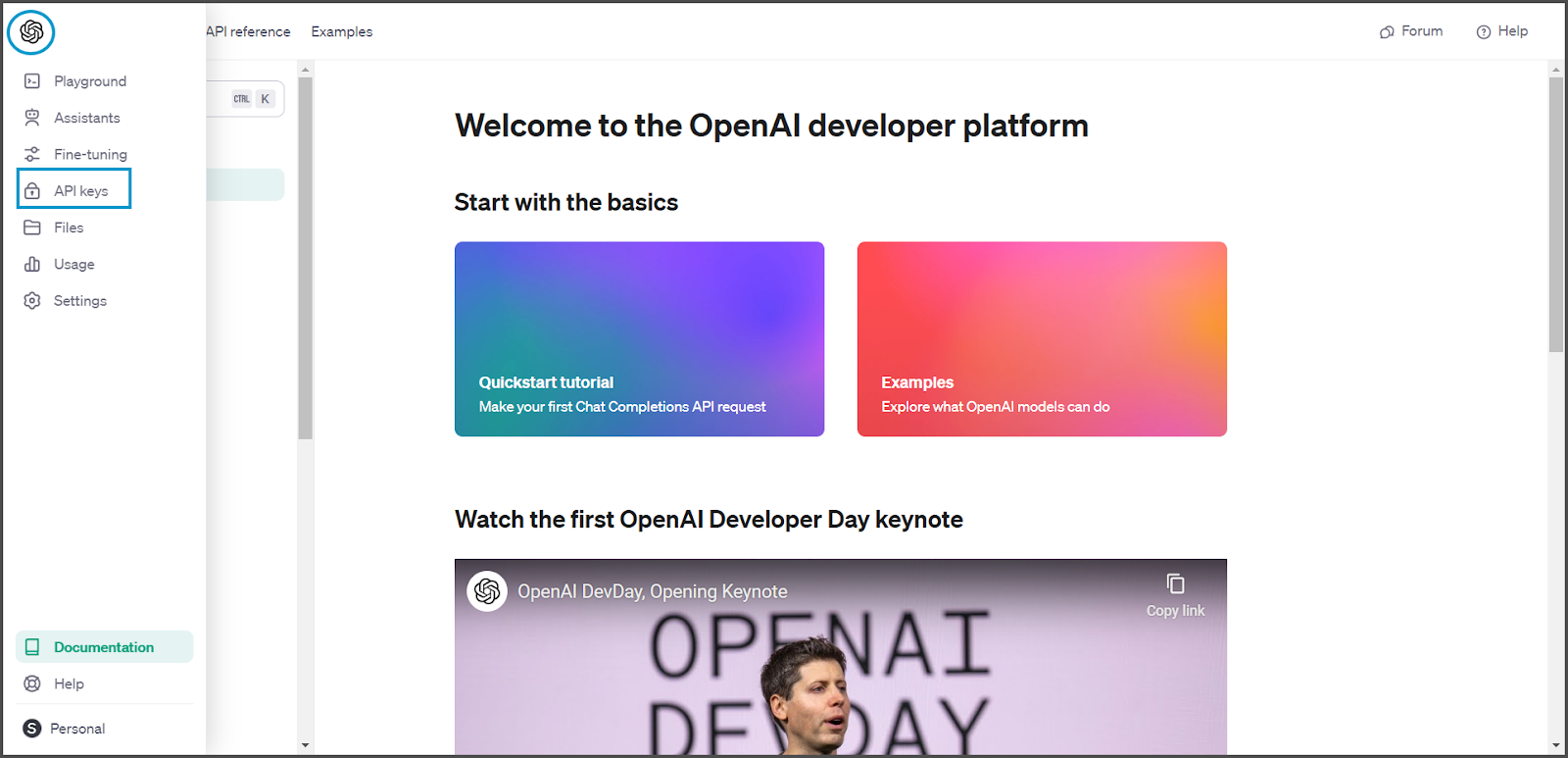
* Users can access the OpenAI (ChatGPT)Developer Platform and navigate to the left-side pane by hovering over the OpenAI symbol. The available options include selecting API Keys. <br>

  <figure><img src="https://1813356899-files.gitbook.io/~/files/v0/b/gitbook-x-prod.appspot.com/o/spaces%2FhTnkoJQml0pok9awFDhx%2Fuploads%2FryABPkXz1Zc5ZQ4wfNsA%2Fimage.png?alt=media&#x26;token=98005976-c65a-47f7-925a-f5f23a0f23e2" alt=""><figcaption></figcaption></figure>
* Users can now create a new secret key.

  <figure><img src="https://lh7-rt.googleusercontent.com/docsz/AD_4nXeErC-34cYthBiaEfTA72ddxwAb0blpB4J7G2nN0N5roYnJZOzM5io-WHsupgXiPnKBCgpMq9y5bN7cECWA-_kHPh5Y8YKouXuGgNQfQaJbjl18a1iLpJwLMCQ4a0rso28pBv9TjtBtRgF0AbkJZmEgxW70?key=LdRDHvoIcQ3lZjjUWDetsw" alt=""><figcaption></figcaption></figure>
* After providing the name, click the "Create Secret Key" button.

  <figure><img src="https://lh7-rt.googleusercontent.com/docsz/AD_4nXd7g7zIkfjZ0hgPR09jRuoekFP7yhHivnPqqa_iIap1s3SKnWd_NNTTm49Y4FGLacLOqNISeE5lh93xw4L9OxcClLWziIxl9IRCdYg6hpowew54g2-GU4R5qA9VWspbdRWxlJRu2oOkfSKFjsGVPVECjbj3?key=LdRDHvoIcQ3lZjjUWDetsw" alt=""><figcaption></figcaption></figure>
* Users can now view the secret key, which can be copied for integration into the OvalEdge application.
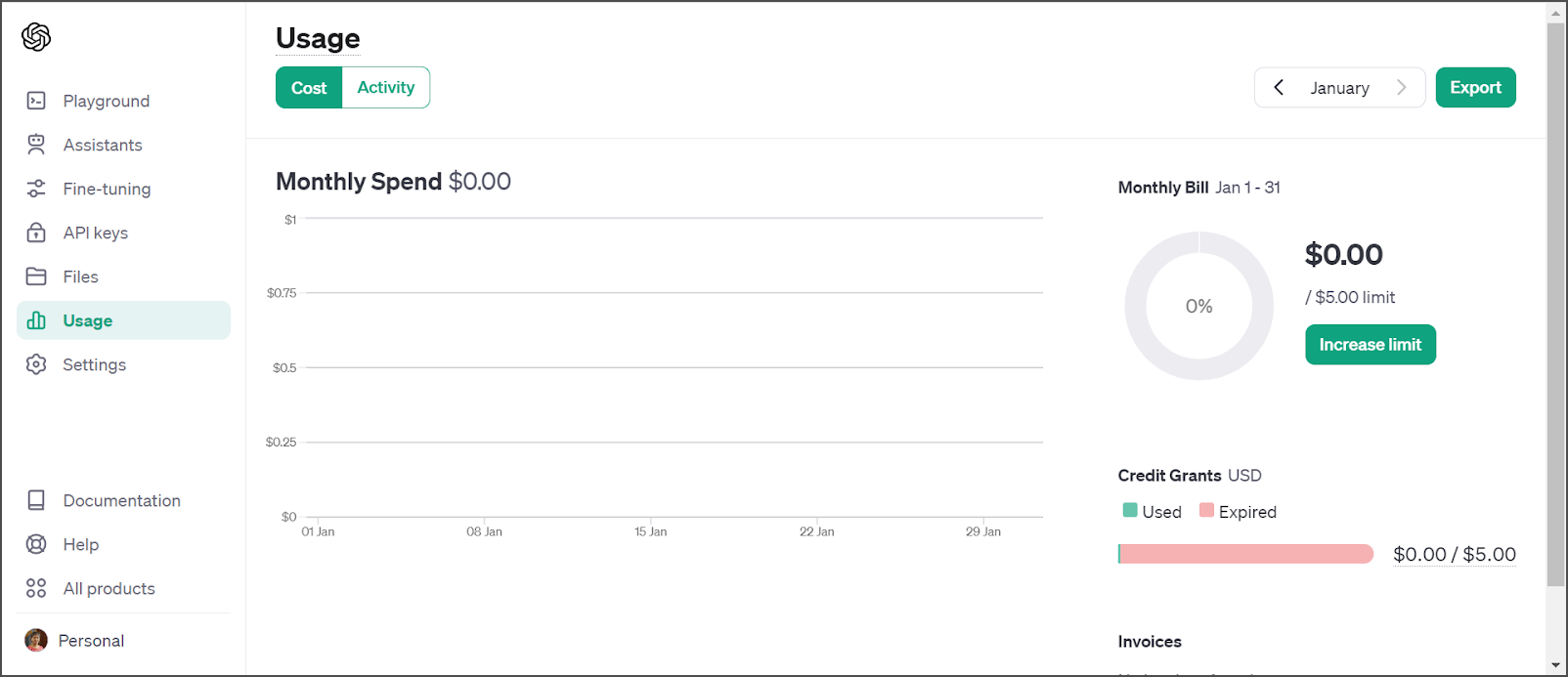
* Users should verify their available credits to utilize the feature and maintain the minimum billing requirements.<br>

  <figure><img src="https://1813356899-files.gitbook.io/~/files/v0/b/gitbook-x-prod.appspot.com/o/spaces%2FhTnkoJQml0pok9awFDhx%2Fuploads%2FGGkfvu5OXOCkpMdyelbS%2Fimage.png?alt=media&#x26;token=883e195e-da7b-4e31-9661-47799960ec1c" alt=""><figcaption></figcaption></figure>

### OvalEdge Integration&#x20;

To integrate OpenAI (ChatGPT), users can access Administration > System Settings > AI, locate the configuration key "**OpenAI.Activation.Token**," and paste the link from the screen, into the configuration key value.&#x20;

<figure><img src="https://lh7-rt.googleusercontent.com/docsz/AD_4nXcozTYzgCWGgFBxeamvVsXa7RD9l7le3S7crgvvGr01rbSMN5sXfvboUaQvMoOjk5qq0ey-iHEUuxVqd8u-GJOQqZeMy8uWSvQsy1m-C0mkbiUO0gMnrKHcMCijJLb92F25F2TUnQpX_C0Sx3SsyboiQ0c?key=LdRDHvoIcQ3lZjjUWDetsw" alt=""><figcaption></figcaption></figure>

* Click on the save button.&#x20;

## Impacted Areas

OpenAI (ChatGPT) is seamlessly integrated across the application wherever users need to provide business, source, or technical descriptions. It is updated in the Data Catalog and Business Glossary sections.&#x20;

<figure><img src="https://lh7-rt.googleusercontent.com/docsz/AD_4nXe8M5-b3viUgPkK0qGKrLTx-7UrmxTl12EAAqUxo6Owe1CfB6UKBKgBK05Pr48rFEFmHbqcEI9dCzDx65U8Su3Ql8rsEEnzJV2ppitkGP7TacPHGkS1jDg-WFbrl8I3mH6Qps2VhYSzbC5PcM8iYDFm_ZW3?key=LdRDHvoIcQ3lZjjUWDetsw" alt=""><figcaption></figcaption></figure>

The OpenAI (ChatGPT) symbol becomes visible when users input or modify descriptions.<br>

<figure><img src="https://1813356899-files.gitbook.io/~/files/v0/b/gitbook-x-prod.appspot.com/o/spaces%2FhTnkoJQml0pok9awFDhx%2Fuploads%2FBleNyyWGL7X7toR7cGvh%2Fimage.png?alt=media&#x26;token=ce99bacd-4937-4145-9855-6473f50895f7" alt=""><figcaption></figcaption></figure>

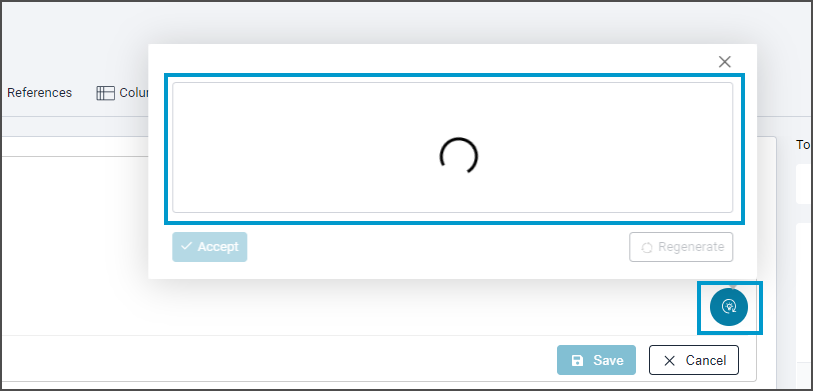
Clicking on the OpenAI (ChatGPT) symbol opens a new window where users can see the AI provides suggestions, and users can accept them if satisfied or regenerate for new suggestions if needed.

## Inputs to AI from OvalEdge&#x20;

The following metadata is shared with OpenAI to generate a response.&#x20;

| OvalEdge Module   | Inputs to AO to Generate Description                                       |
| ----------------- | -------------------------------------------------------------------------- |
| Business Glossary | Domain Name                                                                |
| <p><br></p>       | Category Name                                                              |
| <p><br></p>       | Subcategory Name                                                           |
| <p><br></p>       | Term Name                                                                  |
| Data Catalog      | Schema Name                                                                |
| <p><br></p>       | Table Name/File Name / Report Name/ API Name/ Code Name                    |
| <p><br></p>       | Table Column Name / Report Column Name / File Column Name / API attributes |
| <p><br></p>       | Data Type                                                                  |

***

Copyright © 2025, OvalEdge LLC, Peachtree Corners, GA USA