# SAP BO Universe

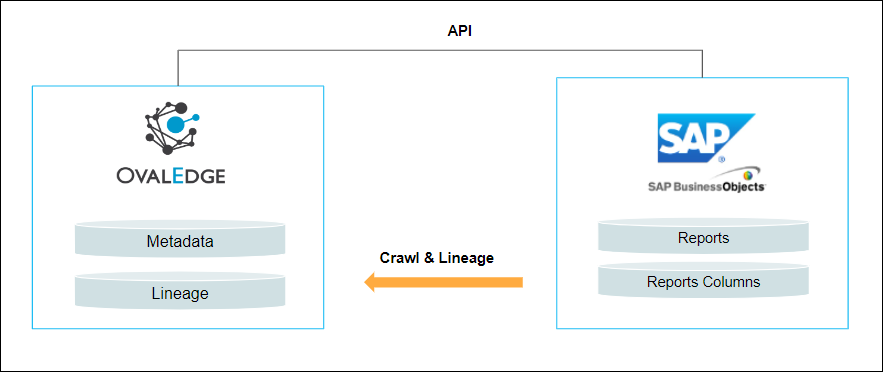
OvalEdge uses APIs to connect to the data source, crawl data objects such as Reports, and build Lineage.

<figure><img src="https://content.gitbook.com/content/hTnkoJQml0pok9awFDhx/blobs/yXJaj8Xemmx4v97UYcrk/SAP%20BO.png" alt=""><figcaption></figcaption></figure>

## **Connector Characteristics**

| Connector Category                                                                                                                                             | Reporting Systems                |
| -------------------------------------------------------------------------------------------------------------------------------------------------------------- | -------------------------------- |
| Connectivity                                                                                                                                                   | REST APIs                        |
| <p>Connector Version</p><p><em>\[OvalEdge Connector Version Information]</em></p>                                                                              | 6.3.1                            |
| <p>SAP BO Versions Supported </p><p><em>\[Data Source Version from which OvalEdge started providing support]</em></p>                                          | Depends on the client's request. |
| <p>OvalEdge Releases Supported (Available From)</p><p><em>\[OvalEdge Release Version in which the connector was included in the OvalEdge Application]</em></p> | 5.0 onwards                      |

## **Connector Features**

| Crawling of Metadata Objects                      | Supported     |
| ------------------------------------------------- | ------------- |
| **Data Objects**                                  |               |
| Reports                                           |               |
| Profiling                                         | Not Supported |
| Report Preview                                    | Supported     |
| Lineage                                           | Supported     |
| **Lineage Levels Supported**                      |               |
| <p>Report lineage</p><p>Report Column lineage</p> |               |
| Data Quality                                      | Not Supported |
| DAM (Data Access Management)                      | Not Supported |
| Authentication via Credential Manager             | Supported     |
| Bridge                                            | Supported     |

## **Prerequisites**

The following are the prerequisites required for establishing a connection:&#x20;

A few libraries need to be installed in the OvalEdge instance, as shown below:

* OE\_SAP\_UNIVERSE\_HOME.zip
* sapbo-utility-0.0.1-SNAPSHOT.jar

### **Service Account Permissions**

The administrator needs to create a SAP BO account to connect to OvalEdge with the View Object Permission to crawl metadata and build the lineage in OvalEdge.

### **Data Source Configuration**

| Connector Creator privileges are required for data source connection configuration. |
| ----------------------------------------------------------------------------------- |

1. Log into OvalEdge, go to Administration > Connectors, click **+ (New Connector)**, search for **SAP BO**, and complete the specific parameters.

{% hint style="success" %}
***Note:** Fields marked with an asterisk (**\***) are mandatory for establishing a connection.*
{% endhint %}

<table data-header-hidden><thead><tr><th width="220.25"></th><th></th></tr></thead><tbody><tr><td><strong>Field Name</strong></td><td><strong>Description</strong></td></tr><tr><td>Connector Type</td><td>By default, "SAP BO" is displayed as the selected connector type.</td></tr><tr><td><strong>Connector Settings</strong></td><td></td></tr><tr><td>Credential Manager*</td><td><p>Select the desired credentials manager from the dropdown list. Relevant parameters will be displayed based on your selection.</p><p>Supported Credential Managers:</p><ul><li>OE Credential Manager</li><li>AWS Secrets Manager</li><li>HashiCorp Vault</li><li>Azure Key Vault</li></ul></td></tr><tr><td>License Add Ons</td><td><p>OvalEdge connectors have a default license add-on for data crawling and profiling.</p><ul><li>Select the checkbox for <strong>Auto Lineage Add-On</strong> to construct data lineage automatically.</li></ul></td></tr><tr><td>Connector Name*</td><td><p>Enter a unique connector name for the SAP BO connection. </p><p><strong>Example:</strong> <em>"SAPBO_Prod"</em></p></td></tr><tr><td>Connector Environment</td><td>Select the environment (e.g., PROD, STG) configured for the connector. </td></tr><tr><td>Filter</td><td>Users need to add the list of comma-separated folders to filter out.</td></tr><tr><td>Base URL</td><td>Add the Base URL as the entry point for the SAP BO RESTful Web Services (or API) to interact with the SAP BusinessObjects system.</td></tr><tr><td>Authentication Type</td><td><p>Add the Authentication Type method to specify how users authenticate themselves to the SAP BusinessObjects server.</p><p>Example: secEnterprise</p></td></tr><tr><td>Include Folder Path</td><td>It is a path of text file where each line in the text file is a folder name to ignore during crawling.</td></tr><tr><td>RPT Folder Path</td><td>It is a folder where all the RPT Files are present.</td></tr><tr><td>Username*</td><td>A username is required to connect to the SAP BO.</td></tr><tr><td>Password*</td><td>A password is required to connect to the SAP BO server.</td></tr><tr><td>SAP BO RPT Remote Base Url</td><td>Specify the REST API endpoint URL to connect to the OvalEdge SAP BO project.</td></tr><tr><td><strong>Default Governance Roles</strong></td><td></td></tr><tr><td>Default Governance Roles*</td><td>Select the appropriate users or teams for each governance role from the dropdown list. All users and teams configured in OvalEdge Security are displayed for selection. </td></tr><tr><td><strong>Admin Roles</strong></td><td></td></tr><tr><td>Admin Roles*</td><td>Select one or more users from the dropdown list for Integration Admin and Security and Governance Admin. All users configured in OvalEdge Security are available for selection.</td></tr><tr><td>No of Archive Objects*</td><td><p>It indicates the number of recent metadata changes to a dataset at the source. By default, it is off. Users can enable it by toggling the <strong>Archive</strong> button and specifying the number of objects to archive.</p><p><strong>Example:</strong> Setting it to 4 retrieves the last 4 changes, shown in the 'version' column of the 'Metadata Changes' module.</p></td></tr><tr><td>Select Bridge*</td><td>The dropdown displays the bridges set up in Manage Bridge. Select the appropriate bridge that enables seamless connectivity between data sources without altering firewall rules.</td></tr></tbody></table>

2. After entering all connection details, you can perform the following actions:
   1. Click **Validate** to verify the connection.
   2. Click **Save** to store the connection for future use.
   3. Click **Save & Configure** to apply additional settings before saving.
3. The saved connection will appear on the Connectors home page.

## **Errors & Resolution**

If incorrect parameters are provided, you may encounter error messages. To resolve these issues, ensure all input is correct. If problems persist, contact your assigned **OvalEdge support** team.

<table data-header-hidden><thead><tr><th width="82.75"></th><th width="209.5"></th><th></th></tr></thead><tbody><tr><td><strong>S. No.</strong></td><td><strong>Error Message(s)</strong></td><td><strong>Error Description / Resolution</strong></td></tr><tr><td>1</td><td>Invalid Username or Password"</td><td><p><strong>Description:</strong> This error usually occurs when a user provides incorrect credentials (username or password) for authentication in the SAP BO environment. It can happen during login attempts or when the connector is trying to access data from an external system.</p><p>Resolution: </p><ul><li>Verify credentials: Double-check the username and password.</li><li>Account lockout: Ensure the account is not locked due to too many failed login attempts. If it’s locked, reset the account.</li><li>Case-sensitivity: Remember that passwords in SAP BO are case-sensitive.</li><li>Expired password: If the password has expired, reset it and update the credentials accordingly.</li></ul></td></tr><tr><td>2</td><td>Connection Timeout</td><td><p><strong>Description:</strong> This error occurs when the connection to the SAP BO server takes too long and times out.</p><p>Resolution: </p><ul><li>Ensure the SAP BO server is running and accessible.</li><li>Check if there is any network latency or firewall blocking the connection.</li><li>Increase the timeout settings in the connector configuration.</li><li>Verify that the network port required for the BO server is open.</li></ul></td></tr></tbody></table>

## **Connector Settings**

The SAP BO connector offers various settings to customize data crawling and build lineage. These include:

* **Crawler:** Configure how data is discovered and extracted.
* **Access Instructions:** Specify how data can be accessed.
* **Business Glossary Settings:** Manage term associations at the connector level.
* **Lineage:** Configure multiple dialects to build the lineage.
* **Others:** Sending metadata change notifications.

### **Crawl/Profile**

| Integration Admin privileges are required for Crawl/Profile operations. |
| ----------------------------------------------------------------------- |

Crawl and Profile operations enable you to select one or more reports from a list of all available reports within a specific reports group. This allows you to customize the crawling and building the lineage according to your requirements.

### **Manage Connector**&#x20;

The **Connectors page** in OvalEdge provides a centralized view of all configured connectors, including their health status. You can view, edit, validate, build lineage, and delete connectors using the **Nine Dots** menu.

#### Managing connectors includes:

* **Connectors Health**: Displays performance with a green (active) or red (inactive) icon, helping monitor data flow and address issues early.
* **Viewing**: Shows connector details (e.g., domains, reports) via the **View** icon.

#### **Nine Dots Menu Options**:

* **Edit Connector**: Update and revalidate the data source.
* **Validate Connector**: Check the connection's integrity.
* **Settings**: Modify connector settings.
* **Build Lineage**: Automatically build data lineage.
* **Delete Connector**: Remove connectors or report group with confirmation.

## **FAQ’s**

1. What should I do if I encounter authentication errors?\
   A: Verify that the username and password are correct.
2. Do we need to install any other software when OvalEdge is installed on Linux?\
   A: Yes, there are some libraries that should be installed and running on Windows. We need to configure the SAP BO project URL in the OvalEdge application.

## **Planned Upgrades**

| **S.No.**                  | **Expected Date** | **Upgrade Version** | **Description** |
| -------------------------- | ----------------- | ------------------- | --------------- |
| **NONE planned as of now** |                   |                     |                 |

***

Copyright © 2025, OvalEdge LLC, Peachtree Corners GA USA
