# IBM DB2

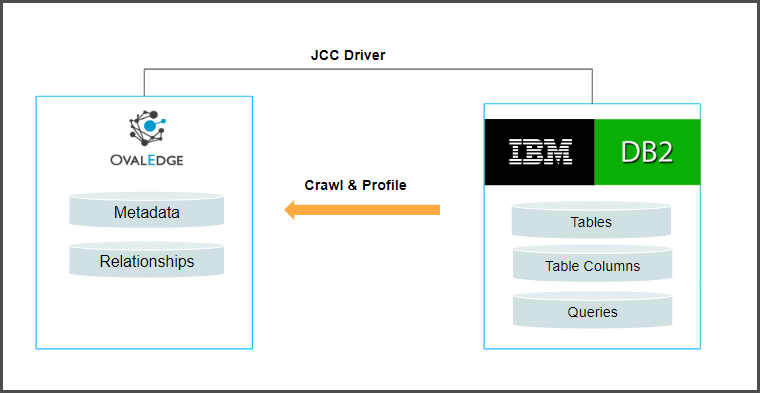
The OvalEdge JCC Driver for IBM Db2 connector facilitates connectivity between OvalEdge and IBM Db2 databases. This connector uses the JDBC Type 4 driver architecture, commonly known as the JCC (Java Common Connector) driver, to establish connections and interact with Db2 databases.

<figure><img src="https://content.gitbook.com/content/hTnkoJQml0pok9awFDhx/blobs/PrJt5ncBhy2M5n3IZKw8/db2.webp" alt=""><figcaption></figcaption></figure>

The drivers used by the connector are given below:

| **Driver/API**  | **Version** | **Details**                                                                                                                                                                                                                                                                                                        |
| --------------- | ----------- | ------------------------------------------------------------------------------------------------------------------------------------------------------------------------------------------------------------------------------------------------------------------------------------------------------------------ |
| **JDBC driver** | 10.1        | <p><a href="https://ovaledge-jars.s3.amazonaws.com/third_party_jars/db2jcc4-10.1.jar"><https://ovaledge-jars.s3.amazonaws.com/third_party_jars/db2jcc4-10.1.jar></a></p><p><strong>Note:</strong> Latest version is <a href="https://mvnrepository.com/artifact/com.ibm.db2.jcc/db2jcc4/11.1.1.1">11.1.1.1</a></p> |

## **Technical Specifications**

Technical Specifications typically refer to detailed information about the technical characteristics, requirements, and capabilities of a product, system, or service. These specifications provide essential details that help users, developers, or purchasers understand the product's capabilities and compatibility with other systems.

The connector capabilities are shown below:

### **Crawling**

<table data-header-hidden><thead><tr><th width="150.25"></th><th width="280.5"></th><th></th></tr></thead><tbody><tr><td><strong>Feature</strong></td><td><strong>Supported Objects</strong></td><td><strong>Remarks</strong></td></tr><tr><td>Crawling</td><td>Tables</td><td> </td></tr><tr><td> </td><td>Table columns</td><td><p>Supported Data types:</p><p>Varchar, longvarchar, char, bigint, integer, decimal, smallint, float, date, time, timestamp.</p></td></tr><tr><td> </td><td>Views</td><td> </td></tr><tr><td> </td><td>Stored procedures</td><td> </td></tr><tr><td> </td><td>Functions</td><td> </td></tr><tr><td> </td><td>Triggers</td><td> </td></tr><tr><td> </td><td>Relationships</td><td> </td></tr></tbody></table>

### **Profiling**

Please see [Profiling Data](https://support.ovaledge.com/profile-data) for more details on profiling.

| **Feature**      | **Support**                                   | **Remarks**                                       |
| ---------------- | --------------------------------------------- | ------------------------------------------------- |
| Table Profiling  | Row count, Columns count, View sample data    |                                                   |
| View Profiling   | Row count, Columns count, View sample data    | View is treated as a table for profiling purposes |
| Column Profiling | Min, Max, Null count, distinct, top 50 values |                                                   |
| Full Profiling   | Supported                                     |                                                   |
| Sample Profiling | Supported                                     |                                                   |

### **Lineage Building**

| **Lineage entities** | **Details**   |
| -------------------- | ------------- |
| Table lineage        | Not Supported |
| Column lineage       | Not Supported |
| Lineage Sources      | NA            |

### **Querying**&#x20;

By default the service account provided for the connector will be used for any query operations.

| **Operation**          | **Details** |
| ---------------------- | ----------- |
| Select                 | Supported   |
| Insert                 | Supported   |
| Update                 | Supported   |
| Delete                 | Supported   |
| Joins within database  | Supported   |
| Joins outside database | Supported   |
| Aggregations           | Supported   |
| Group By               | Supported   |
| Order By               | Supported   |

## **Pre-requisites**

To use the connector, the following need to be available:

* Connection details as specified in the following section should be available.
* A User account with read privileges.
* Add DB2 drivers into the OvalEdge Jar path to communicate with the DB2 database.&#x20;
* For more detailed information on adding the drivers to the JAR path, please refer to the [Configuration section](https://support.ovaledge.com/ovaledgeconfiguration).

### **Connection Details**

The following connection settings should be added for connecting to a DB2 database:

<table data-header-hidden><thead><tr><th width="220.25"></th><th></th></tr></thead><tbody><tr><td><strong>Property</strong></td><td><strong>Details</strong></td></tr><tr><td><strong>Connector Type</strong></td><td>DB2</td></tr><tr><td><strong>License Add On</strong></td><td><p>OvalEdge offers a default Base Connector License for all connectors, allowing users to crawl and profile data sources to obtain metadata and statistical information. Additionally, OvalEdge provides various Add-Ons to cater to different connector functionality requirements:</p><ul><li><strong>Auto Lineage Add-On:</strong> To enable the automatic construction of data Lineage for a connector, choose the Auto Lineage Add-On license, which supports the Lineage feature.</li><li><strong>Data Quality Add-On:</strong> To identify, report, and resolve data quality issues for a connector that requires data quality support, opt for the Data Quality Add-On license. This license provides features such as Data Quality Rules/functions, Anomaly detection, Reports, and more.</li><li><strong>Data Access Add-On:</strong> For connector access management via OvalEdge with the Remote Data Access Management (RDAM) feat</li></ul></td></tr><tr><td><strong>Connection Name</strong></td><td>Select a Connection name for the DB2 database. The name that you specify is a reference name to easily identify your DB2 database connection in OvalEdge. Example: DB2 Connection</td></tr><tr><td><strong>Connector Environment</strong></td><td>Select the desired environment for the connector from the dropdown list. The environment field provides information about the specific environment in which the connector is established, such as UAT, NON-PROD, etc.</td></tr><tr><td><strong>Server</strong></td><td>Database instance URL (on-premises/cloud-based)<br>Example: 3.138.187.1</td></tr><tr><td><strong>Port</strong></td><td>By Default the port number is 50005. If there is any change users can change the port number.</td></tr><tr><td><strong>Database</strong></td><td>Name of the database to connect.</td></tr><tr><td><strong>Driver Name</strong></td><td>JDBC driver name for DB2. It will be auto-populated.<br>Example: com.ibm.db2.jcc.DB2Driver</td></tr><tr><td><strong>Username</strong> </td><td>User account login credential </td></tr><tr><td><strong>Password</strong> </td><td>Password </td></tr><tr><td><strong>Connection String</strong> </td><td><p>DB2 connection string. Set the Connection string toggle button to automatic, to get the details automatically from the credentials provided. Alternatively, you can manually enter the string.<br><strong>Format:</strong> jdbc:db2://{server}:50005/{sid} </p><p>Example: jdbc:db2://3.138.187.2:50005/test</p></td></tr><tr><td><strong>Plugin Server/Port</strong></td><td>NA</td></tr><tr><td><strong>Default Governance Roles</strong></td><td><strong>Steward*</strong>: Select the Steward from the drop-down options.</td></tr><tr><td><strong>Admin Roles</strong></td><td><strong>Custodian*</strong>: Select the Custodian from the drop-down options.</td></tr><tr><td><strong>No of Archive Objects</strong></td><td><strong>Owner*</strong>: Select the Owner from the drop-down options.</td></tr><tr><td><strong>Select Bridge</strong></td><td><p>The OvalEdge Bridge component enables seamless connectivity between cloud-hosted servers and on-premise or public cloud data sources without requiring modifications to firewall rules. It offers real-time control, simplifying the management of data movement between different sources and destinations. </p><p>For more information, refer to <a href="https://support.ovaledge.com/bridge-overview">Bridge Overview</a></p></td></tr></tbody></table>

Once connectivity is established, additional configurations for crawling and profiling can be specified:

<table data-header-hidden><thead><tr><th width="220.25"></th><th></th></tr></thead><tbody><tr><td><strong>Property</strong></td><td><strong>Details</strong></td></tr><tr><td>Profile Settings</td><td></td></tr><tr><td>Order</td><td>Priority of the rule</td></tr><tr><td>Start time and End time</td><td>Used when crawling/profiling are to be scheduled</td></tr><tr><td>No. of threads</td><td>No. of threads used to perform profiling</td></tr><tr><td>Profile Type</td><td>Disabled/Auto/Sample/Query</td></tr><tr><td>Row count Constraint</td><td>No. of rows to be fetched</td></tr><tr><td>Sample profile size</td><td>Sample profile row limit</td></tr><tr><td>Sample data count</td><td>Sample amount of data to profile</td></tr><tr><td>Query Timeout</td><td>Time to wait for response</td></tr><tr><td><strong>Crawler options</strong></td><td>Procedures, Functions, Triggers &#x26; Views Source Code/Tables, Views &#x26; Columns/Relationship.</td></tr><tr><td><strong>Profile options</strong></td><td>Tables and Columns/Views and Columns</td></tr><tr><td><strong>Crawler Rules</strong></td><td>Include and Exclude  Regex for table/column/procedures</td></tr><tr><td><strong>Profile Rules</strong></td><td>Include and Exclude  Regex for table/column</td></tr></tbody></table>

## **FAQ's**

**How much does the driver cost?**

The Microsoft JDBC Driver for DB2 is available at no additional charge.

***

&#x20;Copyright © 2025, OvalEdge LLC, Peachtree Corners GA USA
