# Matillion

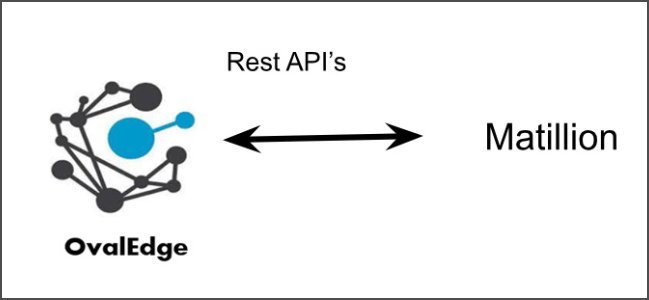
OvalEdge provides RESTful APIs that enable connectivity and integration with various applications and services, including Matillion. These APIs allow you to access, manipulate, and exchange data and information between OvalEdge and Matillion to streamline data management and analytics processes.

<figure><img src="https://content.gitbook.com/content/hTnkoJQml0pok9awFDhx/blobs/DIw7HxhvbSWSX8ioZenU/Matillion.png" alt=""><figcaption></figcaption></figure>

## **Windows Requirements**

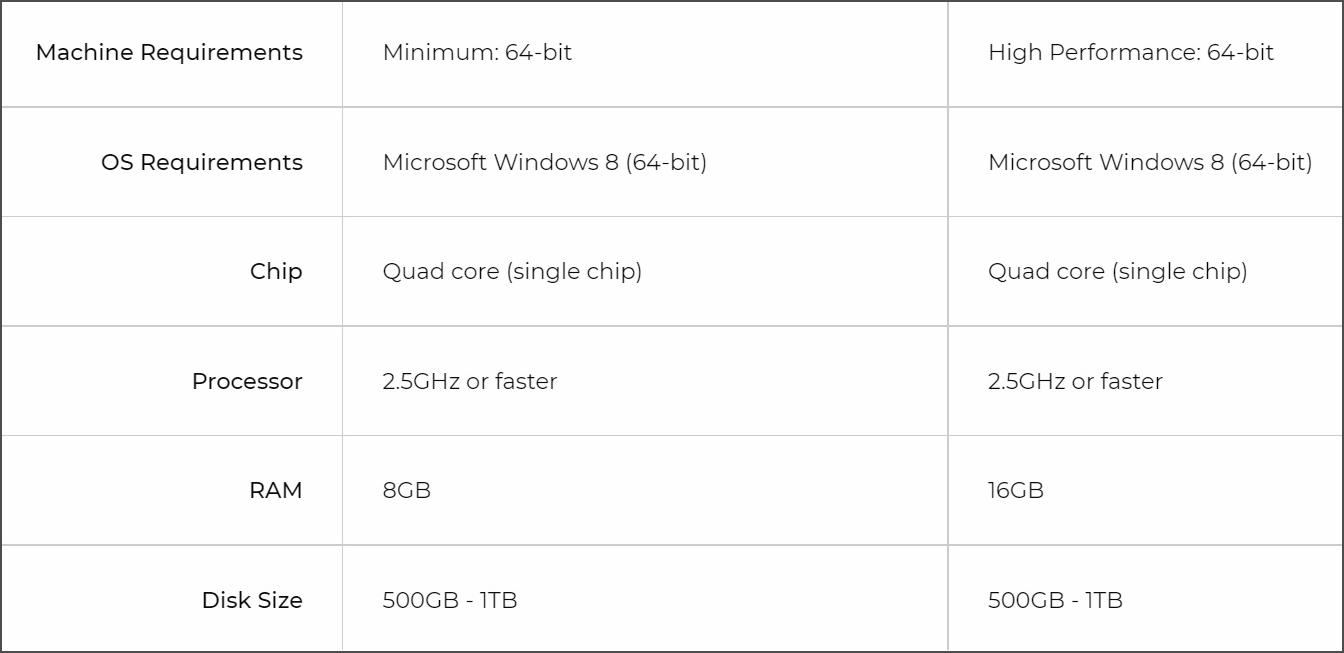
The specific requirements for Windows can vary depending on the version and purpose. Here are some common requirements for Windows operating systems:

<figure><img src="https://content.gitbook.com/content/hTnkoJQml0pok9awFDhx/blobs/8pYUSVVnMlXcoTaqpuqc/matillion%20-.png" alt=""><figcaption></figcaption></figure>

| **Edition** | **Version**     | **Support** |
| ----------- | --------------- | ----------- |
| Version     | Default version | Supported   |

## **Technical Specifications**

Technical specifications are detailed descriptions of the technical characteristics, requirements, and capabilities of a product, system, or component.&#x20;

The connector capabilities are shown below:

### **Crawling**

<table data-header-hidden><thead><tr><th width="162.75"></th><th width="292"></th><th></th></tr></thead><tbody><tr><td><strong>Feature</strong></td><td><strong>Supported Objects</strong></td><td><strong>Remarks</strong></td></tr><tr><td>Crawling</td><td>Get Project Groups and Projects as Schemas.</td><td>Differentiating the ProjectGroup and Project as ProjectGroup ~~ Project</td></tr></tbody></table>

### **Lineage Building**

| **Lineage entities** | **Details** |
| -------------------- | ----------- |
| Table to Table       | Supported   |
| Table-File Lineage   | Supported   |
| File - Table Lineage | Supported   |
| Column lineage       | Supported   |

## **Pre-requisites**

This section lists the prerequisites necessary to establish a connection between the Matillion connector and OvalEdge Application.

### **Service Account Permissions**

To use the connector, the following permissions are needed:

* A service account for crawling is required.
* The connection details mentioned in the table below must be accessible and provided.

| **Operation**                               | **Access Permission**                                                      |
| ------------------------------------------- | -------------------------------------------------------------------------- |
| Connection validate                         | Should have API Role permission for the given specified Matillion Instance |
| Crawl Jobs with Project Groups and Projects | Should have read access for the specified Project Group and Project        |

## **Establish a Connection**

To establish a connection with Matillion Connector, follow these steps:

1. In the OvalEdge application, click on the "**Administration**" module from the left panel menu.
2. Select "**Connectors**" to display the Connectors page.
3. Click on the **"+"** (New Connector) button at the top right corner of the page. The ‘Add Connector’ pop-up window is displayed.
4. Select the connection type as Matillion. The Add Connector with Matillion details is displayed.

<table data-header-hidden><thead><tr><th width="220.25"></th><th></th></tr></thead><tbody><tr><td><strong>Fields</strong></td><td><strong>Details</strong></td></tr><tr><td><strong>Connector Type</strong></td><td>It allows users to select the connector from the drop-down menu. By default, Matillion is displayed as the selected connection type.</td></tr><tr><td><strong>License Type</strong></td><td><p>OvalEdge offers a default Base Connector License for all connectors, allowing users to crawl and profile data sources to obtain metadata and statistical information. Additionally, OvalEdge provides various Add-Ons to cater to different connector functionality requirements:</p><ul><li><strong>Auto Lineage Add-On:</strong> To enable the automatic construction of data lineage for a connector, choose the Auto Lineage Add-On license, which supports the Lineage feature.</li><li><strong>Data Quality Add-On:</strong> To identify, report, and resolve data quality issues for a connector that requires data quality support, opt for the Data Quality Add-On license. This license provides features such as Data Quality Rules/functions, Anomaly detection, Reports, and more.</li><li><strong>Data Access Add-On:</strong> For connector access management via OvalEdge with the Remote Data Access Management (RDAM) feature enabled, select the Data Access Add-On license. </li></ul></td></tr><tr><td><strong>Connection Name</strong></td><td>Select a Connection name for the Matillion. The name that you specify is a reference name to easily identify the Matillion  connection in OvalEdge. Example: matilllion_dev</td></tr><tr><td><strong>Connector Environment</strong></td><td>Select the desired environment for the connector from the dropdown list. The environment field provides information about the specific environment in which the connector is established, such as UAT, NON-PROD, etc.</td></tr><tr><td><strong>Server</strong></td><td>Provide the appropriate Matillion Instance URL</td></tr><tr><td><strong>Is SSL Enabled</strong></td><td>By default, the SSL (Secure Sockets Layer) option is disabled, with the value set to "false."</td></tr><tr><td><strong>User Name</strong></td><td>Provide the User Name which has an API Role</td></tr><tr><td><strong>Password</strong></td><td>Provide the respective Password.</td></tr><tr><td><strong>Plugin Server</strong></td><td>Provide the server name if you are running this as a Plugin</td></tr><tr><td><strong>Plugin Port</strong></td><td>Provide the port number on which Plugin is running</td></tr><tr><td><strong>Default Governance Roles</strong></td><td><strong>Steward*</strong>: Select the Steward from the drop-down options.</td></tr><tr><td><strong>Admin Roles</strong></td><td><strong>Custodian*</strong>: Select the Custodian from the drop-down options.</td></tr><tr><td><strong>No of Archive Objects</strong></td><td><strong>Owner*</strong>: Select the Owner from the drop-down options.</td></tr><tr><td><strong>Select Bridge</strong></td><td><p>The OvalEdge Bridge component enables seamless connectivity between cloud-hosted servers and on-premise or public cloud data sources without requiring modifications to firewall rules. It offers real-time control, simplifying the management of data movement between different sources and destinations. </p><p>For more information, refer to <a href="https://support.ovaledge.com/bridge-overview">Bridge Overview</a></p></td></tr></tbody></table>

### **How to Validate the Lineage:**

To validate the lineage in Matillion, follow these steps:

* Open the Matillion instance with respective username and password.
* Open a specific Project from the Project Group.
* Navigate to the respective job (orchestration and transformation)&#x20;

## **References:**&#x20;

* OvalEdge supports Snowflake and Redshift as databases for AWS instances.
* The Matillion connector offers a range of services to facilitate data integration and transformation.

***

Copyright © 2025, OvalEdge LLC, Peachtree Corners GA USA
