# Apache Impala

IMPALA is an MPP (Massive Parallel Processing) SQL query engine that processes huge volumes of data stored in a Hadoop cluster.

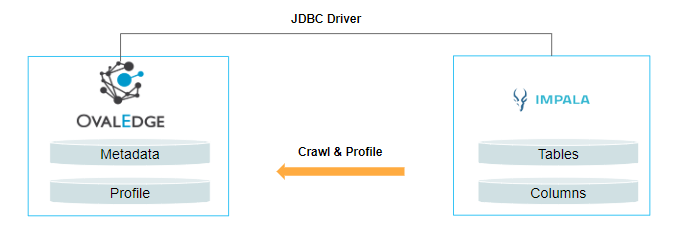
OvalEdge enables connectivity to IMPALA using the JDBC driver, allowing for tasks such as crawling database objects and profiling sample data.
![](https://lh7-us.googleusercontent.com/nWNFGwPWG52atfoHxwmphMtktdUC70kInBmhJuRlqublDh0eTMfoQHbch003gv59iZRELaZV1IaNWMmGE8pdHyKYogOQffbjNxUYrNUiehHnRsXvJnm5A_npoOQ2hhklH_YPc6kyclZtBmadBcwxGPY)

#### **Connector Capabilities**

The connector capabilities are shown below:

**Crawling**

| **Feature**   | **Supported Objects**    | **Remarks** |
| ------------- | ------------------------ | ----------- |
| Crawling      | Tables                   |             |
| Table Columns | All Data Types in IMPALA |             |

**Profiling**

| **Feature**      | **Supported Objects**                         | **Remarks**                                                                                                                                                                                |
| ---------------- | --------------------------------------------- | ------------------------------------------------------------------------------------------------------------------------------------------------------------------------------------------ |
| Table Profiling  | Row Count, Columns Count, View Sample data    | -                                                                                                                                                                                          |
| Column Profiling | Min, Max, Null Count, Distinct, Top 50 values | **Supported Data Types**: bit, tinyint, bigint, unsigned, char, nchar, numeric, decimal, int, smallint, double, float, varchar, nvarchar, datetime, xml, text, ntext, mediumtext, longtext |
| Full Profiling   | Supported                                     | -                                                                                                                                                                                          |
| Sample Profiling | Supported                                     | -                                                                                                                                                                                          |

**Lineage Building**

| **Lineage entities** | **Details**   |
| -------------------- | ------------- |
| Table Lineage        | Not Supported |
| Column Lineage       | Not Supported |

**Querying**&#x20;

| **Operation**          | **Details**              |
| ---------------------- | ------------------------ |
| Select                 | Supported                |
| Insert                 | By default not supported |
| Update                 | By default not supported |
| Delete                 | By default not supported |
| Joins within database  | Supported                |
| Joins outside database | Not supported            |
| Aggregations           | Supported                |
| Group By               | Supported                |
| Order By               | Supported                |
| Union                  | Supported                |

By default, the service account provided for the connector will be used for any query operations. If the service account has write privileges, then Insert / Update / Delete queries can be executed.

#### **Prerequisites**

The following are prerequisites for connecting to the IMPALA:

**Drivers**

The APIs/drivers used by the connector are given below:

| **Sl.No** | **Driver / API**   | **Version**     | **Details**                                                                                                                                                                                         |
| --------- | ------------------ | --------------- | --------------------------------------------------------------------------------------------------------------------------------------------------------------------------------------------------- |
| 1         | Impala JDBC Driver | 1.1.X and above | <p><a href="https://www.cloudera.com/downloads/connectors/impala/jdbc/2-6-15.html">Download Impala JDBC Connector 2.6.15</a> (Kerberos Authentication)</p><p>Note: The latest version is 2.6.15</p> |

#### **Configuring Environment Variables**

Configuring environment names enables you to select the appropriate environment from the drop-down list when adding a connector. This allows for consistent crawling of schemas across different environments, such as production (PROD), staging (STG), or temporary environments. It also facilitates schema comparisons and assists in application upgrades by providing a temporary environment that can later be deleted.

Before establishing a connection, it is important to configure the environment names for the specific connector. If your environments have already been configured, skip this step.&#x20;

**Steps to Configure the Environment**

1. Log in to the OvalEdge application.
2. Navigate to **Administration** >  **System Settings**.
3. Select the Connector tab.
4. Find the key name “connector.environment”.<br>
5. Enter the desired environment values (PROD, STG) in the **Value** column.
6. Click ✔ to Save.

#### **Service Account Permissions**

An admin/service account is necessary for crawling and building lineage. The minimum privileges required are:

| **Operation**              | **Access Permission** |
| -------------------------- | --------------------- |
| Connection Validation      | Read                  |
| Crawl Schemas and Tables   | Read                  |
| Profile Schemas and Tables | Read                  |

#### **Establish a Connection**

To connect to **IMPALA** using the OvalEdge application, complete the following steps:

1. Log in to the **OvalEdge** application.
2. Navigate to **Administration** > **Connectors.**
3. Click on the **+** (New Connector) icon.<br>
4. The **Add Connector** pop-up window is displayed, and you can search for the IMPALA connector.\
   **Note:** An asterisk (\*) denotes a mandatory field for establishing a connection.    <br>

   | **Field Name**                   | **Description**                                                                                                                                                                                                                                                                                                                                                                                                                                                                                                                                                                                                                                                                                                                                                                                                                                                                                                                                                                                                                                                                                  |
   | -------------------------------- | ------------------------------------------------------------------------------------------------------------------------------------------------------------------------------------------------------------------------------------------------------------------------------------------------------------------------------------------------------------------------------------------------------------------------------------------------------------------------------------------------------------------------------------------------------------------------------------------------------------------------------------------------------------------------------------------------------------------------------------------------------------------------------------------------------------------------------------------------------------------------------------------------------------------------------------------------------------------------------------------------------------------------------------------------------------------------------------------------ |
   | Connector Type                   | This field allows you to select the connector from the drop-down list provided. By default, 'IMPALA' is displayed as the selected connector type.                                                                                                                                                                                                                                                                                                                                                                                                                                                                                                                                                                                                                                                                                                                                                                                                                                                                                                                                                |
   | **Connector Settings**           |                                                                                                                                                                                                                                                                                                                                                                                                                                                                                                                                                                                                                                                                                                                                                                                                                                                                                                                                                                                                                                                                                                  |
   | Authentication\*                 | <p>IMPALA data security supports two forms of authentication mechanisms. </p><ul><li><strong>Kerberos Authentication:</strong> Authentication is performed based on kerberos keytab and kerberos principal provided.</li><li><strong>Non-Kerberos Authentication:</strong> Authentication is performed based on the Service Account Username and Password.</li></ul>                                                                                                                                                                                                                                                                                                                                                                                                                                                                                                                                                                                                                                                                                                                             |
   | Credential Manager\*             | <p>Select the option from the drop-down list to save your credentials.</p><p><strong>OE Credential Manager:</strong> When OvalEdge establishes a connection to the IMPALA database, the connection is configured with the service account's basic username and password in real time.</p><ul><li><strong>HashiCorp:</strong> The credentials are stored in the HashiCorp database server and fetched from HashiCorp to OvalEdge.  </li><li><strong>AWS Secrets Manager:</strong> The credentials are stored in the AWS Secrets Manager database server and fetched from the AWS Secrets Manager to OvalEdge.</li><li><strong>Azure Key Vault:</strong> The credentials are stored in the Azure Key Vault database server and fetched from the Azure Key Vault to OvalEdge.<br>For more information on Azure Key Vault, refer to <a href="https://support.ovaledge.com/azurekeyvaultintegration">Azure Key Vault Connector Integration</a>.</li></ul><p>For more information on Credential Manager, refer to <a href="https://support.ovaledge.com/credential-manager">Credential Manager</a></p> |
   | License Add Ons                  | <p>All the connectors will have a Base Connector License by default, which allows you to crawl and profile to obtain metadata and statistical information from a data source. </p><p>OvalEdge supports various License Add-Ons based on the connector’s functionality requirements.</p><ul><li>Select the <strong>Data Quality</strong> Add-On license to identify, report, and resolve the data quality issues for a connector whose data supports data quality using DQ Rules/functions, Anomaly detection, Reports, and more.</li></ul>                                                                                                                                                                                                                                                                                                                                                                                                                                                                                                                                                       |
   | Connector Name\*                 | <p>Provide a connector name for the IMPALA database in OvalEdge. This name will serve as a reference for identifying the IMPALA database connection. </p><p><em>Example: "IMPALA\_Connection\_test"</em></p>                                                                                                                                                                                                                                                                                                                                                                                                                                                                                                                                                                                                                                                                                                                                                                                                                                                                                     |
   | Connector Environment            | <p>The Connector Environment drop-down list allows you to select the environment configured for the connector from the drop-down list. </p><p>For example, you can select PROD or STG (based on the configured items in the OvalEdge configuration for the connector.environment).</p><p>The purpose of the environment field is to help you identify which connector is connecting what type of system environment (Production, STG, or QA).</p><p> <em><strong>Note:</strong> The Configuring Environment Variables section explains setting up environment variables.</em></p>                                                                                                                                                                                                                                                                                                                                                                                                                                                                                                                |
   | Server\*                         | <p>Specify the name of the IMPALA database instance server IP/URL, which is accessible via the OvalEdge application.</p><p><em><strong>Example</strong></em>: </p><p><strong>IP</strong>: 190.x1.x3.xx90</p><p><strong>Server</strong>: ovalimpaladbms.com</p>                                                                                                                                                                                                                                                                                                                                                                                                                                                                                                                                                                                                                                                                                                                                                                                                                                   |
   | Port\*                           | By default, port number 21050, related to the IMPALA database, is displayed. A new port number can be provided if needed.                                                                                                                                                                                                                                                                                                                                                                                                                                                                                                                                                                                                                                                                                                                                                                                                                                                                                                                                                                        |
   | Database\*                       | Enter the source database name for crawling.                                                                                                                                                                                                                                                                                                                                                                                                                                                                                                                                                                                                                                                                                                                                                                                                                                                                                                                                                                                                                                                     |
   | Driver\*                         | A JDBC driver is a Java library file with the extension .jar that connects to a database. By default, the driver details associated with the IMPALA database will be auto-populated.                                                                                                                                                                                                                                                                                                                                                                                                                                                                                                                                                                                                                                                                                                                                                                                                                                                                                                             |
   | **Kerberos Authentication**      |                                                                                                                                                                                                                                                                                                                                                                                                                                                                                                                                                                                                                                                                                                                                                                                                                                                                                                                                                                                                                                                                                                  |
   | Principal                        | Enter a unique identity to which Kerberos is assigned.                                                                                                                                                                                                                                                                                                                                                                                                                                                                                                                                                                                                                                                                                                                                                                                                                                                                                                                                                                                                                                           |
   | Connection String                | <p>Set the Kerberos Connection string toggle button to automatically get the details from the credentials provided. Alternatively, you can manually enter the string.</p><p><strong>Format:</strong> <em>jdbc:hive2://{server}:21050/{sid};principal=impala/{principal}</em></p><p><strong>Example:</strong></p><p><em>jdbc:hive2://18.220.154.229:21050/default;principal=impala/ec2-<18-220-154-229.us-east-2.compute.amazonaws.com@US-EAST-2.COMPUTE.INTERNAL></em></p>                                                                                                                                                                                                                                                                                                                                                                                                                                                                                                                                                                                                                       |
   | Keytab                           | Enter the Keytab file path associated with the Principal.                                                                                                                                                                                                                                                                                                                                                                                                                                                                                                                                                                                                                                                                                                                                                                                                                                                                                                                                                                                                                                        |
   | Krb5-Configuration File\*        | Enter the Kerberos configuration file path associated with the Principal.                                                                                                                                                                                                                                                                                                                                                                                                                                                                                                                                                                                                                                                                                                                                                                                                                                                                                                                                                                                                                        |
   | **Non- Kerberos Authentication** |                                                                                                                                                                                                                                                                                                                                                                                                                                                                                                                                                                                                                                                                                                                                                                                                                                                                                                                                                                                                                                                                                                  |
   | Username\*                       | Enter the Service Account Username of the IMPALA Server.                                                                                                                                                                                                                                                                                                                                                                                                                                                                                                                                                                                                                                                                                                                                                                                                                                                                                                                                                                                                                                         |
   | Password\*                       | Enter the password of the IMPALA server name.                                                                                                                                                                                                                                                                                                                                                                                                                                                                                                                                                                                                                                                                                                                                                                                                                                                                                                                                                                                                                                                    |
   | Connection String                | <p>Set the Non-Kerberos Connection string toggle button to automatically get the details from the credentials provided. Alternatively, you can manually enter the string.</p><p><strong>Format:</strong> jdbc:impala://{server}:21050/{sid}</p><p><em><strong>Example</strong></em>: </p><p> jdbc:impala://18.220.154.229:21050/default</p>                                                                                                                                                                                                                                                                                                                                                                                                                                                                                                                                                                                                                                                                                                                                                      |
   | Plugin Server                    | Specify the server name if the data source library is running as a web server, similar to bridge-lite.                                                                                                                                                                                                                                                                                                                                                                                                                                                                                                                                                                                                                                                                                                                                                                                                                                                                                                                                                                                           |
   | Plugin Port                      | Enter the port number associated with the plugin server.                                                                                                                                                                                                                                                                                                                                                                                                                                                                                                                                                                                                                                                                                                                                                                                                                                                                                                                                                                                                                                         |
   | **Default Governance Roles**     |                                                                                                                                                                                                                                                                                                                                                                                                                                                                                                                                                                                                                                                                                                                                                                                                                                                                                                                                                                                                                                                                                                  |
   | Steward\*                        | Select the Steward from the drop-down list options.                                                                                                                                                                                                                                                                                                                                                                                                                                                                                                                                                                                                                                                                                                                                                                                                                                                                                                                                                                                                                                              |
   | Custodian\*                      | Select the Custodian from the drop-down list options.                                                                                                                                                                                                                                                                                                                                                                                                                                                                                                                                                                                                                                                                                                                                                                                                                                                                                                                                                                                                                                            |
   | Owner\*                          | Select the Owner from the drop-down list options.                                                                                                                                                                                                                                                                                                                                                                                                                                                                                                                                                                                                                                                                                                                                                                                                                                                                                                                                                                                                                                                |
   | Governance Roles 4, 5, 6\*       | <p>Select the respective user from the drop-down options.</p><p><em><strong>Note:</strong> The drop-down list displays all the configurable roles (single user or a team) as per the configurations made in the OvalEdge <strong>Security</strong> > <strong>Governance Roles</strong> section.</em></p>                                                                                                                                                                                                                                                                                                                                                                                                                                                                                                                                                                                                                                                                                                                                                                                         |
   | **Admin Roles**                  |                                                                                                                                                                                                                                                                                                                                                                                                                                                                                                                                                                                                                                                                                                                                                                                                                                                                                                                                                                                                                                                                                                  |
   | Integration Admins\*             | <p>To add Integration Admin Roles, search for or select one or more roles from the Integration Admin options and then click on the Apply button.<br>The Integration Admin's responsibilities include configuring crawling and profiling settings for the connector and deleting connectors, schemas, or data objects.</p>                                                                                                                                                                                                                                                                                                                                                                                                                                                                                                                                                                                                                                                                                                                                                                        |
   | Security and Governance Admins\* | <p>To add Security and Governance Admin roles, search for or select one or more roles from the list and then click on the Apply button.<br>The Security and Governance Admin is responsible for:</p><ul><li>Configuring role permissions for the connector and its associated data objects.</li><li>Adding admins to set permissions for the connector's roles and associated data objects.</li><li>Updating governance roles.</li><li>Creating custom fields.</li><li>Developing Service Request templates for the connector.</li><li>Creating approval workflows for  Service Request templates.</li></ul>                                                                                                                                                                                                                                                                                                                                                                                                                                                                                     |
   | No. of Archive Objects\*         | The number of archive objects indicates the number of recent metadata modifications made to a dataset at a remote/source location. By default, the archive objects feature is deactivated. However, users may enable it by clicking the Archive toggle button and specifying the number of objects they wish to archive.                                                                                                                                                                                                                                                                                                                                                                                                                                                                                                                                                                                                                                                                                                                                                                         |
   | Select Bridge\*                  | <p>With the OvalEdge Bridge component, any cloud-hosted server can connect with any on-premise or public cloud data source(s) without modifying firewall rules. A bridge provides real-time control, making managing data movement between source and destination easy. For more information, refer to</p><p><a href="https://support.ovaledge.com/bridge-overview">Bridge Overview</a></p>                                                                                                                                                                                                                                                                                                                                                                                                                                                                                                                                                                                                                                                                                                      |

   &#x20;
5. After entering all the required connection details, select the appropriate option based on your preferences:&#x20;
   1\.
   1. **Validate:** Click on the Validate button to verify the connection details. This ensures that the provided information is accurate and enables successful connection establishment.
   2. **Save:** Click on the Save button to store the connection details. Once saved, the connection will be added to the Connectors home page for easy access.
   3. **Save & Configure:** For certain Connectors requiring additional configuration settings, click the Save & Configure button. This will open the Connection Settings pop-up window, allowing you to configure the necessary settings before saving the connection.
6. Once the connection is validated and saved, it will be displayed on the Connectors home page.\
   \&#xNAN;***Note:** You can either save the connection details first or validate the connection first and then save it.*

#### **Connection Validation Details**

| S.No | Error Message(s)                                                | Description                                  |
| ---- | --------------------------------------------------------------- | -------------------------------------------- |
| 1    | Failed to establish a connection, please check the credentials. | In case of an invalid username and password. |

***Note**: If you have issues creating a connection, please contact your assigned OvalEdge Customer Success Management (CSM) team.*

#### **Connector Settings**

Once the connection is successfully established, various settings are provided to fetch and analyze the information from the data source. &#x20;

The connection settings include Crawler, Profiler, Query Policies, Access Instruction, Business Glossary Settings, Anomaly Detection Settings, and Others.

To view the Connector Settings page,

1. Go to the Connectors page.
2. From the 9-dots, select the **Settings** option.
3. This will display the Connector Settings page, where you can view all the connector settings.
4. When you have finished making your desired changes, click on **Save Changes**. All setting changes will be applied to the metadata.
5. The following is a list of connection settings and their corresponding descriptions.<br>

   | **Connection Settings**    | **Description**                                                                                                                                                                                                                                                                                                                                                                                                                        |
   | -------------------------- | -------------------------------------------------------------------------------------------------------------------------------------------------------------------------------------------------------------------------------------------------------------------------------------------------------------------------------------------------------------------------------------------------------------------------------------- |
   | Crawler                    | Crawler settings are configured to connect to a data source and collect and catalog all the data elements in metadata.                                                                                                                                                                                                                                                                                                                 |
   | Profiler                   | Profiler settings govern gathering statistics and informative summaries about the connected data source(s). These statistics can help assess the quality of data sources before using them for analysis. Profiling is always optional; crawling can be run without profiling.                                                                                                                                                          |
   | Query Policies             | Query Policy settings restrict the use of the selected query types based on your user role type.                                                                                                                                                                                                                                                                                                                                       |
   | Access Instruction         | Access Instruction allows the data owner to instruct others on using the objects in the application.                                                                                                                                                                                                                                                                                                                                   |
   | Business Glossary Settings | The Business Glossary Settings provide flexibility and control over how users view and manage term association within a business glossary at the connector level.                                                                                                                                                                                                                                                                      |
   | Anomaly Detection Settings | <p>Anomaly Detection Settings enable users to configure anomaly detection preferences at the connector level. By default, the configuration aligns with the global settings in System Settings and cannot be modified.</p><p>Users can activate or deactivate anomaly detection for a specific connector in custom settings. They can also switch between the default Deviation or IQR algorithm and adjust associated parameters.</p> |
   | Others                     | <p>The Enable/Disable Metadata Change Notifications option sets notification preferences for metadata changes of data objects.</p><ul><li>You can use the toggle button to set the Default Governance Roles (e.g., Steward, Owner Custodian, etc.).  </li><li>Using the <strong>Roles</strong> and <strong>Teams</strong>, you can select the role and team to receive the notification of metadata changes.</li></ul>                 |

   ***Note:** For more information, refer to the* [***Connector Settings***](https://support.ovaledge.com/connector-settings)*.*

#### **Crawling of Schema(s)**

The **Crawl/Profile** option allows you to select the specific schema(s) for the following operations:       Crawl, Crawl & Profile, Profile, or Profile Unprofiled. The defined run date and time are displayed for any scheduled crawlers and profilers under the Action section.

1. Navigate to the Connectors page and click the **Crawl/Profile** button.

   **Select Schema For Crawling and Profiling** pop-up window is displayed below.
2. Select the required Schema(s).
3. The list of actions below is displayed in the **Action** section.
   1. **Crawl**:  This allows the selected schema(s) metadata to be crawled.
   2. **Crawl & Profile**: This allows the metadata of the selected schema(s) and profiles of the sample data to be crawled.
   3. **Profile**: This allows the collection of table column statistics.
   4. **Profile Unprofiled**: This allows data that has not been profiled to be profiled.
   5. **Schedule**: Connectors can also be scheduled in advance to run crawling and/or profiling at prescribed times and selected intervals.

      ***Note:** For more information on Scheduling, refer to* [***Scheduling Connector***](https://support.ovaledge.com/how-to-schedule-connectors)*.*
4. Click on the **Run** button. This gathers all metadata from the connected source and places it in the OvalEdge Data Catalog.

#### **Important Notes**

* No Procedures, Functions, Views, and Triggers exist for the IMPALA connector.
* Lineage is not supported for IMPALA Connector.
* Setup the Kerberos configuration in Tomcat if using Kerberos authentication for Impala
* In the Tomcat bin folder, Create/ Edit the setenv.bat (setenv.sh for Linux boxes) to configure the krb5.conf file of the respective connection with the below line:
* **Windows:**

  *set CATALINA\_OPTS=-Djava.security.krb5.conf="\<path to krb5.conf file where an application is running>\krb5.conf"*&#x20;
* **Linux:**

  *export CATALINA\_OPTS=-Djava.security.krb5.conf="\<Path to krb5.conf file>/krb5.conf"*    &#x20;

#### **FAQs**

1. How much does the driver cost?

   The IMPALA JDBC Driver for IMPALA is available at no additional charge.
2. Can I use the driver to access Impala from a Linux computer?

   Yes! You can use the driver to access Impala from Linux, Unix, and other non-Windows platforms.
3. Which authentication types are supported by the IMPALA JDBC Driver for IMPALA?

   Authentication options are listed below.

   **Non-Windows** -  Kerberos, NON- Kerberos authentication

   **Windows**  - Kerberos, NON- Kerberos authentication

***

Copyright © 2025, OvalEdge LLC, Peachtree Corners, GA USA
