# How to Add Column Mapping

The application allows users to map columns manually.&#x20;

* Navigate to **Advanced Tools > Lineage Maintenance** and select the Object type, Connector Name, Schema, and Table.
* It displays the list of source and destination lineage objects.
* Users can click the **edit** icon in the "**Columns**" field.

  <figure><img src="https://lh7-rt.googleusercontent.com/docsz/AD_4nXcZcozeU-7nMCNKOoyGw8yhoeqcmeZK2zpOkk_p5Qw9w-x4N2F8R2sNI3vQ2C0rSjnSucMARNTUw9rTt8dM-qk2Cl9QcJQPWKSx7H7jAJgvudyOWK4Ymh97S3p8kRyVR356iISUqQ?key=7S-lJ1VvBGLuUwv5Bk6M8zbE" alt=""><figcaption></figcaption></figure>
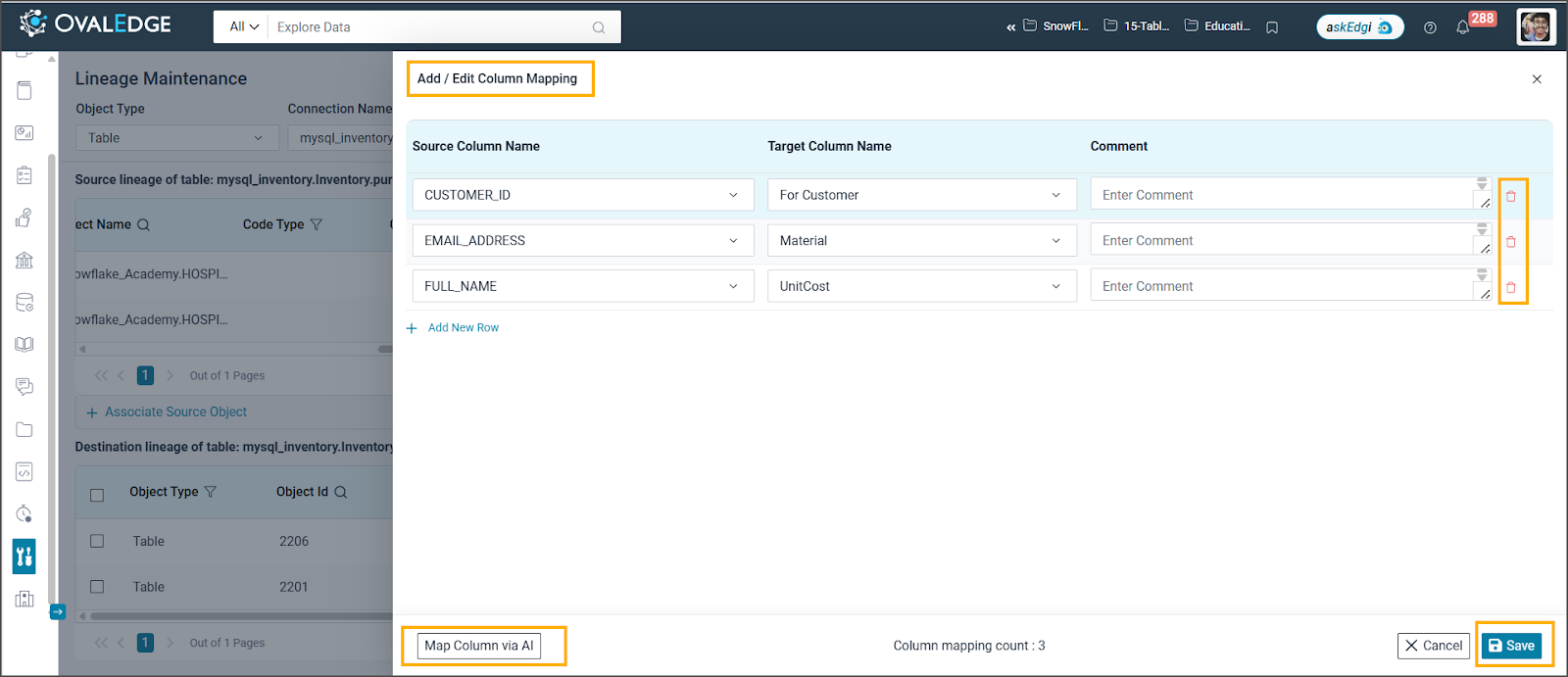
* A new window appears, where users can add new rows based on the requirement.&#x20;
* Users can select the Source Column Name and Target Column Name from the dropdown list and specify comments as needed.<br>

  <figure><img src="https://lh7-rt.googleusercontent.com/docsz/AD_4nXfZYmdYOJf4bIL8VDfMQNpDh14GlJg2p1XmaFIBoiR5jGOfoOl6EZwjXfMKRFk0GWDyg9Ka_W5VpAF0xZEZ1VcLdpz8Gx39QwgDbCWozMHyYjKh8zzoUc3uavpbUFeC8gw2e4kA?key=7S-lJ1VvBGLuUwv5Bk6M8zbE" alt=""><figcaption></figcaption></figure>
* Users can map columns using the “**Map column via AI**” option. This automatically fills in the suggested source and target columns, which users can adjust or delete as required. <br>

  <figure><img src="https://content.gitbook.com/content/hTnkoJQml0pok9awFDhx/blobs/t9ljB7gu0L3YgLS93VWP/image.png" alt=""><figcaption></figcaption></figure>