> For the complete documentation index, see [llms.txt](https://docs.ovaledge.com/llms.txt). Markdown versions of documentation pages are available by appending `.md` to page URLs; this page is available as [Markdown](https://docs.ovaledge.com/release8.3/installation-and-settings/installation-overview.md).
# Installation Overview
OvalEdge is a data catalog and governance platform that helps organizations use data to drive innovation. It can be deployed on-premises, in a cloud environment, or as a software-as-a-service (SaaS) solution.
This article is intended for IT and management professionals responsible for installing OvalEdge on-premises or in the cloud. It outlines the hardware specifications, installation steps, and resource prerequisites for a successful deployment. It also describes supported installation environments to meet different organizational requirements.
## OvalEdge Components
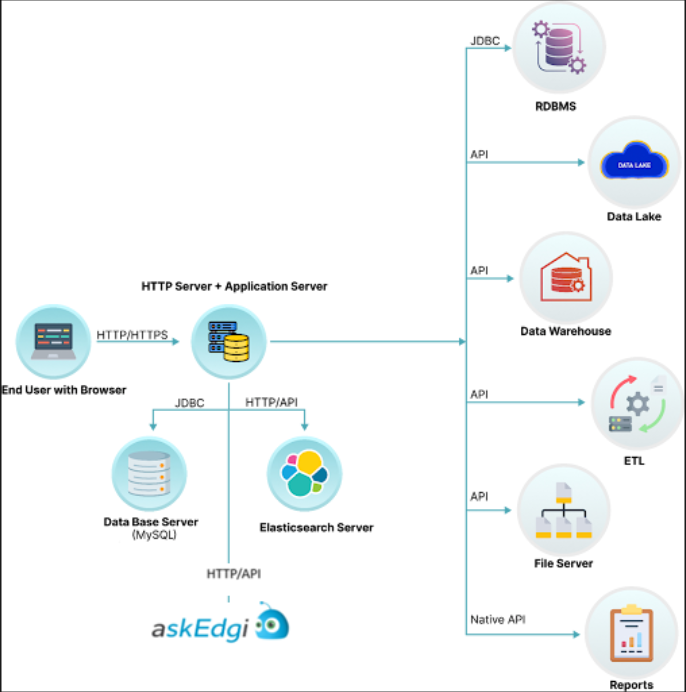
OvalEdge requires multiple software servers, referred to as middleware. These components can run on a single computer or be distributed across multiple systems. The following are the core components required for an OvalEdge installation:
* **Web Browser** – Provides user access to OvalEdge applications over a company network or the internet.
* **HTTP Server** – A dedicated HTTP server can be configured to work with the Tomcat application server.
* **Application Server (AS)** – Manages OvalEdge Java Server Pages (JSPs), XML, and business logic components. OvalEdge uses the latest open-source Apache Tomcat server.
* **Database Server (DB)** – Stores all OvalEdge metadata. The data can be stored in MySQL or any other supported database.
* **Elasticsearch Server (ES)** – An open-source, distributed search and analytics engine that indexes and searches OvalEdge data objects and their relationships in real time.
* **File Server (FS)** – Hosts shared files and data accessible to multiple systems on the network.
 ***
Copyright © 2025, OvalEdge LLC, Peachtree Corners, GA, USA.
---
# Agent Instructions
This documentation is published with GitBook. GitBook is the documentation platform designed so that both humans and AI agents can read, navigate, and reason over technical content effectively. Learn more at gitbook.com.
## Querying This Documentation
If you need additional information that is not directly available in this page, you can query the documentation by asking a question.
Perform an HTTP GET request on the following URL with the `ask` and `goal` query parameters:
```
GET https://docs.ovaledge.com/release8.3/installation-and-settings/installation-overview.md?ask=&goal=
```
`ask` is the immediate question: it should be specific, self-contained, and written in natural language.
`goal` is what the user is ultimately trying to achieve, the reason they need the answer. Sharing it helps GitBook give you a better, more relevant answer. A goal is most helpful when it describes the outcome the user wants rather than restating the question. For example, with `ask=how do I create an API token`, a goal like `automate deployments from our CI pipeline` lets GitBook tailor the answer to that use case.
The response will contain a direct answer to the question and relevant excerpts and sources from the documentation.
Use this mechanism when the answer is not explicitly present in the current page, you need clarification or additional context, or you want to retrieve related documentation sections.
***
Copyright © 2025, OvalEdge LLC, Peachtree Corners, GA, USA.
---
# Agent Instructions
This documentation is published with GitBook. GitBook is the documentation platform designed so that both humans and AI agents can read, navigate, and reason over technical content effectively. Learn more at gitbook.com.
## Querying This Documentation
If you need additional information that is not directly available in this page, you can query the documentation by asking a question.
Perform an HTTP GET request on the following URL with the `ask` and `goal` query parameters:
```
GET https://docs.ovaledge.com/release8.3/installation-and-settings/installation-overview.md?ask=&goal=
```
`ask` is the immediate question: it should be specific, self-contained, and written in natural language.
`goal` is what the user is ultimately trying to achieve, the reason they need the answer. Sharing it helps GitBook give you a better, more relevant answer. A goal is most helpful when it describes the outcome the user wants rather than restating the question. For example, with `ask=how do I create an API token`, a goal like `automate deployments from our CI pipeline` lets GitBook tailor the answer to that use case.
The response will contain a direct answer to the question and relevant excerpts and sources from the documentation.
Use this mechanism when the answer is not explicitly present in the current page, you need clarification or additional context, or you want to retrieve related documentation sections.