> For the complete documentation index, see [llms.txt](https://docs.ovaledge.com/llms.txt). Markdown versions of documentation pages are available by appending `.md` to page URLs; this page is available as [Markdown](https://docs.ovaledge.com/release8.3/data-products/security-matrix.md).

# Security Matrix

<table><thead><tr><th width="126.2222900390625">Actions</th><th width="184.888916015625">Data Domain Admin</th><th width="264">Data Domain Governance Roles</th><th width="198.22216796875">Data Product Manager</th><th width="267.555419921875">Data Product Governance Roles</th><th width="200.8887939453125">Data Product Browser</th><th width="219.5556640625">Data Product Consumer</th></tr></thead><tbody><tr><td>Data Domain Creation</td><td>Yes</td><td>No</td><td>No</td><td>No</td><td>No</td><td>No</td></tr><tr><td>Data Domain Deletion</td><td>Yes</td><td>Yes</td><td>No</td><td>No</td><td>No</td><td>No</td></tr><tr><td>Data Domain Metadata Edit - Title, Description, Avatar</td><td>Yes</td><td>Yes</td><td>No</td><td>No</td><td>No</td><td>No</td></tr><tr><td>Configure Sub Domains</td><td>Yes</td><td>Yes</td><td>No</td><td>No</td><td>No</td><td>No</td></tr><tr><td>Update Data Domain Gov Roles</td><td>Yes</td><td>Yes</td><td>No</td><td>No</td><td>No</td><td>No</td></tr><tr><td>Update Data Product Manager</td><td>No</td><td>Yes</td><td>Yes</td><td>Yes</td><td>No</td><td>No</td></tr><tr><td>Update Data Product Browser</td><td>No</td><td>Yes</td><td>Yes</td><td>Yes</td><td>No</td><td>No</td></tr><tr><td>Data Product Creation</td><td>No</td><td>No</td><td>Yes</td><td>No</td><td>No</td><td>No</td></tr><tr><td>Data Product Deletion</td><td>No</td><td>No</td><td>No</td><td>Yes</td><td>No</td><td>No</td></tr><tr><td>Update Gov Roles - Data Products</td><td>No</td><td>No</td><td>No</td><td>Yes</td><td>No</td><td>No</td></tr><tr><td>Data Product Metadata Edit - Title, Description, Tags, Custom Fields, Access Instructions</td><td>No</td><td>No</td><td>Yes</td><td>Yes</td><td>No</td><td>No</td></tr><tr><td>Change Delivery Access Mode</td><td>No</td><td>No</td><td>Yes</td><td>Yes</td><td>No</td><td>No</td></tr><tr><td>Add Objects</td><td>No</td><td>No</td><td>Yes</td><td>Yes</td><td>No</td><td>No</td></tr><tr><td>Upload Objects</td><td>No</td><td>No</td><td>Yes</td><td>Yes</td><td>No</td><td>No</td></tr><tr><td>Assign Related Objects</td><td>No</td><td>No</td><td>Yes</td><td>Yes</td><td>No</td><td>No</td></tr><tr><td>Remove all associated data objects</td><td>No</td><td>No</td><td>Yes</td><td>Yes</td><td>No</td><td>No</td></tr><tr><td>Change Domain</td><td>No</td><td>No</td><td>Yes</td><td>Yes</td><td>No</td><td>No</td></tr><tr><td>Publish &#x26; Draft Data Products</td><td>No</td><td>No</td><td>No</td><td>Yes</td><td>No</td><td>No</td></tr><tr><td>Request to publish Data Products</td><td>No</td><td>No</td><td>Yes</td><td>Yes</td><td>No</td><td>No</td></tr><tr><td>Manage My Watchlist</td><td>No</td><td>No</td><td>Yes</td><td>Yes</td><td>Yes</td><td>Yes</td></tr><tr><td>Subscribe to Data Products</td><td>No</td><td>No</td><td>Yes</td><td>Auto Subscribed</td><td>Yes</td><td>No</td></tr><tr><td>Unsubscribe to Data Products</td><td>No</td><td>No</td><td>No</td><td>No</td><td>No</td><td>Yes</td></tr><tr><td>Approve Data Product Subscription</td><td>No</td><td>No</td><td>No</td><td>Only Data Product Owner</td><td>No</td><td>No</td></tr><tr><td>Revoke Data Product Subscription</td><td>No</td><td>No</td><td>No</td><td>Yes</td><td>No</td><td>No</td></tr><tr><td>Make Product Instantly Available</td><td>No</td><td>No</td><td>Yes</td><td>Yes</td><td>No</td><td>No</td></tr><tr><td>Edit, Manage and Restore Data Contracts</td><td>No</td><td>No</td><td>Yes</td><td>Yes</td><td>No</td><td>No</td></tr><tr><td>Export Data Contract</td><td>No</td><td>No</td><td>Yes</td><td>Yes</td><td>Yes</td><td>Yes</td></tr><tr><td>Browse Data Products</td><td>No</td><td>No</td><td>Yes</td><td>Yes</td><td>Yes</td><td>Yes</td></tr><tr><td>Rate and comment on Data Products</td><td>No</td><td>No</td><td>Yes</td><td>Yes</td><td>Yes</td><td>Yes</td></tr><tr><td>Converse in Conversation</td><td>No</td><td>No</td><td>Yes</td><td>Yes</td><td>Yes</td><td>Yes</td></tr><tr><td>Preview &#x26; Read Data</td><td>No</td><td>No</td><td>No</td><td>Yes</td><td>No</td><td>Yes</td></tr></tbody></table>

## Activities and Audit Trials

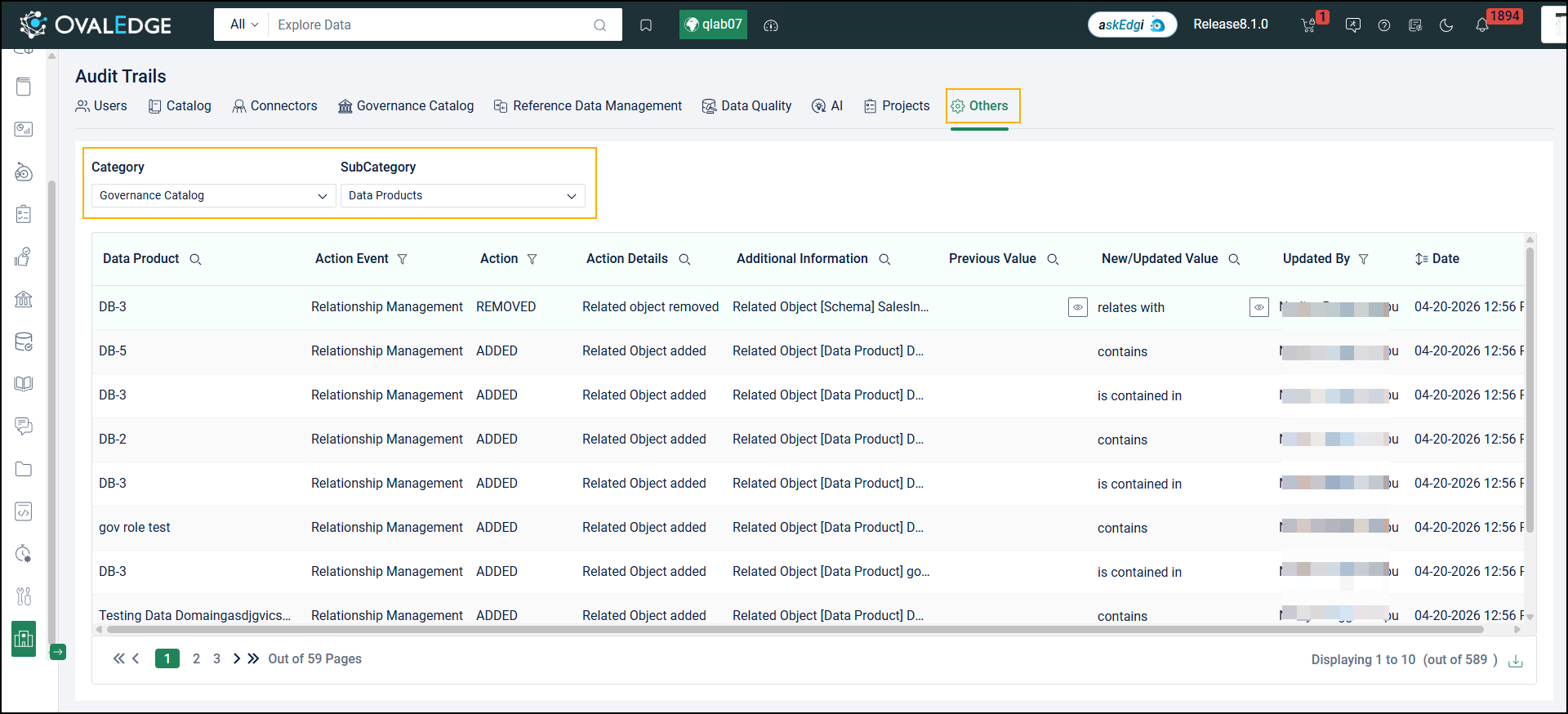
Audit information for Data Products is available in Audit Trails via a dedicated Data Products option within the Governance Catalog category.

<figure><img src="https://content.gitbook.com/content/8fgltewNgYZ8ucAp7Svt/blobs/1WHI9FbHA0x45l0pg9PI/unknown.png" alt=""><figcaption></figcaption></figure>

Audit Trails capture a broader range of Data Product-related activities, providing visibility into user interactions. The system records events for actions such as updating Instant Availability expiry, adding objects to the askEdgi Workspace, viewing Access Instructions, viewing Data Product lineage, and viewing Data Product relationships.

### Configurable Governance Roles for Data Products

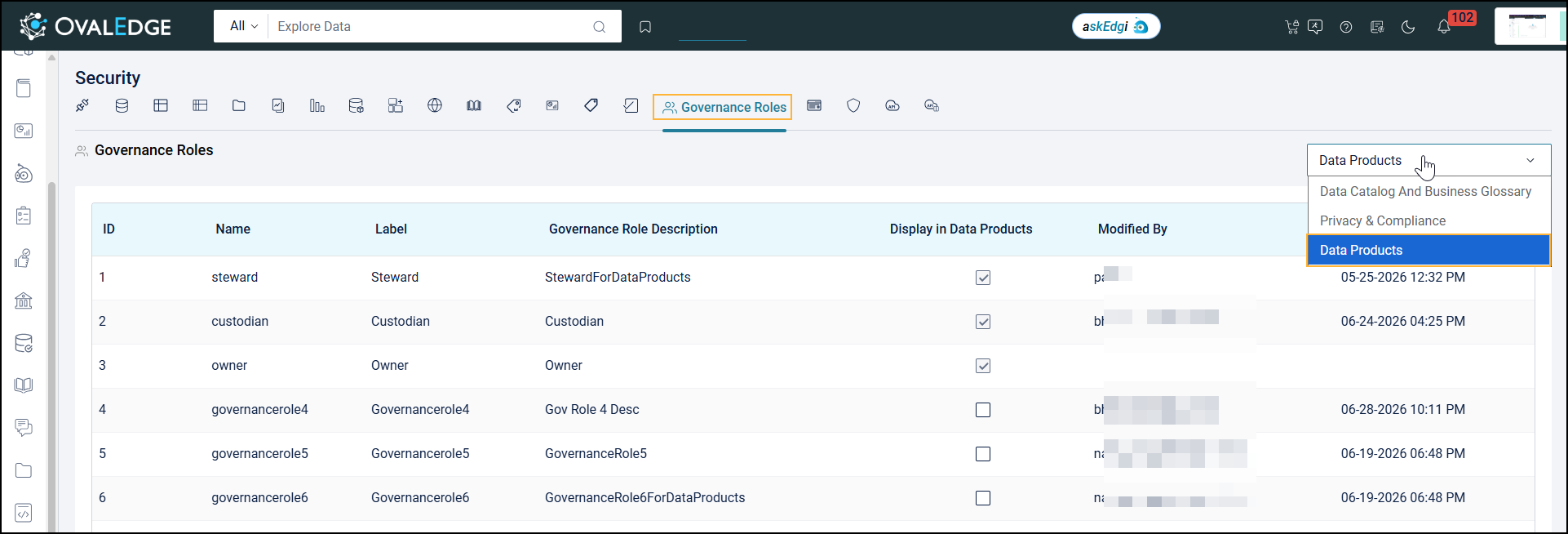
A dedicated Data Products section is available under Administration > Security > Governance Roles for managing Data Product governance roles.

<div align="left"><img src="https://content.gitbook.com/content/8fgltewNgYZ8ucAp7Svt/blobs/WbDXbxKBd4nYeEXYCKqB/unknown.png" alt="" height="212" width="624"></div>

Administrators can:

* View governance roles in a table
* Edit governance role labels and descriptions
* Enable or disable Governance Roles 4, 5, and 6 for Data Products

Enabled governance roles are available across Data Product pages, including the Data Product Registry, Data Product Summary, and Data Domain pages. Disabled governance roles are not displayed in these areas.

***

Copyright © 2026, OvalEdge LLC, Peachtree Corners, GA, USA.


---

# Agent Instructions
This documentation is published with GitBook. GitBook is the documentation platform designed so that both humans and AI agents can read, navigate, and reason over technical content effectively. Learn more at gitbook.com.

## Querying This Documentation
If you need additional information that is not directly available in this page, you can query the documentation by asking a question.

Perform an HTTP GET request on the following URL with the `ask` and `goal` query parameters:

```
GET https://docs.ovaledge.com/release8.3/data-products/security-matrix.md?ask=<question>&goal=<user_goal>
```

`ask` is the immediate question: it should be specific, self-contained, and written in natural language.
`goal` is what the user is ultimately trying to achieve, the reason they need the answer. Sharing it helps GitBook give you a better, more relevant answer. A goal is most helpful when it describes the outcome the user wants rather than restating the question. For example, with `ask=how do I create an API token`, a goal like `automate deployments from our CI pipeline` lets GitBook tailor the answer to that use case.

The response will contain a direct answer to the question and relevant excerpts and sources from the documentation.

Use this mechanism when the answer is not explicitly present in the current page, you need clarification or additional context, or you want to retrieve related documentation sections.