> For the complete documentation index, see [llms.txt](https://docs.ovaledge.com/llms.txt). Markdown versions of documentation pages are available by appending `.md` to page URLs; this page is available as [Markdown](https://docs.ovaledge.com/release8.3/askedgi/deployment-and-installation/deployment/single-vm.md).
# Single-VM
This article describes the infrastructure requirements for deploying OvalEdge in a Proof of Concept (POC) environment. It defines the virtual machine specifications, network and port requirements, supported software versions, and required deployment artifacts.
Use this article to prepare the environment before installing the OvalEdge application and related services.
### **Scope**
This article covers the following areas:
* Virtual machine specifications
* Network and port requirements
* Software versions and dependencies
* Deployment artifacts and ownership
### Virtual Machine Specifications
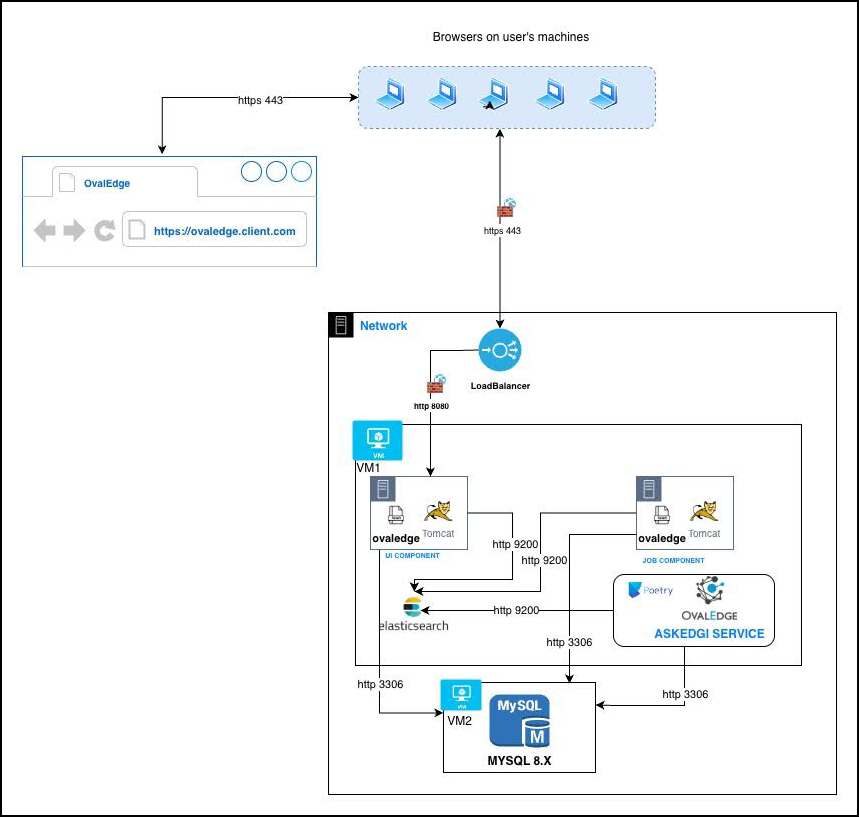
OvalEdge requires two virtual machines for optimal performance and logical separation of services:
* **VM1** hosts the OvalEdge application, ElasticSearch, and askEdgi services.
* **VM2** hosts the MySQL database.
#### Recommended VM Configuration
| Service Type | Ram | vCPU | Storage (SSD) |
| ---------------------------------------- | ----- | ---- | ------------- |
| VM1 (OvalEdge + ElasticSearch + askEdgi) | 32 GB | 8 | 200 GB |
| VM2 (Database) | 32 GB | 8 | 200 GB |
{% hint style="info" %}
These specifications are recommended for a POC environment. Production environments may require higher capacity based on metadata volume, connector usage, and lineage processing.
{% endhint %}
### Network and Port Requirements
#### Database Connectivity
Allow VM1 (OvalEdge application + Elastic Search) to communicate with VM2 (MySQL database) using the following port:
* **Port**: 3306 (MySQL)
#### Network Configuration Guidelines
* Whitelist the IP addresses of VM1 and VM2 on both servers.
* Ensure bi-directional network access between the virtual machines.
* Verify that no firewall or security group rules block database connectivity.
### Software Specifications and Supported Versions
Install and configure the following software versions before deploying OvalEdge:
| Component | Supported Version |
| -------------------- | ------------------------ |
| Operating System | Ubuntu 24.04 |
| MySQL | 8.4.x |
| OvalEdge Application | Latest supported version |
| Apache Tomcat | 10.1.5x |
| ElasticSearch | 9.3x |
| Java | OpenJDK 21 |
| Python | 3.13.x |
| Poetry | 2.1.2 |
{% hint style="warning" %}
**Important**: Use only the supported versions listed above to avoid compatibility issues with metadata ingestion, lineage processing, and stewardship workflows.
{% endhint %}
### Deployment Artifacts
#### Artifacts Provided by OvalEdge
The OvalEdge team provides the following artifacts required for deployment:
* OvalEdge application **WAR file**
* **MasterScripts** for initial database schema setup
* **License key**
* **Crontab configuration** for cleaning temporary and cached files
#### Artifacts Provided by the Customer
The customer must provide the following:
* **SSL certificate** bound to the domain used for the OvalEdge application
Attach the SSL certificate to enable HTTPS access and secure communication between users and the OvalEdge platform.
### Network Architecture
The following diagram represents the high-level network architecture for the OvalEdge POC deployment.
 ## Conclusion
This article outlines the infrastructure, network, software, and artifact prerequisites for deploying OvalEdge in a POC environment. Completing these requirements ensures a stable and secure foundation for OvalEdge installation and operation.
***
Copyright © 2026, OvalEdge LLC, Peachtree Corners, GA, USA.
---
# Agent Instructions
This documentation is published with GitBook. GitBook is the documentation platform designed so that both humans and AI agents can read, navigate, and reason over technical content effectively. Learn more at gitbook.com.
## Querying This Documentation
If you need additional information that is not directly available in this page, you can query the documentation by asking a question.
Perform an HTTP GET request on the following URL with the `ask` and `goal` query parameters:
```
GET https://docs.ovaledge.com/release8.3/askedgi/deployment-and-installation/deployment/single-vm.md?ask=&goal=
```
`ask` is the immediate question: it should be specific, self-contained, and written in natural language.
`goal` is what the user is ultimately trying to achieve, the reason they need the answer. Sharing it helps GitBook give you a better, more relevant answer. A goal is most helpful when it describes the outcome the user wants rather than restating the question. For example, with `ask=how do I create an API token`, a goal like `automate deployments from our CI pipeline` lets GitBook tailor the answer to that use case.
The response will contain a direct answer to the question and relevant excerpts and sources from the documentation.
Use this mechanism when the answer is not explicitly present in the current page, you need clarification or additional context, or you want to retrieve related documentation sections.
## Conclusion
This article outlines the infrastructure, network, software, and artifact prerequisites for deploying OvalEdge in a POC environment. Completing these requirements ensures a stable and secure foundation for OvalEdge installation and operation.
***
Copyright © 2026, OvalEdge LLC, Peachtree Corners, GA, USA.
---
# Agent Instructions
This documentation is published with GitBook. GitBook is the documentation platform designed so that both humans and AI agents can read, navigate, and reason over technical content effectively. Learn more at gitbook.com.
## Querying This Documentation
If you need additional information that is not directly available in this page, you can query the documentation by asking a question.
Perform an HTTP GET request on the following URL with the `ask` and `goal` query parameters:
```
GET https://docs.ovaledge.com/release8.3/askedgi/deployment-and-installation/deployment/single-vm.md?ask=&goal=
```
`ask` is the immediate question: it should be specific, self-contained, and written in natural language.
`goal` is what the user is ultimately trying to achieve, the reason they need the answer. Sharing it helps GitBook give you a better, more relevant answer. A goal is most helpful when it describes the outcome the user wants rather than restating the question. For example, with `ask=how do I create an API token`, a goal like `automate deployments from our CI pipeline` lets GitBook tailor the answer to that use case.
The response will contain a direct answer to the question and relevant excerpts and sources from the documentation.
Use this mechanism when the answer is not explicitly present in the current page, you need clarification or additional context, or you want to retrieve related documentation sections.