> For the complete documentation index, see [llms.txt](https://docs.ovaledge.com/llms.txt). Markdown versions of documentation pages are available by appending `.md` to page URLs; this page is available as [Markdown](https://docs.ovaledge.com/release8.1/home/login.md).
# Login
OvalEdge is a data governance and cataloging tool that helps organizations manage and govern their data assets. It provides capabilities for:
* Data discovery
* Data lineage
* Data cataloging
* Access management
* Data quality
* Data governance
These features enable users to find, understand, trust, and use data efficiently within the organization.
The application integrates with various data sources and platforms to create a comprehensive view of the data ecosystem. This integration supports compliance with data policies and improves data quality and accessibility.
**Login Methods**\
Users can log in to the application using one of the following methods:
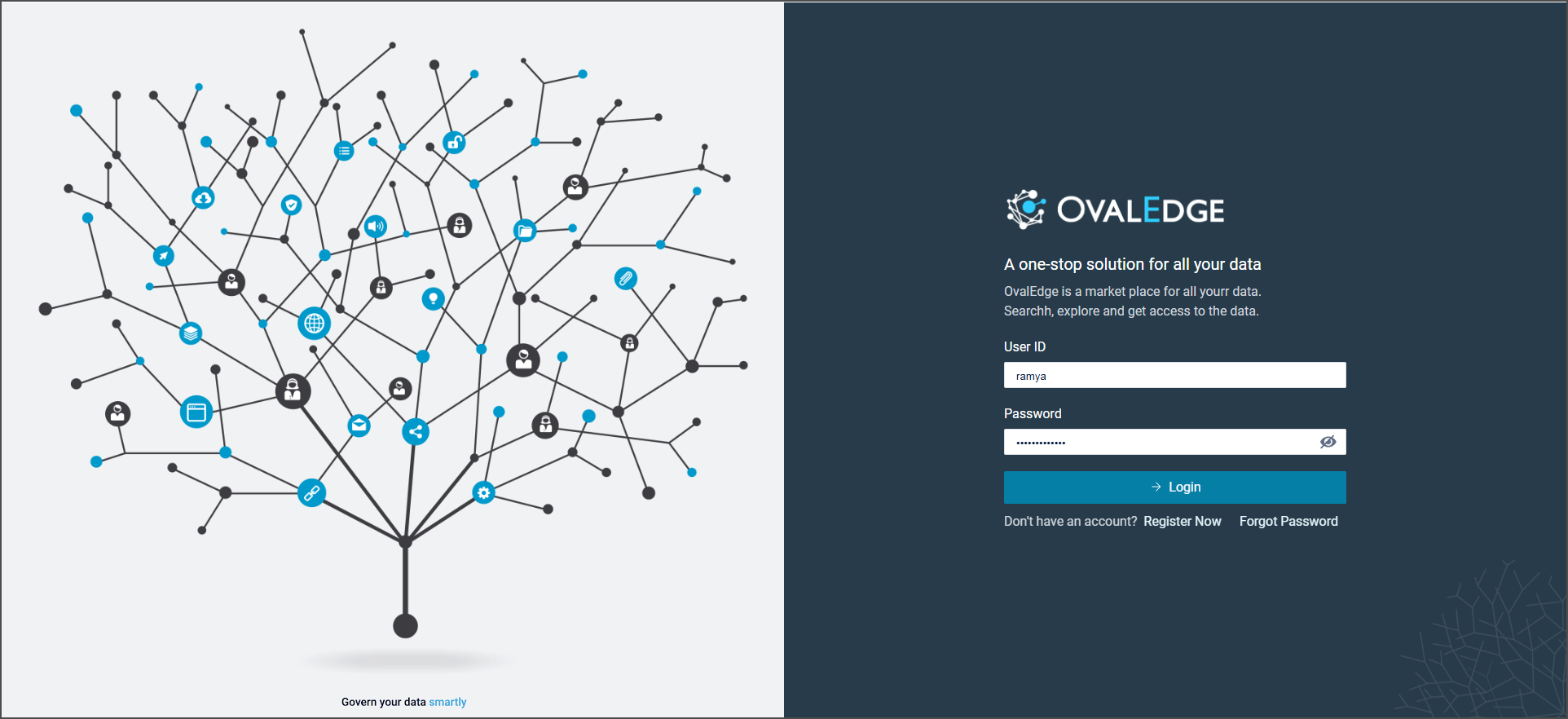
1. **Database Authentication (DB Auth)**
* Enter the User ID and Password provided by the administrator.
* If an account is not available, select **Register Now** to create one.
 2. **Single Sign-On (SSO)**\
OvalEdge supports Single Sign-On (SSO) to simplify user authentication. Users can access the application through their organization’s identity provider instead of maintaining separate credentials.
**Supported SSO providers:**
* Google
* GitHub
* Okta
* Microsoft ADFS
* OneLogin
* Microsoft Entra ID (formerly Azure AD)
* Ping Identity
* Keycloak
2. **Single Sign-On (SSO)**\
OvalEdge supports Single Sign-On (SSO) to simplify user authentication. Users can access the application through their organization’s identity provider instead of maintaining separate credentials.
**Supported SSO providers:**
* Google
* GitHub
* Okta
* Microsoft ADFS
* OneLogin
* Microsoft Entra ID (formerly Azure AD)
* Ping Identity
* Keycloak

 ## Login Page Layout
The login page is divided into two sections:
1. **Right Section**
* Displays the organization’s logo.
* Provides fields for **Username** and **Password**.
* Includes a **Login** button.
* Offers a **Register Now** option, which opens a pop-up where new users can enter their email address, first name, and last name to receive login credentials by email.
2. **Left Section**
* Provides access to support resources, including:
* Guides and tutorials
* FAQs
* Contact information for support (email or Slack)
* A feedback and suggestions section
{% hint style="info" %}
Authorized users/administrators can configure the links for support resources (Documents and videos, FAQs, Human Support, and Feedback and improvements) within the OvalEdge application [System Settings](/release8.1/home/home-page/customization-via-system-settings.md).
{% endhint %}
***
Copyright © 2025, OvalEdge LLC, Peachtree Corners, GA, USA.
---
# Agent Instructions
This documentation is published with GitBook. GitBook is the documentation platform designed so that both humans and AI agents can read, navigate, and reason over technical content effectively. Learn more at gitbook.com.
## Querying This Documentation
If you need additional information that is not directly available in this page, you can query the documentation dynamically by asking a question.
Perform an HTTP GET request on the current page URL with the `ask` query parameter, and the optional `goal` query parameter:
```
GET https://docs.ovaledge.com/release8.1/home/login.md?ask=&goal=
```
`ask` is the immediate question: it should be specific, self-contained, and written in natural language.
`goal` is optional and describes the broader end goal you are ultimately trying to accomplish on behalf of the user. GitBook uses it to tailor the answer towards what is most useful for that goal.
The response will contain a direct answer to the question and relevant excerpts and sources from the documentation.
Use this mechanism when the answer is not explicitly present in the current page, you need clarification or additional context, or you want to retrieve related documentation sections.
## Login Page Layout
The login page is divided into two sections:
1. **Right Section**
* Displays the organization’s logo.
* Provides fields for **Username** and **Password**.
* Includes a **Login** button.
* Offers a **Register Now** option, which opens a pop-up where new users can enter their email address, first name, and last name to receive login credentials by email.
2. **Left Section**
* Provides access to support resources, including:
* Guides and tutorials
* FAQs
* Contact information for support (email or Slack)
* A feedback and suggestions section
{% hint style="info" %}
Authorized users/administrators can configure the links for support resources (Documents and videos, FAQs, Human Support, and Feedback and improvements) within the OvalEdge application [System Settings](/release8.1/home/home-page/customization-via-system-settings.md).
{% endhint %}
***
Copyright © 2025, OvalEdge LLC, Peachtree Corners, GA, USA.
---
# Agent Instructions
This documentation is published with GitBook. GitBook is the documentation platform designed so that both humans and AI agents can read, navigate, and reason over technical content effectively. Learn more at gitbook.com.
## Querying This Documentation
If you need additional information that is not directly available in this page, you can query the documentation dynamically by asking a question.
Perform an HTTP GET request on the current page URL with the `ask` query parameter, and the optional `goal` query parameter:
```
GET https://docs.ovaledge.com/release8.1/home/login.md?ask=&goal=
```
`ask` is the immediate question: it should be specific, self-contained, and written in natural language.
`goal` is optional and describes the broader end goal you are ultimately trying to accomplish on behalf of the user. GitBook uses it to tailor the answer towards what is most useful for that goal.
The response will contain a direct answer to the question and relevant excerpts and sources from the documentation.
Use this mechanism when the answer is not explicitly present in the current page, you need clarification or additional context, or you want to retrieve related documentation sections.