> For the complete documentation index, see [llms.txt](https://docs.ovaledge.com/llms.txt). Markdown versions of documentation pages are available by appending `.md` to page URLs; this page is available as [Markdown](https://docs.ovaledge.com/release8.1/deployment-and-maintenance/upgrade/mysql-upgrade-from-8.0.4-to-8.4.x-rhel-internet.md).
# MySQL Upgrade from 8.0.4 to 8.4.x (RHEL) Internet
This article describes the steps, checks, and dependencies required to upgrade MySQL from version 8.0.4 to 8.4.x on RHEL 8 systems. It covers prerequisites, pre-upgrade tasks, upgrade execution, post-upgrade validations, and rollback procedures to ensure a safe and reliable production upgrade.
### Prerequisites
#### **OS Compatibility**
* Verify that the operating system supports MySQL 8.4.
* Recommended: RHEL 8.x or later.
* Check the OS version:
```bash
cat /etc/os-release
```
#### **System Requirements**
* Ensure sufficient disk space for backup and rollback (`df -Th`).
* Confirm root or sudo access.
* All listed commands must be executed.
## Pre-Upgrade Checks
### **Backup**
* Perform a logical backup of the MySQL database.
* **Log Management Procedure**
* Confirm you are backing up the correct schema.
```bash
mkdir /home/ec2-user/mysql_backup
mysqldump -u root -p ovaledgedb > /home/ec2-user/mysql_backup/ovaledgedb_backup.sql
```
 {% hint style="info" %}
Ensure sufficient space is available before running the `mysqldump` command.
{% endhint %}
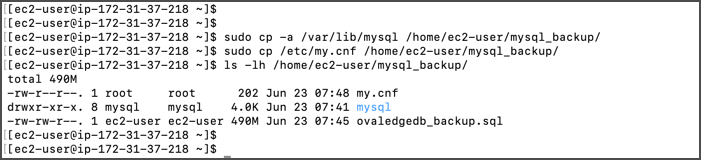
* **Back up configuration files:**
```bash
sudo cp /etc/my.cnf /home/ec2-user/mysql_backup/
sudo cp -a /var/lib/mysql /home/ec2-user/mysql_backup/
```
{% hint style="info" %}
Ensure sufficient space is available before running the `mysqldump` command.
{% endhint %}
* **Back up configuration files:**
```bash
sudo cp /etc/my.cnf /home/ec2-user/mysql_backup/
sudo cp -a /var/lib/mysql /home/ec2-user/mysql_backup/
```
 **Database Size and Row Count Check**
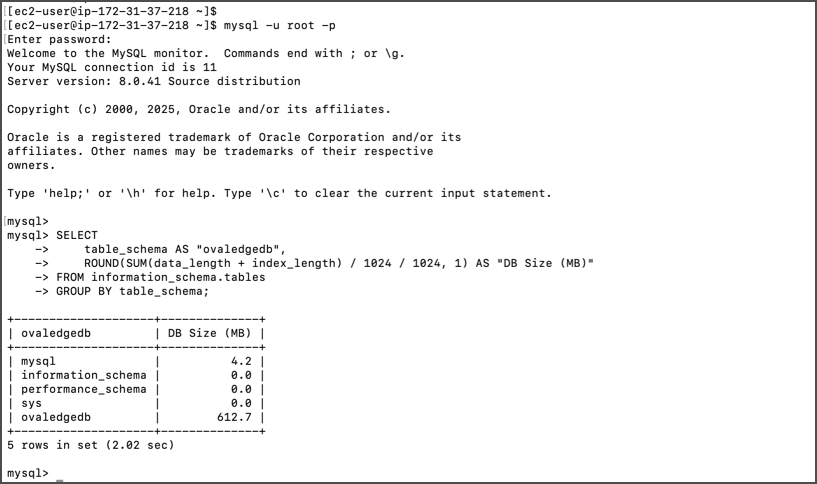
* Run the following queries before upgrading:
**Database size query:**
```sql
SELECT
table_schema AS "Database Name",
ROUND(SUM(data_length + index_length) / 1024 / 1024, 1) AS "DB Size (MB)"
FROM information_schema.tables
GROUP BY table_schema;
```
**Database Size and Row Count Check**
* Run the following queries before upgrading:
**Database size query:**
```sql
SELECT
table_schema AS "Database Name",
ROUND(SUM(data_length + index_length) / 1024 / 1024, 1) AS "DB Size (MB)"
FROM information_schema.tables
GROUP BY table_schema;
```
 **Row count query:**\
*(*[*Download SQL script*](https://ovaledge.s3.us-west-1.amazonaws.com/queries/dbsize.sql?utm_source=chatgpt.com)*)*
**Row count query:**\
*(*[*Download SQL script*](https://ovaledge.s3.us-west-1.amazonaws.com/queries/dbsize.sql?utm_source=chatgpt.com)*)*
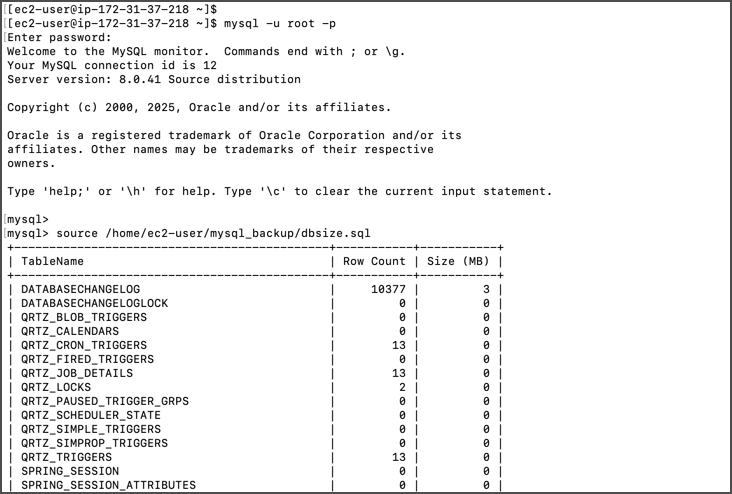 * Save outputs for post-upgrade comparison.
## Upgrade Execution
### **Stop MySQL Services**
Stop MySQL services by running the following command
* Save outputs for post-upgrade comparison.
## Upgrade Execution
### **Stop MySQL Services**
Stop MySQL services by running the following command
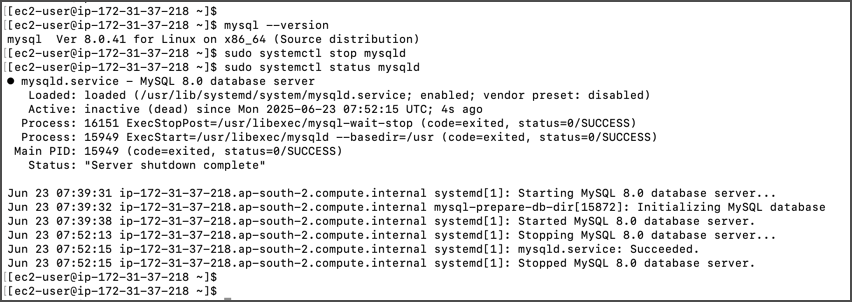 ```bash
mysql --version
sudo systemctl stop mysqld
```
### **Install MySQL 8.4.x**
* **Download repository package:**
```bash
wget https://dev.mysql.com/get/mysql84-community-release-el8-1.noarch.rpm
```
```bash
mysql --version
sudo systemctl stop mysqld
```
### **Install MySQL 8.4.x**
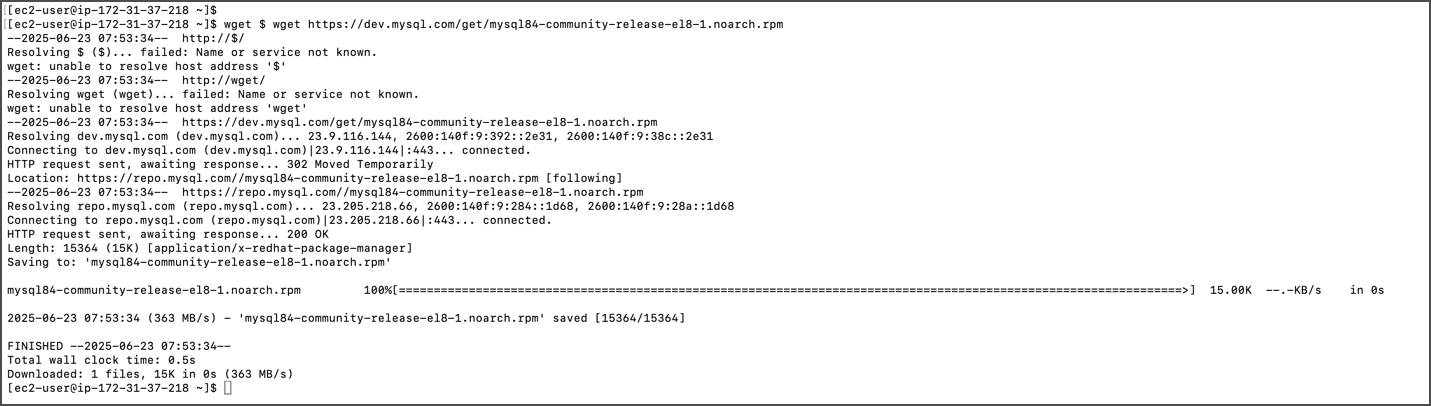
* **Download repository package:**
```bash
wget https://dev.mysql.com/get/mysql84-community-release-el8-1.noarch.rpm
```
 * **Install repository:**
```bash
sudo yum localinstall mysql84-community-release-el8-1.noarch.rpm
```
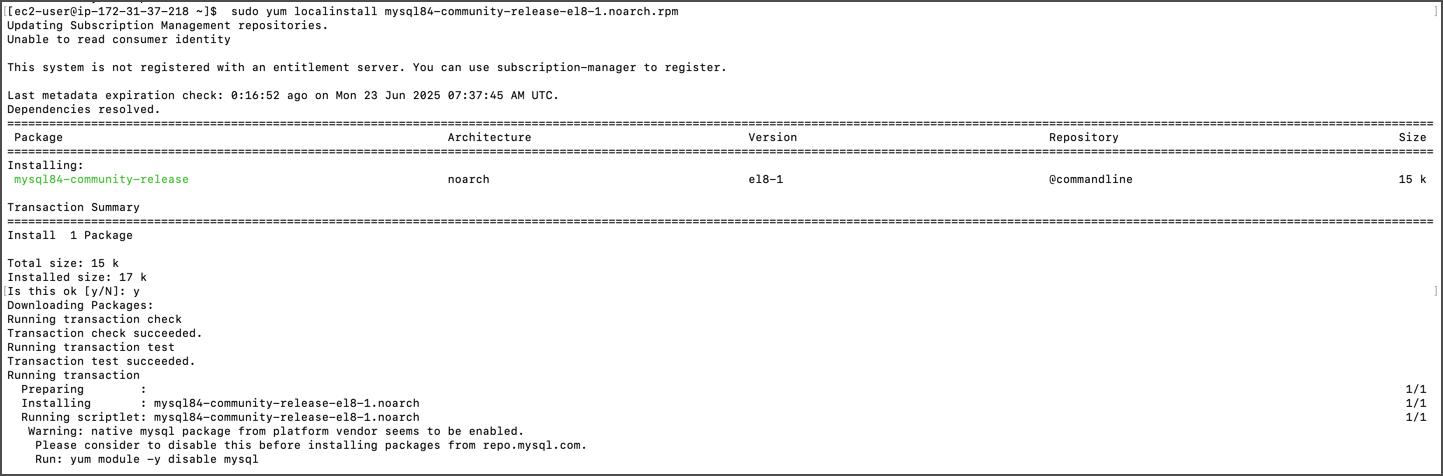
* **Install repository:**
```bash
sudo yum localinstall mysql84-community-release-el8-1.noarch.rpm
```
 * Disable any existing MySQL 8.0 repositories:
```bash
sudo vi /etc/yum.repos.d/mysql-community.repo
# enable=0 (disable) / enable=1 (enabled)
```
* Disable MySQL module in the package manager:
```bash
sudo yum module disable mysql -y
```
* Disable any existing MySQL 8.0 repositories:
```bash
sudo vi /etc/yum.repos.d/mysql-community.repo
# enable=0 (disable) / enable=1 (enabled)
```
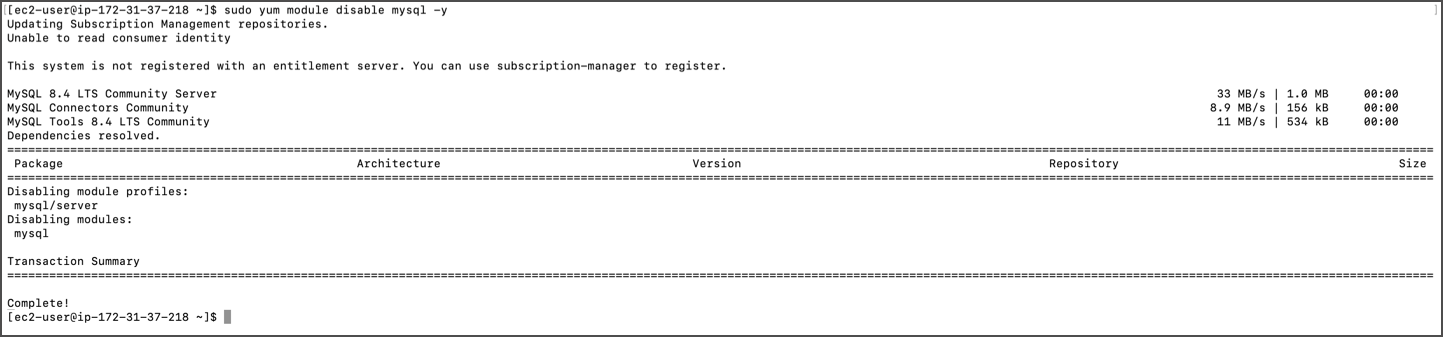
* Disable MySQL module in the package manager:
```bash
sudo yum module disable mysql -y
```
 * Install MySQL 8.4.x:
```bash
sudo yum install mysql-community-server
```
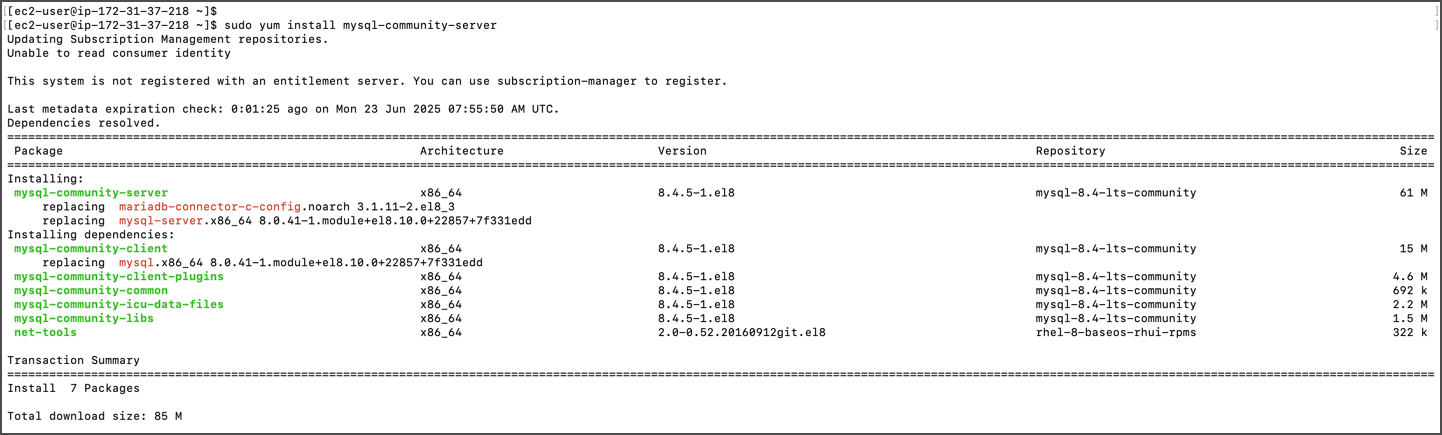
* Install MySQL 8.4.x:
```bash
sudo yum install mysql-community-server
```
 * Check installed version:
```bash
mysql --version
```
* Check installed version:
```bash
mysql --version
```
 **Update Configuration**
* Edit the configuration file:
```bash
sudo vi /etc/my.cnf
mysql_native_password=ON
```
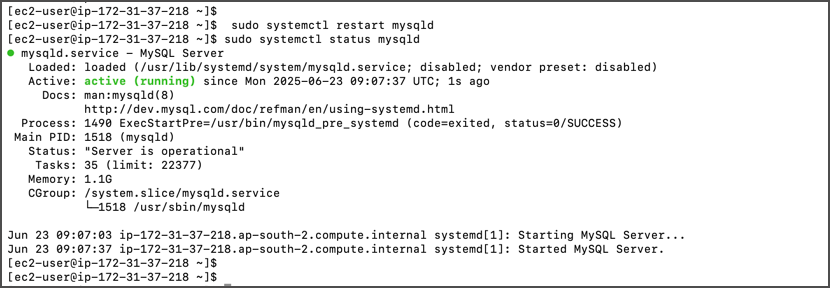
* Save file and restart MySQL:
```bash
sudo systemctl restart mysqld
sudo systemctl status mysqld
```
**Update Configuration**
* Edit the configuration file:
```bash
sudo vi /etc/my.cnf
mysql_native_password=ON
```
* Save file and restart MySQL:
```bash
sudo systemctl restart mysqld
sudo systemctl status mysqld
```
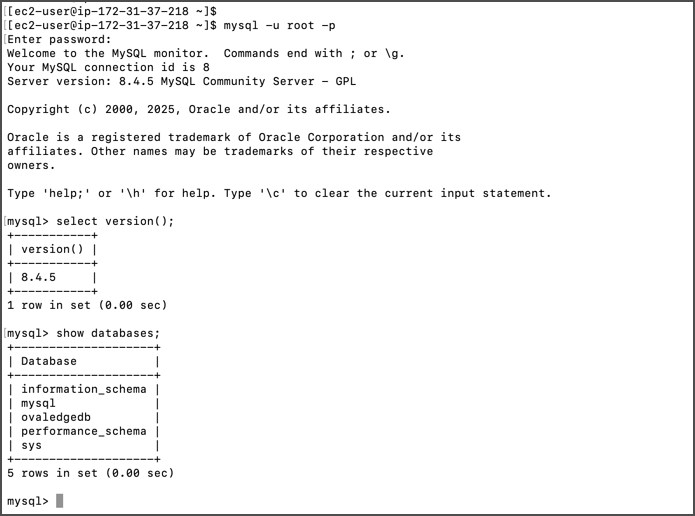
 * Verify upgrade by checking MySQL version.
 ## Post-Upgrade Validations
### **Verify Row Counts and Database Size**
* Connect to MySQL:
```bash
mysql -u root -p
```
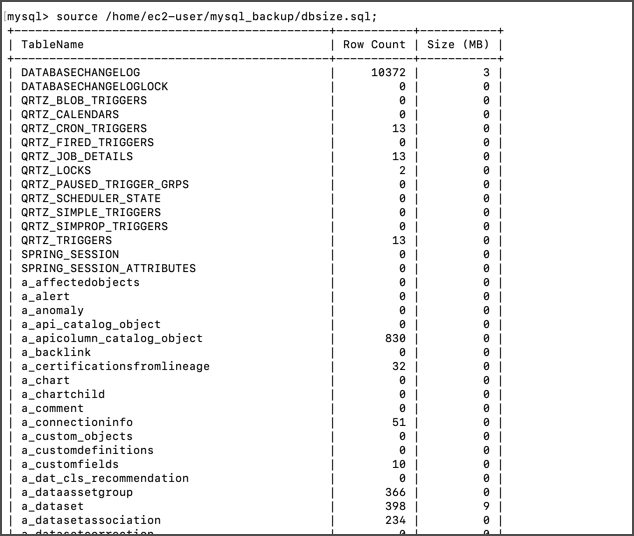
* Run validation queries:
* Row count query: [SQL Script](https://ovaledge.s3.us-west-1.amazonaws.com/queries/dbsize.sql)
## Post-Upgrade Validations
### **Verify Row Counts and Database Size**
* Connect to MySQL:
```bash
mysql -u root -p
```
* Run validation queries:
* Row count query: [SQL Script](https://ovaledge.s3.us-west-1.amazonaws.com/queries/dbsize.sql)
 * Database size query:
```sql
SELECT
table_schema AS "Database Name",
ROUND(SUM(data_length + index_length) / 1024 / 1024, 1) AS "DB Size (MB)"
FROM information_schema.tables
GROUP BY table_schema;
```
* Database size query:
```sql
SELECT
table_schema AS "Database Name",
ROUND(SUM(data_length + index_length) / 1024 / 1024, 1) AS "DB Size (MB)"
FROM information_schema.tables
GROUP BY table_schema;
```
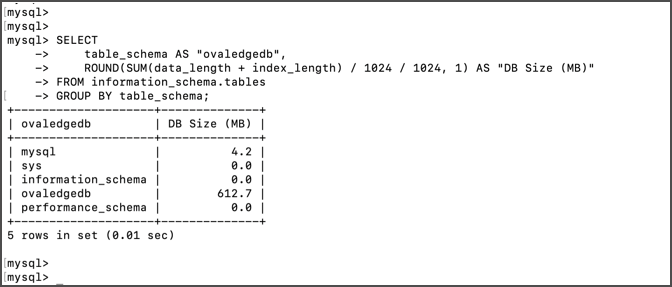 * Compare results with pre-upgrade outputs.
**Update MySQL Parameters**
* Add/update parameters in `/etc/my.cnf`:
```
max_binlog_size=1GB
binlog_expire_logs_seconds=2592000
group_concat_max_len=50000
max_connections=600
innodb_buffer_pool_size=10GB
max_allowed_packet=1G
bind-address=0.0.0.0
```
* Adjust values as per client instance size.
* Compare results with pre-upgrade outputs.
**Update MySQL Parameters**
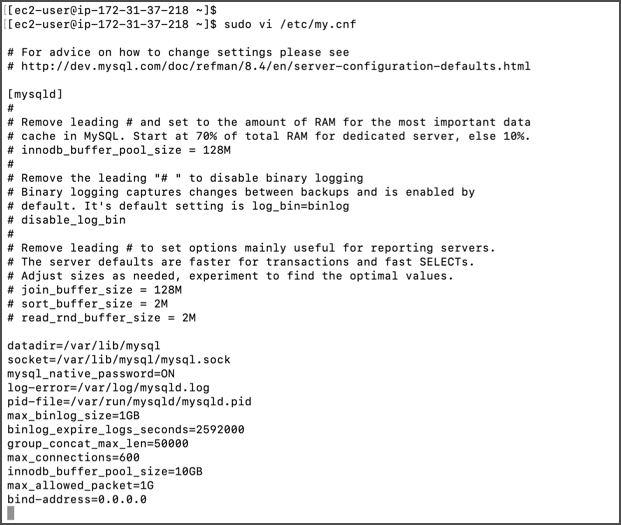
* Add/update parameters in `/etc/my.cnf`:
```
max_binlog_size=1GB
binlog_expire_logs_seconds=2592000
group_concat_max_len=50000
max_connections=600
innodb_buffer_pool_size=10GB
max_allowed_packet=1G
bind-address=0.0.0.0
```
* Adjust values as per client instance size.
 * Restart MySQL:
```bash
sudo systemctl restart mysqld
```
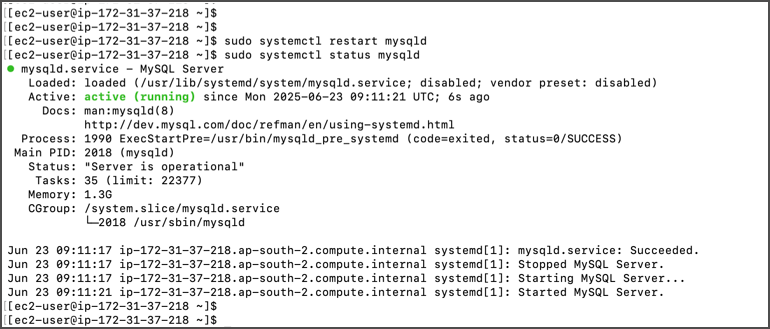
* Restart MySQL:
```bash
sudo systemctl restart mysqld
```
 ### **Update Application User Passwords (Optional)**
* Change OvalEdge MySQL user passwords:
```sql
ALTER USER 'ovaledge'@'localhost' IDENTIFIED BY '';
ALTER USER 'ovaledge'@'%' IDENTIFIED BY '';
FLUSH PRIVILEGES;
```
At this stage, the MySQL database has been upgraded to version 8.4 and the default OvalEdge MySQL password has been changed.
### Rollback Plan (if required)
* Take backup of MySQL 8.4 installation before rollback:
```bash
mkdir /home/ec2-user/mysql8.4_backup
sudo cp /etc/my.cnf /home/ec2-user/mysql8.4_backup
sudo cp -a /var/lib/mysql /home/ec2-user/mysql8.4_backup
```
* Stop MySQL services, reinstall MySQL 8.0.4, start the service, and restore data from backups.
***
Copyright © 2025, OvalEdge LLC, Peachtree Corners, GA, USA.
---
# Agent Instructions
This documentation is published with GitBook. GitBook is the documentation platform designed so that both humans and AI agents can read, navigate, and reason over technical content effectively. Learn more at gitbook.com.
## Querying This Documentation
If you need additional information that is not directly available in this page, you can query the documentation by asking a question.
Perform an HTTP GET request on the following URL with the `ask` and `goal` query parameters:
```
GET https://docs.ovaledge.com/release8.1/deployment-and-maintenance/upgrade/mysql-upgrade-from-8.0.4-to-8.4.x-rhel-internet.md?ask=&goal=
```
`ask` is the immediate question: it should be specific, self-contained, and written in natural language.
`goal` is what the user is ultimately trying to achieve, the reason they need the answer. Sharing it helps GitBook give you a better, more relevant answer. A goal is most helpful when it describes the outcome the user wants rather than restating the question. For example, with `ask=how do I create an API token`, a goal like `automate deployments from our CI pipeline` lets GitBook tailor the answer to that use case.
The response will contain a direct answer to the question and relevant excerpts and sources from the documentation.
Use this mechanism when the answer is not explicitly present in the current page, you need clarification or additional context, or you want to retrieve related documentation sections.
### **Update Application User Passwords (Optional)**
* Change OvalEdge MySQL user passwords:
```sql
ALTER USER 'ovaledge'@'localhost' IDENTIFIED BY '';
ALTER USER 'ovaledge'@'%' IDENTIFIED BY '';
FLUSH PRIVILEGES;
```
At this stage, the MySQL database has been upgraded to version 8.4 and the default OvalEdge MySQL password has been changed.
### Rollback Plan (if required)
* Take backup of MySQL 8.4 installation before rollback:
```bash
mkdir /home/ec2-user/mysql8.4_backup
sudo cp /etc/my.cnf /home/ec2-user/mysql8.4_backup
sudo cp -a /var/lib/mysql /home/ec2-user/mysql8.4_backup
```
* Stop MySQL services, reinstall MySQL 8.0.4, start the service, and restore data from backups.
***
Copyright © 2025, OvalEdge LLC, Peachtree Corners, GA, USA.
---
# Agent Instructions
This documentation is published with GitBook. GitBook is the documentation platform designed so that both humans and AI agents can read, navigate, and reason over technical content effectively. Learn more at gitbook.com.
## Querying This Documentation
If you need additional information that is not directly available in this page, you can query the documentation by asking a question.
Perform an HTTP GET request on the following URL with the `ask` and `goal` query parameters:
```
GET https://docs.ovaledge.com/release8.1/deployment-and-maintenance/upgrade/mysql-upgrade-from-8.0.4-to-8.4.x-rhel-internet.md?ask=&goal=
```
`ask` is the immediate question: it should be specific, self-contained, and written in natural language.
`goal` is what the user is ultimately trying to achieve, the reason they need the answer. Sharing it helps GitBook give you a better, more relevant answer. A goal is most helpful when it describes the outcome the user wants rather than restating the question. For example, with `ask=how do I create an API token`, a goal like `automate deployments from our CI pipeline` lets GitBook tailor the answer to that use case.
The response will contain a direct answer to the question and relevant excerpts and sources from the documentation.
Use this mechanism when the answer is not explicitly present in the current page, you need clarification or additional context, or you want to retrieve related documentation sections.