> For the complete documentation index, see [llms.txt](https://docs.ovaledge.com/llms.txt). Markdown versions of documentation pages are available by appending `.md` to page URLs; this page is available as [Markdown](https://docs.ovaledge.com/release8.1/data-catalog/data-objects-in-detail.md).
# Data Objects in Detail
## Databases
The databases display the list of schema’s objects, along with Queries, Codes, Functions, Views, Procedures, Triggers, Synonyms, and other query types of a Schema in separate tabs at the bottom of the page.
Here are additional attributes displayed on the schema-level summary page alongside the fundamental attributes explained earlier.
| Attributes | Description |
| --------------------------- | -------------------------------------------------------------------------------------------------------------------- |
| Row Count | The row count at the schema level displays the total number of rows across all tables within that particular schema. |
| Table Count | Displays the total number of tables in a Schema. |
| Last Anomaly Detection Date | Displays the date and time when a data anomaly was last detected on the data object |
9-Dots Action Items specific to Databases
| Actions | Meta Read | Meta Write |
| -------------------------- | --------- | ---------- |
| Profile | ❌ | ✅ |
| Profile Unprofiled Tables | ❌ | ✅ |
| Profile & Detect Anomalies | ❌ | ✅ |
## Tables
Tables, topics, and views are included as a part of Tables. The table summary page displays a complete list of table columns associated with the table and their profiling attributes, shown in a convenient list view.
Below are additional attributes presented on the Table-level summary page alongside the fundamental attributes explained earlier.
{% hint style="warning" %}
In connectors, objects in the source system may have the same name but different letter casing (for example, **Orders** and **orders**). Currently, the application does not fully support handling such case-sensitive object names during metadata ingestion.
\
As a result, when schemas are crawled, the job logs may show the correct total count of tables and views, but the Data Catalog may display fewer objects. This occurs because objects that differ only by case may not be displayed.
{% endhint %}
| Attributes | Description |
| ------------ | ----------------------------------------------------------------------------------------------------------------------------------------------------------------------------------------------------------------------------------------------------------------------------------------------------------------------------------------------------- |
| Row Count | The row count at the schema level displays the total number of rows across all tables within that particular schema. |
| Column Count | Displays the total number of columns present within that specific table. |
| Type | Specifies whether it falls into the categories of Tables, Views, or Materialized Views. |
| Has Relation | Indicates whether the table has relationships. Yes implies the presence of relationships; No indicates the absence of relationships. |
| Density |
Indicates the degree to which a table is filled with unique values. It is the proportion of distinct values compared to the total values in the table. A higher density suggests more unique values, while a lower density indicates a more repetitive or uniform set of values.
Density formula - (Distinct Count / Total Count)\*100.
|
| Null Density |
Displays the ratio of null values to total values in a table.
Null Density formula - (Null Count / Total Count)\*100
|
9-Dots Action Items specific to Tables
| Actions | Meta Read | Meta Write |
| ----------------------------------- | --------- | ---------- |
| Profile | ❌ | ✅ |
| Profile & Execute Anomaly Detection | ❌ | ✅ |
| View in Query Sheet | ❌ | ✅ |
## Table Columns
The left panel menu displays all columns associated with a table and allows sorting and viewing based on preferences.
Each Table Column has a dedicated summary page with attribute details highlighting its distinctive characteristics. Lineage provides visibility at the column level, whereas pattern relationships provide a deeper understanding of how different data elements are interconnected within the application.
Here is the list of exclusive tabs associated with Table Columns.
* **Relationships:** It displays a tabular list of all relationships gathered from remote sources via Primary Key - Foreign Key relationships, through advanced jobs, or manually added using the "Add Relationships" button within the application.
* **Pattern Relationships:** It identifies and displays the connections between table columns by analyzing data patterns. During profiling, pattern-matching algorithms detect matching patterns, such as repeated values or specific data structures. Pattern match score of secondary column = (Count of rows with matching patterns to the base column\* 50 ) / row count of the secondary table.
Below are additional attributes displayed on the Table-level summary page alongside the fundamental attributes explained earlier.
| Attributes | Description |
| --------------------------- | ----------------------------------------------------------------------------------------------------------------------------------------------------------------------------------------------------------------------------------------------------------------------------------------------------- |
| Length | Represents the maximum number of characters or bytes it can store. |
| Key | Identifies if it is a Primary key or a Foreign Key. |
| Data Type | It denotes whether the column denotes an integer, varchar, char, date, time, boolean, decimal, float, text, etc. |
| Nullable | Table Columns are configured to permit or restrict null values at the time of creation at the remote source. If set to True, a column can have null values, signifying the absence of a value. Conversely, if set to False, a column must have a complete set of data and cannot contain blank cells. |
| Has Relation | Indicates whether the table has relationships. Yes implies the presence of relationships; No shows the absence of relationships. |
| Distinct Value/Percentage | Refers to unique values not repeated in a data object or column. It helps to understand the uniqueness of the data object. |
| Minimum Value | Displays the lowest value from all the records in the column. |
| Maximum Value | Displays the highest value of all records in the column. |
| Empty Count | Displays the number of empty records in a table column. |
| Zero Count | Displays the number of records with values as ‘0’. |
| Null Value Count/Percentage | Null Value refers to the number of null or missing values in a specific column. |
| Is Masked | Indicates whether a column has been subjected to any masking policies. |
| Is Restricted | Prevents unauthorized access by making the data object completely invisible or inaccessible when the option is applied. Only authorized users can view or interact with the data object. |
**Top Values**
The Top Values section displays the table column's top 50 profiling statistics, which are repetitive.
{% hint style="info" %}
The Top Values only display the top 5 profiling statistics, but clicking “View All Values” displays the remaining ones.
{% endhint %}
9-Dots Action Items specific to Table Columns
| Actions | Meta Read | Meta Write |
| ----------------------------------- | --------- | ---------- |
| Profile | ❌ | ✅ |
| Profile & Execute Anomaly Detection | ❌ | ✅ |
| View in Query Sheet | ❌ | ✅ |
## Files
The Data Catalog stores the first-level folders fetched from remote data sources directly, but subsequent sub-folders and files are not initially cataloged; instead, their file structure is stored in the File Manager module. Catalog all sub-folders and files to the Data Catalog directly from the File Manager.
Here is the list of exclusive tabs associated with Files.
* **Cataloged Files (Folder):** It displays the Sub Folders and Files within a folder.
* **Folder Analysis (Folder):** It provides valuable insights into the composition and arrangement of a selected folder in a connector.
* **Data (only for profiled File formats):** The Data tab for Files is available only for the file types that can be profiled. They are: .csv, .json, .parquet, .orc, .xlsx, .xls, .avro, .gz.
* **Sub Files (xlsx):** The Sub Files tab is present in .xlsx format and shows all the sheets available for an Excel file.
Below are additional attributes presented on the File level summary page alongside the fundamental attributes explained earlier.
| Attributes | Description |
| ----------- | --------------------------------------------------------------------------- |
| Type | Denotes whether it is a File or Folder. |
| File Size | Size of a specific file (not a folder) in bytes. |
| Remote Tags | Displays the list of tags assigned to the data object at the remote source. |
9-Dots Action Items specific to Files
| Actions | Meta Read | Meta Write |
| --------------------------------------------------- | --------- | ---------- |
| Catalog all the subfolders (Folder only) | ❌ | ✅ |
| Catalog all the files (Folder only) | ❌ | ✅ |
| Profile folders assuming same content (Folder only) | ❌ | ✅ |
| Uncatalog File/Folder | ❌ | ✅ |
| Run Folder Analysis (Folder only) | ❌ | ✅ |
| Profile file (File only) | ❌ | ✅ |
## RDBMS
### Index Crawling
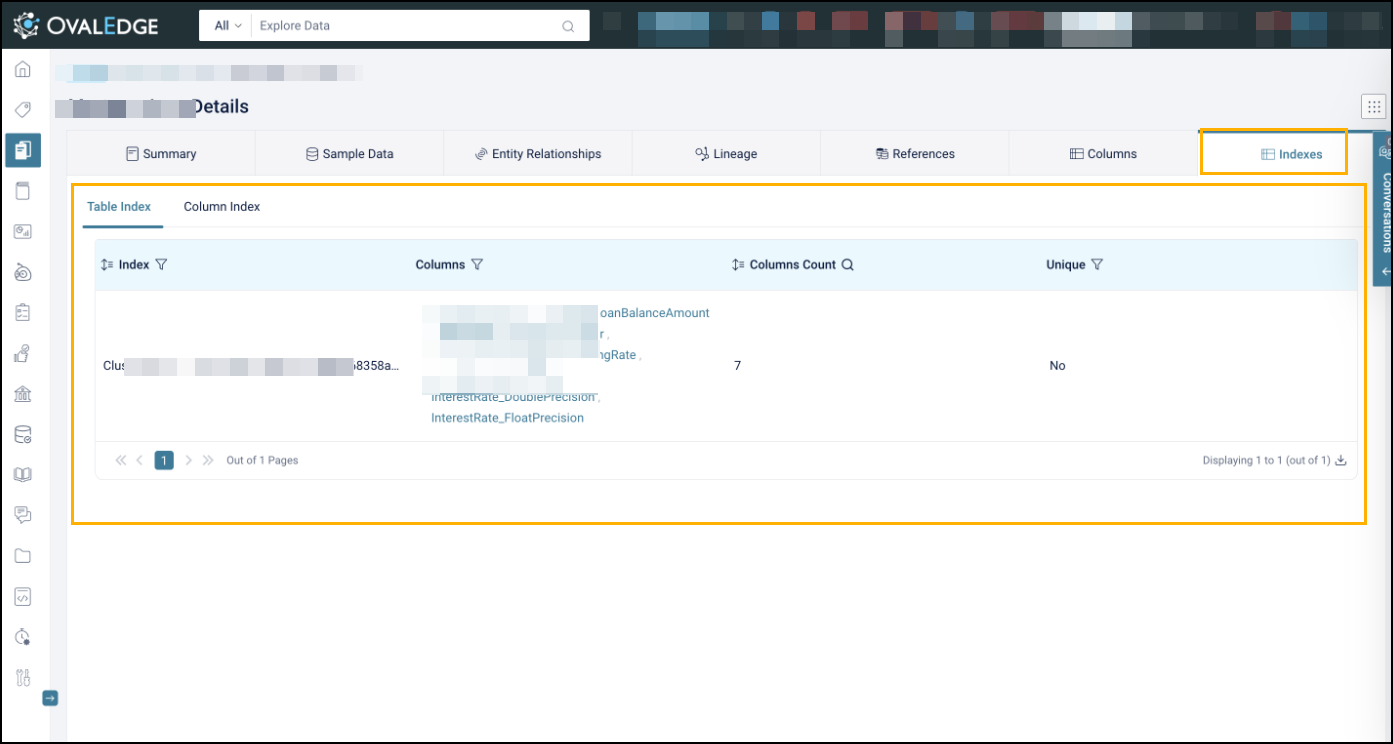
RDBMS Connectors provide automatic discovery and management of database indexes during metadata crawling. Index attributes are captured and integrated with table and column metadata for improved visibility and governance.
**Key Capabilities**
* **Automatic Index Discovery**: Identifies primary, unique, composite, and full-text indexes.
* **Metadata Enrichment**: Adds index type, uniqueness, and usage details to tables and columns.
* **Connector-Level Configuration**: Index crawling can be enabled or adjusted per connector.
* **Framework Integration**: Operates within the existing connector framework without additional setup.
## File Columns
The File Columns tab displays the columns associated with the cataloged files.
Below are additional attributes presented on the File level summary page alongside the fundamental attributes explained earlier.
| Attributes | Description |
| --------------------------- | --------------------------------------------------------------------------------------------------------------------- |
| Maximum Value | Displays the highest value among all records in the File Column. |
| Minimum Value | Displays the lowest value among all records in the File Column. |
| Data Type | It denotes whether the File Column denotes an integer, varchar, char, date, time, boolean, decimal, float, text, etc. |
| Zero Count | Indicates that the File Column has no data entries or records. |
| Empty Count | Displays the number of empty records. |
| Distinct Count/Percentage | Represents the count of distinct values, excluding duplicates. |
| Null Value Count/Percentage | Refers to the number of occurrences of null or missing values. |
#### **Top Values**
The Top Values section displays the file column's top 50 profiling statistics, which are repetitive.
{% hint style="info" %}
The Top Values only display the top 5 profiling statistics, but clicking “View All Values” displays the remaining ones.
{% endhint %}
## Reports
In the Data Catalog, the Reports tab showcases all the reports crawled from connected source systems.
Here is the list of exclusive sections associated with Reports.
* **Eye Frame:** The Eye Frame appears at the bottom of the Reports Summary Page. Clicking on it will redirect to the corresponding report in the Data Source.
Below are additional attributes displayed on the Report-level summary page alongside the fundamental attributes explained earlier.
| Attributes | Description |
| ------------------------- | --------------------------------------------------------------------------------------------------------------------------------------- |
| Column Count | Indicates the number of columns present in the report. |
| Path | It represents the remote folder path where the report is stored. |
| Type | It displays the report type, such as datasets, workbooks, dashboards, titles, views, Webi, CrystalReports, Page, ColumnChart, map, etc. |
| Source Last Modified Date | Reflects the latest modification timestamp from the source system. |
9-Dots Action Items specific to Reports
| Actions | Meta Read | Meta Write |
| ----------------------------- | --------- | ---------- |
| Add Reports to Dashboard | ✅ | ✅ |
| Remove Reports from Dashboard | ✅ | ✅ |
{% hint style="warning" %}
**Viewer users** can see restricted **Power BI** report pages in the **Sub Reports** tab even when they have **No Access** to those pages. Selecting a **restricted** page displays an Access Denied message, but the page remains visible in the list.
{% endhint %}
In Report Connectors, the system maintains the Last Metadata Sync Date to represent the most recent metadata change from the source system. During each ingestion cycle, the Source Last Modified Date is retrieved for supported asset types from source APIs. The system compares this value with the previously recorded state to detect changes. The Last Metadata Sync Date is updated only when a change is detected. If no change is detected, the existing timestamp is retained. This logic is applied at the individual asset level, so each asset reflects its own metadata update status. The behavior applies across asset types, including reports, datasets, dataflows, dashboards, and nested components such as pages and visuals.
The implementation is supported across all connectors and applies consistent metadata synchronization behavior across source systems.
### Example Scenario
A report named **Sales Performance Dashboard** exists in the Power BI source and is crawled into the OvalEdge application.
**Initial Crawl**
| Attribute | Value | Description |
| ------------------------- | -------------------- | ----------------------------------------------------------- |
| Source Last Modified Date | 10-May-2026 09:15 AM | The report was last modified in Power BI. |
| Last Crawled Date | 10-May-2026 10:00 AM | OvalEdge crawled the connector source. |
| Last Meta Sync Date | 10-May-2026 10:00 AM | Metadata sync occurred because the source metadata changed. |
At this stage:
* The report was recently modified in Power BI.
* During crawling, OvalEdge detected the updated metadata.
* Since a change existed, the Last Meta Sync Date was updated.
{% hint style="info" %}
The Attribute "Source Last Modified Date" is applicable only to Report Connectors.
{% endhint %}
**Next Crawl Without Source Changes**
The connector runs again on **11-May-2026**.
| Attribute | Value | Description |
| ------------------------- | -------------------- | -------------------------------------------------------------------------- |
| Source Last Modified Date | 10-May-2026 09:15 AM | No changes were made in Power BI. |
| Last Crawled Date | 11-May-2026 10:00 AM | Connector crawl completed successfully. |
| Last Meta Sync Date | 10-May-2026 10:00 AM | No metadata change detected, so the existing sync date remained unchanged. |
At this stage:
* OvalEdge performed another crawl.
* The system compared the current source metadata with the previously stored state.
* Since no modification was detected, the Last Meta Sync Date did not change.
**Source Metadata Updated Later**
A user modifies the report title and visuals in Power BI on **13-May-2026**.
The next crawl runs on the same day.
| Attribute | Value | Description |
| ------------------------- | -------------------- | ---------------------------------------------------------------------- |
| Source Last Modified Date | 13-May-2026 02:30 PM | Report metadata was updated in Power BI. |
| Last Crawled Date | 13-May-2026 03:00 PM | OvalEdge crawled the connector source again. |
| Last Meta Sync Date | 13-May-2026 03:00 PM | Metadata sync date updated because a source-level change was detected. |
At this stage:
* OvalEdge detected a newer Source Last Modified Date.
* The system identified a genuine metadata change.
* The Last Meta Sync Date was updated to reflect the latest synchronized metadata state.
**Summary of Attribute Behavior**
| Attribute | Behavior |
| ------------------------- | ----------------------------------------------------------------------------- |
| Last Crawled Date | Updates after every successful crawl execution. |
| Source Last Modified Date | Reflects the latest modification timestamp from the source system. |
| Last Meta Sync Date | Updates only when OvalEdge detects an actual metadata change from the source. |
## Report Columns
The Report Columns tab displays report columns associated with a Report. The Data Source shows the columns used to build the Report after crawling the Connector.
Below are additional attributes displayed on the Report level summary page alongside the fundamental attributes explained earlier.
| Attributes | Description |
| ---------- | --------------------------------------------------------------------------------------------------- |
| Path | Denotes the report's location, i.e., the folder path where the report is stored in a remote system. |
| Formula | Displays the mathematical or logical expression used to analyze and present the data in a report. |
## Codes
Codes display queries crawled from connected data sources, queries executed using the Query Sheet, and queries added through the "Data Catalog > Codes > Add New Code" option for a selected Connector/Schema.
Here is the list of exclusive tabs associated with Codes.
* **Results**: The Queries executed within the Query Sheet and cataloged to the data catalog are displayed in the Query Results tab.
* **Visualize Results**: The results of the queries executed in the Query Sheet can be viewed in various report formats, including bar, line, area, scatter, and pie charts (note that pie charts are not supported for non-integer data).
* **Associations:** It displays a single, cohesive view of the data objects (Tables, Files, or Reports) on which queries execute within the system.
Below are additional attributes displayed on the Code summary page alongside the fundamental attributes explained earlier.
| Attributes | Description |
| ----------------------- | ------------------------------------------------------------------------------------------------------------------------------------------------- |
| Catalog Status | If it is cataloged in the Data Catalog, it shows as "Yes." If not, it shows as "No." |
| Last Run Date | Represents the date when the specified codes were last executed or run. |
| Job Type | Denotes the type of job associated with the code, such as View, Function, Procedure, Trigger, workflow, extraction, transformation, loading, etc. |
| SQL Type | Denotes whether DDL, DML, DCL, and supported formats. |
| Lineage Status | Indicates success, failure, or partial building of lineages. |
| Parent Query | Distinguishes between datasets that are considered parent datasets, especially when working with codes with similar names. |
| Has Association | Indicates the presence of connections or links a query has with other data objects, enhancing the understanding of relationships. |
| Last Lineage Build Date | Displays the date when the lineage was built for data objects using this query or code. |
9-Dots Action Items specific to Codes
| Actions | Meta Read | Meta Write |
| -------------------------------- | --------- | ---------- |
| Add New Code | ❌ | ✅ |
| Recommend Lineage and References | ❌ | ✅ |
| Delete Association | ❌ | ✅ |
| Delete Lineage | ❌ | ✅ |
| Delete Code | ❌ | ❌ |
## APIs
The API Connector allows the crawling of APIs with support for Swagger and OpenAPIv3 types, enabling security measures to limit API access to authorized users.
Below are additional attributes displayed on the API level summary page alongside the fundamental attributes explained earlier.
| Attributes | Description |
| --------------- | ---------------------------------------------------------------------------------------------------------------------------------------- |
| URL | Denotes the web address where the API can be accessed. It defines the location for making requests and receiving responses from the API. |
| Path | Denotes the NFS or GIT path where APIs are stored. |
| Method | Defines the actions or operations that can be performed by calling specific functions or endpoints within the API. |
| Endpoint | Defines the various operations and data manipulations that can be performed using the API. |
| Attribute Count | Displays the total number of attributes present in the API. |
## API Attributes
API Attributes are the Request and the Response Parameters inside any API. They can be crawled into the Data Catalog, allowing for the assignment of tags, business glossary terms, classifications, and other metadata-related actions.
Below are additional attributes displayed on the API level summary page alongside the fundamental attributes explained earlier.
| Attributes | Description |
| ---------- | -------------------------------------------------------------------------------------------------- |
| Type | The Type shows whether the Attribute is a Request or a Response parameter. |
| Data Type | Specifies the Data Type of an API Attribute and shows if it’s a string, integer, array, or number. |
## Actions on Data Catalog Objects
The Data Catalog 9-Dots icon provides various options for efficient control and organization of data objects, from raising service requests to adding objects to data quality, impact analysis, watchlist, dashboard, and more. Actions are customized based on access permissions. The 9-Dots option is available in the List View for bulk action and on the Summary Page of that selected data object.
{% hint style="info" %}
Database (DB), Tables (T), Table Column (TC), Files (F), File Columns (FC), Reports (R), Reports Columns (RC), Codes (C), Application Programming Interface (API) & Application Programming Interface Attributes (APIA).
{% endhint %}
| Action | Objects | Meta Read | Meta Write |
| ----------------------------------- | ------------------------------------------------ | --------- | ---------- |
| Add/ Remove to My Watchlist |