> For the complete documentation index, see [llms.txt](https://docs.ovaledge.com/llms.txt). Markdown versions of documentation pages are available by appending `.md` to page URLs; this page is available as [Markdown](https://docs.ovaledge.com/release8.1/dashboards/data-lineage-dashboard.md).
# Data Lineage Dashboard
The Data Lineage Dashboard helps visualize the complete data journey from source to destination. It provides a unified and interactive interface that enables users to explore data lineage at multiple levels.
 **Key Features**
* **Single View (Hybrid of Flow and Sankey):**\
The current version introduces a simplified, single view combining both Flow and Sankey views into one cohesive interface.
**Key Features**
* **Single View (Hybrid of Flow and Sankey):**\
The current version introduces a simplified, single view combining both Flow and Sankey views into one cohesive interface.
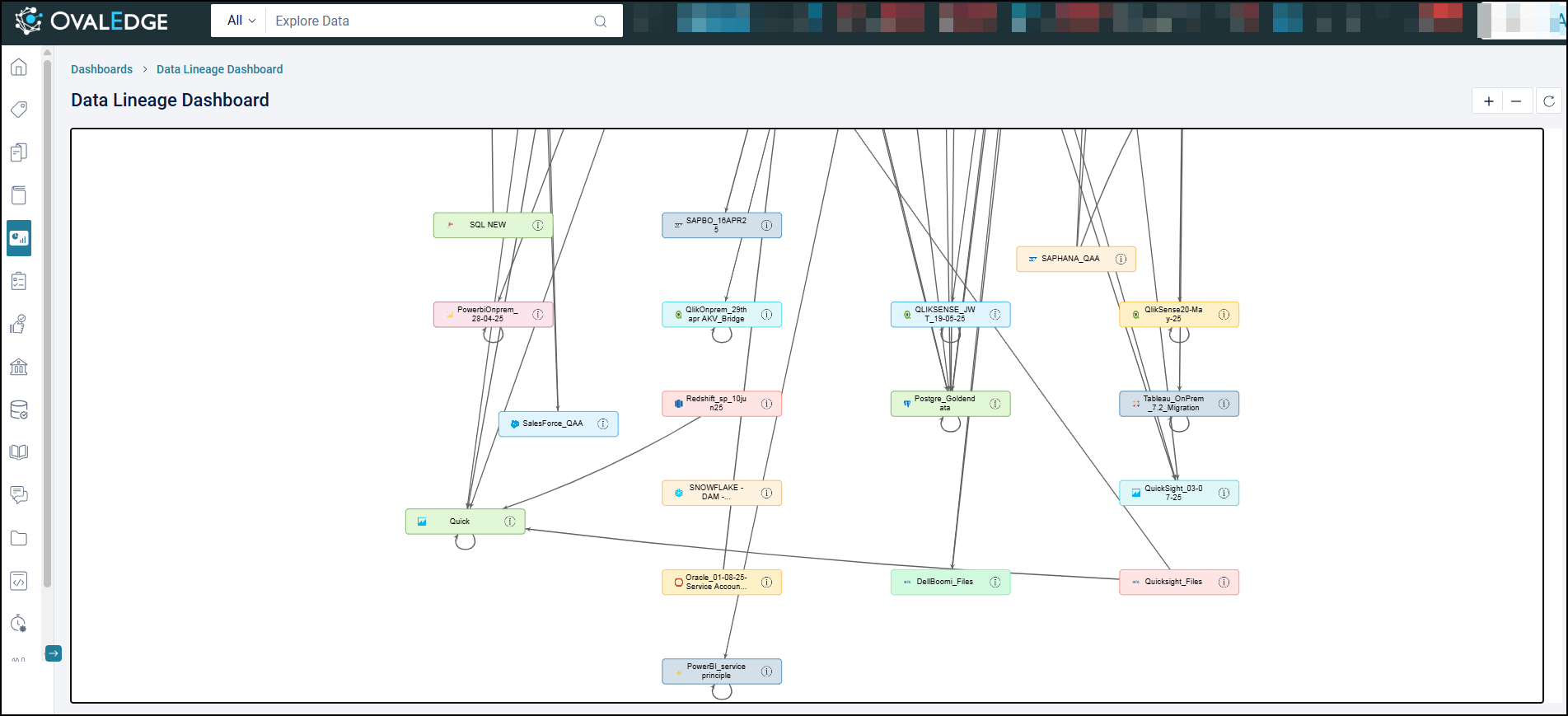
 * **Connection-to-Connection Lineage:**\
The default view now focuses on connection-to-connection lineage. Each connection is represented as a block, and lines between blocks indicate the lineage relationships.
* **Connection-to-Connection Lineage:**\
The default view now focuses on connection-to-connection lineage. Each connection is represented as a block, and lines between blocks indicate the lineage relationships.
 * **Enhanced Navigation:**\
Users can now navigate to the column level by clicking on the lines connecting the blocks, allowing for a more granular exploration of the data lineage.
* **Enhanced Navigation:**\
Users can now navigate to the column level by clicking on the lines connecting the blocks, allowing for a more granular exploration of the data lineage.
 The Reset button in the Lineage graph repositions all nodes to their original structured layout. It provides a quick way to clear any manual adjustments and restore a clean, organized view of the data flow. This function is especially useful when navigating large or complex lineage diagrams.
**Functions of the Reset button include:**
* Repositions all nodes to the default structured layout
* Clears manual changes to node positions
* Improves clarity and alignment in complex data flow graphs
* Saves time by avoiding manual rearrangement
* Maintains a consistent visual structure for easier analysis
The Reset button in the Lineage graph repositions all nodes to their original structured layout. It provides a quick way to clear any manual adjustments and restore a clean, organized view of the data flow. This function is especially useful when navigating large or complex lineage diagrams.
**Functions of the Reset button include:**
* Repositions all nodes to the default structured layout
* Clears manual changes to node positions
* Improves clarity and alignment in complex data flow graphs
* Saves time by avoiding manual rearrangement
* Maintains a consistent visual structure for easier analysis
 ## Visual Representation
* **Nodes and Links:**\
Connected data objects are represented as nodes, while the data flowing between them is defined as links.
* **Schema Representation:**\
Schemas or data sources are visually depicted as boxes or nodes, indicating where data originates or is stored.
* **Arrows or Lines:**\
Arrows or lines connect schema nodes to indicate the direction of data flow. This provides a clear and simplified view of how data moves across different schemas.
This schematic layout enables users to understand the overall flow of data between schemas quickly.
## Visual Representation
* **Nodes and Links:**\
Connected data objects are represented as nodes, while the data flowing between them is defined as links.
* **Schema Representation:**\
Schemas or data sources are visually depicted as boxes or nodes, indicating where data originates or is stored.
* **Arrows or Lines:**\
Arrows or lines connect schema nodes to indicate the direction of data flow. This provides a clear and simplified view of how data moves across different schemas.
This schematic layout enables users to understand the overall flow of data between schemas quickly.
 ### Granular Exploration with Sankey Diagram
The Dashboard provides a detailed, hierarchical view of data lineage through a Sankey diagram—a network-like structure that visualizes complex data movements and transformations across schemas, tables, and columns.
**Components and Interactions**
* **Nodes:**\
Represent connected data objects, such as schemas, tables, and columns.
* **Links:**\
Visually represent the data flow between nodes. The width of a link corresponds to the volume of data transferred.
### Levels of Lineage Visualization
* **Schema-to-Schema Flow:**\
Visualizes the movement of data between entire schemas.
### Granular Exploration with Sankey Diagram
The Dashboard provides a detailed, hierarchical view of data lineage through a Sankey diagram—a network-like structure that visualizes complex data movements and transformations across schemas, tables, and columns.
**Components and Interactions**
* **Nodes:**\
Represent connected data objects, such as schemas, tables, and columns.
* **Links:**\
Visually represent the data flow between nodes. The width of a link corresponds to the volume of data transferred.
### Levels of Lineage Visualization
* **Schema-to-Schema Flow:**\
Visualizes the movement of data between entire schemas.
 * **Table-to-Table Flow:**\
Clicking a schema node drills down to the table level, displaying the tables involved in lineage between the selected schemas.
* **Table-to-Table Flow:**\
Clicking a schema node drills down to the table level, displaying the tables involved in lineage between the selected schemas.
 * **Column-to-Column Flow:**\
Clicking a table connection further drills down to column-level movement, showing how specific columns map and transform data between schemas.
* **Column-to-Column Flow:**\
Clicking a table connection further drills down to column-level movement, showing how specific columns map and transform data between schemas.
 * **Data Mapping and Transformations:**\
The Sankey view highlights how data is processed and transformed throughout its journey, helping users identify potential data quality issues.
***
Copyright © 2025, OvalEdge LLC, Peachtree Corners, GA, USA.
---
# Agent Instructions
This documentation is published with GitBook. GitBook is the documentation platform designed so that both humans and AI agents can read, navigate, and reason over technical content effectively. Learn more at gitbook.com.
## Querying This Documentation
If you need additional information that is not directly available in this page, you can query the documentation dynamically by asking a question.
Perform an HTTP GET request on the current page URL with the `ask` query parameter, and the optional `goal` query parameter:
```
GET https://docs.ovaledge.com/release8.1/dashboards/data-lineage-dashboard.md?ask=&goal=
```
`ask` is the immediate question: it should be specific, self-contained, and written in natural language.
`goal` is optional and describes the broader end goal you are ultimately trying to accomplish on behalf of the user. GitBook uses it to tailor the answer towards what is most useful for that goal.
The response will contain a direct answer to the question and relevant excerpts and sources from the documentation.
Use this mechanism when the answer is not explicitly present in the current page, you need clarification or additional context, or you want to retrieve related documentation sections.
* **Data Mapping and Transformations:**\
The Sankey view highlights how data is processed and transformed throughout its journey, helping users identify potential data quality issues.
***
Copyright © 2025, OvalEdge LLC, Peachtree Corners, GA, USA.
---
# Agent Instructions
This documentation is published with GitBook. GitBook is the documentation platform designed so that both humans and AI agents can read, navigate, and reason over technical content effectively. Learn more at gitbook.com.
## Querying This Documentation
If you need additional information that is not directly available in this page, you can query the documentation dynamically by asking a question.
Perform an HTTP GET request on the current page URL with the `ask` query parameter, and the optional `goal` query parameter:
```
GET https://docs.ovaledge.com/release8.1/dashboards/data-lineage-dashboard.md?ask=&goal=
```
`ask` is the immediate question: it should be specific, self-contained, and written in natural language.
`goal` is optional and describes the broader end goal you are ultimately trying to accomplish on behalf of the user. GitBook uses it to tailor the answer towards what is most useful for that goal.
The response will contain a direct answer to the question and relevant excerpts and sources from the documentation.
Use this mechanism when the answer is not explicitly present in the current page, you need clarification or additional context, or you want to retrieve related documentation sections.