# Connector Roles Management

## Connector Roles Workflow

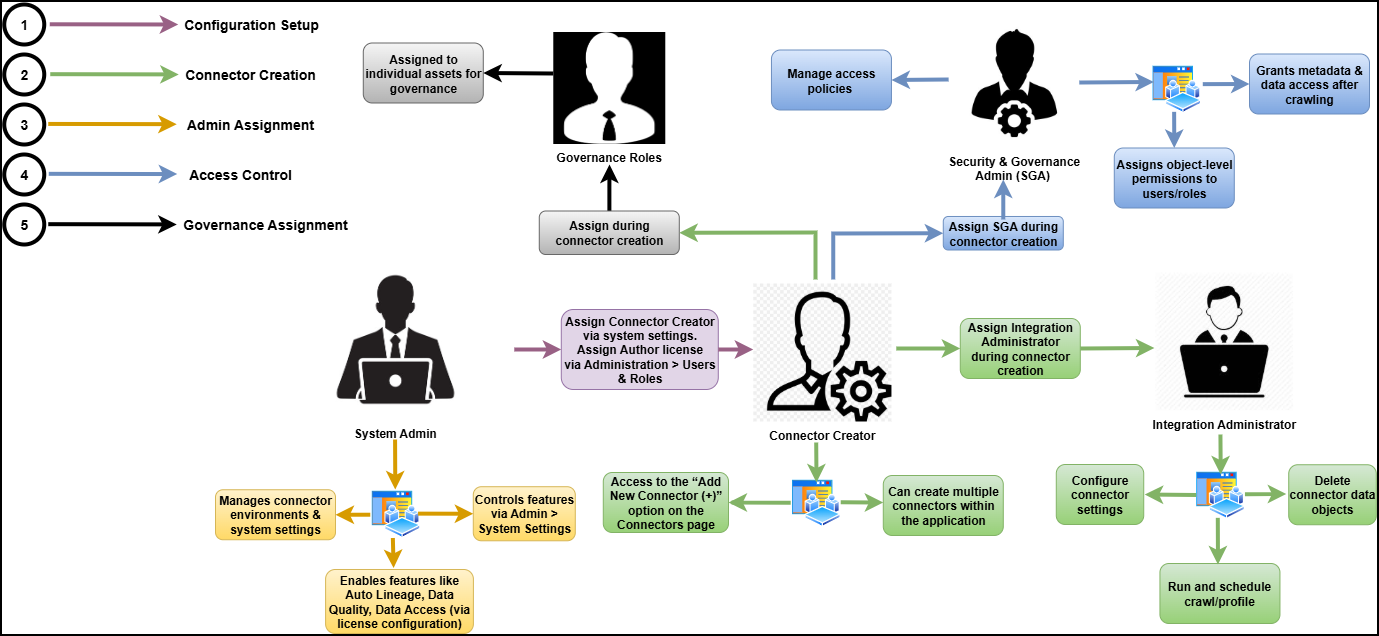
<figure><img src="/files/e0EA4XSvg6iZ1LrRLMef" alt=""><figcaption></figcaption></figure>

## Connector Roles

Roles are assigned to manage connectors effectively:

<table><thead><tr><th width="214.00006103515625">Role</th><th>Responsibility</th></tr></thead><tbody><tr><td>Connector Creator</td><td>Adds new connectors within the application. Requires system-configured role ovaledge.connector.creator.</td></tr><tr><td>Integration Admin</td><td>Edits connector settings, manages crawling, profiling, recrawling, reprofiling, and scheduling. Multiple author roles can be assigned.</td></tr><tr><td>Security &#x26; Governance Admin (SGA)</td><td>Manages metadata and data permissions on connector data assets. Grants various permissions to users and roles. Requires Author license and is editable only from the Security screen (Administration).</td></tr></tbody></table>

### Connector Creator

To define the roles authorized to create new connectors in the system.

#### Configuration Steps

* Navigate to System Settings > Users & Roles.
* Locate the configuration key ovaledge.connector.creator.
* Assign a role with an Author license (e.g., OE\_ADMIN) to this key.<br>

  <figure><img src="https://lh7-rt.googleusercontent.com/docsz/AD_4nXeSM7zZP1ES-qsIUYuiytmBiF6G_QF7SXQYzQ6iawJ7ZXwyWwHXCQFkCz_7xCShPAjmvZea1eracuOWu2Z9pVuJeqwrIf3ydi_sGyRF35ZYg4PPwoEVqB5mSo0H25u81HGJCCL5mw?key=kU5fqtI4eAzquyCyuBsp-g" alt=""><figcaption></figcaption></figure>

#### Capabilities

* Users with the assigned role will see the “Add New Connector (+)” option enabled on the Connectors Page.
* These users can create multiple connectors.
* These users can assign one or more Integration Administrators during the connector setup process.

### Admin Roles

#### Integration Administrator

Manages all technical configurations of a connector.

Scope of Responsibility

* Edit connector settings.
* Run Crawl and Profile operations.
* Perform re‑Crawl and re‑Profile tasks.
* Schedule Crawl/Profile jobs.
* Delete connectors, schemas, or individual data objects.

{% hint style="info" %}
The Connector Creator can assign multiple Integration Administrators to each connector during connector creation.
{% endhint %}

<figure><img src="https://lh7-rt.googleusercontent.com/docsz/AD_4nXeDepzRqRA3k6IhhZQd0C5mvJzAMWJqfMgqRRZxP8oNgSnNGQ6cSHawGCTEvHe8BcT1anYCHsoqohBOfr-g5aPUmLBOPt4JBEHD4KeffhSrwRxAbMeh90Ct2TaiBnU1wl0avB8nTA?key=kU5fqtI4eAzquyCyuBsp-g" alt=""><figcaption></figcaption></figure>

#### Security & Governance Administrator (SGA)

Acts as the security and governance authority for a specific connector.

**Capabilities**

* Full access to both metadata and data permissions within the connector.
* Grants object-level access permissions to roles and users.
* Controls access policies for metadata and data elements across the connector.

**Management**

* SGAs are managed only from Common Administration > Security.
* Multiple SGAs can be assigned to a connector. Only security administrators can manage these assignments.

### Governance Roles

Administrator or Connector Creator can assign governance roles, such as Steward, Custodian, Owner, and others, to data assets. Specific users or teams are selected for each role based on the data asset requirements.

To assign governance roles, administrators can use a drop-down list that shows all single users or teams from Security > Governance Roles.

***

Copyright © 2025, OvalEdge LLC, Peachtree Corners GA USA


---

# Agent Instructions: Querying This Documentation

If you need additional information that is not directly available in this page, you can query the documentation dynamically by asking a question.

Perform an HTTP GET request on the current page URL with the `ask` query parameter:

```
GET https://docs.ovaledge.com/release8.1/connectors/introduction-to-connectors/setup-and-connectivity/connector-roles-management.md?ask=<question>
```

The question should be specific, self-contained, and written in natural language.
The response will contain a direct answer to the question and relevant excerpts and sources from the documentation.

Use this mechanism when the answer is not explicitly present in the current page, you need clarification or additional context, or you want to retrieve related documentation sections.