> For the complete documentation index, see [llms.txt](https://docs.ovaledge.com/llms.txt). Markdown versions of documentation pages are available by appending `.md` to page URLs; this page is available as [Markdown](https://docs.ovaledge.com/deployment-and-maintenance/installation/tomcat-10.x-on-rhel-8-9.md).

# Tomcat 10.x on RHEL 8/9

This article describes the procedure for installing and configuring Apache Tomcat 10.x to deploy the OvalEdge application on RHEL 8/9 systems. It outlines the required setup, configuration steps, and service enablement. The guide ensures a consistent and repeatable installation process aligned with OvalEdge deployment standards.

## Prerequisites

* User account with sudo privileges
* Stable internet connection
* Access to the OvalEdge application package (WAR file)
* Required configuration files (oasis.properties, log4j.properties)

## Steps Involved

1. Create Required Directories
   * Log in to the application VM and create directories to store application configuration files.

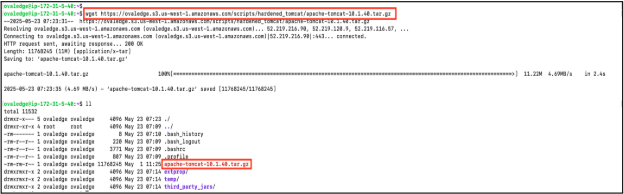
2. Download Apache Tomcat
   * Download the hardened Tomcat package using the following command:

     ```
     wget https://ovaledge.s3.us-west-1.amazonaws.com/scripts/hardened_tomcat/apache-tomcat-10.1.40.tar.gz
     ```

     \
     Sample Reference Screenshot:
     <div align="left"><figure><img src="https://content.gitbook.com/content/gnJyYKHzsnoFOdZJtHsc/blobs/AvB07K4DvdufruJa1JjT/image.png" alt=""><figcaption></figcaption></figure></div>

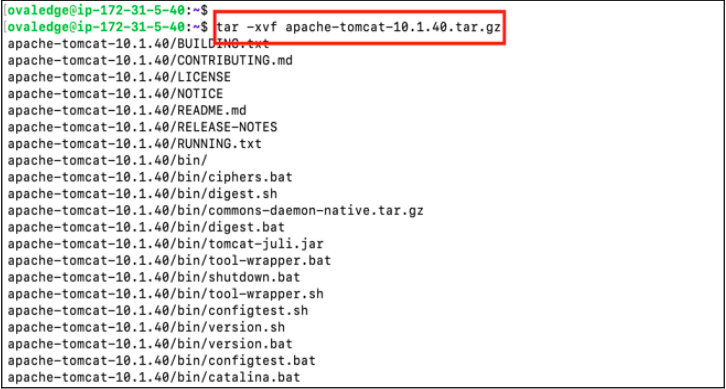
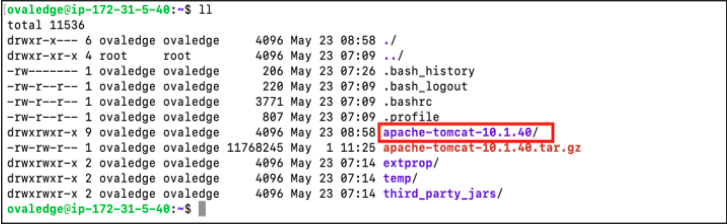
3. Extract the Tomcat Archive
   * Extract the downloaded archive:

     ```
     tar -xvf apache-tomcat-10.1.40.tar.gz
     ```

     \
     Sample Reference Screenshots:

     <figure><img src="https://content.gitbook.com/content/gnJyYKHzsnoFOdZJtHsc/blobs/XxYaZzJP6lgAfMD3nboP/image.png" alt=""><figcaption></figcaption></figure>

     <figure><img src="https://content.gitbook.com/content/gnJyYKHzsnoFOdZJtHsc/blobs/WDSy8j06MJjJdKptswq8/image.png" alt=""><figcaption></figcaption></figure>

4. Configure Environment Settings
   * Navigate to the Tomcat bin directory and create the setenv.sh file:

     ```
     vi apache-tomcat-10.1.40/bin/setenv.sh
     ```
   * Add the following configuration:

     ```
     export CATALINA_OPTS="-Duse.http=true -DOVALEDGE_SECURITY_TYPE=db -Dlog4j.configuration=file:/home/ovaledge/extprop/log4j.properties -Dext.properties.dir=file:/home/ovaledge/extprop/ -Xms4g -Xmx7g -DOVALEDGE_ENCRYPT_DECRYPT_KEY=<client_input> --add-opens=jdk.zipfs/jdk.nio.zipfs=ALL-UNNAMED --add-opens=java.base/jdk.internal.loader=ALL-UNNAMED --add-opens=java.base/java.net=ALL-UNNAMED"
     ```

     \
     Sample Reference Screenshot:

     <figure><img src="https://content.gitbook.com/content/gnJyYKHzsnoFOdZJtHsc/blobs/cyi89xAgzFB7g7T32TdI/image.png" alt=""><figcaption></figcaption></figure>

{% hint style="info" %}
Ensure the correct paths are provided for oasis.properties and log4j.properties.
{% endhint %}

5. Deploy the OvalEdge Application
   * Navigate to the webapps directory and place the ovaledge.war file (provided by the OvalEdge team).\
     \
     Sample Reference Screenshot:

     <figure><img src="https://content.gitbook.com/content/gnJyYKHzsnoFOdZJtHsc/blobs/OPJxW6TuyNQi7v1qIk6e/image.png" alt=""><figcaption></figcaption></figure>
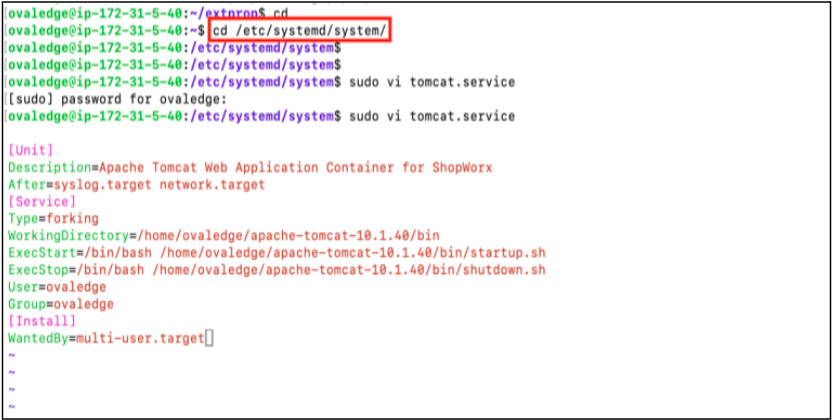
6. Configure Tomcat as a System Service
   * Navigate to the systemd directory:

     ```
     cd /etc/systemd/system
     ```
   * Create the service file:

     ```
     sudo vi tomcat.service
     ```
   * Add the following configuration:

     ```
     [Unit]
     Description=Apache Tomcat Web Application Container for OvalEdge
     After=syslog.target network.target
     [Service]
     Type=forking
     WorkingDirectory=/home/ovaledge/apache-tomcat-10.1.40/bin
     ExecStart=/bin/bash /home/ovaledge/apache-tomcat-10.1.40/bin/startup.sh
     ExecStop=/bin/bash /home/ovaledge/apache-tomcat-10.1.40/bin/shutdown.sh
     User=ovaledge
     Group=ovaledge
     [Install]
     WantedBy=multi-user.target
     ```

     \
     Sample Reference Screenshot:
     <figure><img src="https://content.gitbook.com/content/gnJyYKHzsnoFOdZJtHsc/blobs/zHMJRwmyIxiJgIhcRcTX/image.png" alt=""><figcaption></figcaption></figure>
   * Save the file.
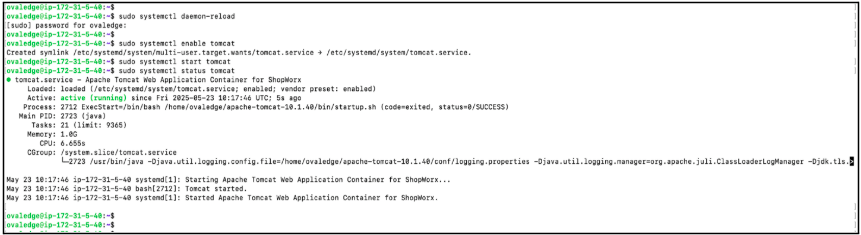
7. Enable and Start Tomcat Service
   * Reload systemd and start the Tomcat service:

     ```
     sudo systemctl daemon-reload
     sudo systemctl enable tomcat
     sudo systemctl start tomcat
     ```

     \
     Sample Reference Screenshot:
     <figure><img src="https://content.gitbook.com/content/gnJyYKHzsnoFOdZJtHsc/blobs/A0N0AlugWv8KwhQUtgBN/image.png" alt=""><figcaption></figcaption></figure>
8. Validate the Deployment
   * Access the application using a web browser:

     ```
     http://<IPADDRESS>:8080/ovaledge
     ```
   * Allow approximately 2 minutes for the application to initialize.<br>

     <figure><img src="https://content.gitbook.com/content/gnJyYKHzsnoFOdZJtHsc/blobs/GgTvSW6r1iqfJZvqniGS/image.png" alt=""><figcaption></figcaption></figure>

***

Copyright © 2026, OvalEdge LLC, Peachtree Corners, GA, USA.


---

# Agent Instructions
This documentation is published with GitBook. GitBook is the documentation platform designed so that both humans and AI agents can read, navigate, and reason over technical content effectively. Learn more at gitbook.com.

## Querying This Documentation
If you need additional information that is not directly available in this page, you can query the documentation by asking a question.

Perform an HTTP GET request on the following URL with the `ask` and `goal` query parameters:

```
GET https://docs.ovaledge.com/deployment-and-maintenance/installation/tomcat-10.x-on-rhel-8-9.md?ask=<question>&goal=<user_goal>
```

`ask` is the immediate question: it should be specific, self-contained, and written in natural language.
`goal` is what the user is ultimately trying to achieve, the reason they need the answer. Sharing it helps GitBook give you a better, more relevant answer. A goal is most helpful when it describes the outcome the user wants rather than restating the question. For example, with `ask=how do I create an API token`, a goal like `automate deployments from our CI pipeline` lets GitBook tailor the answer to that use case.

The response will contain a direct answer to the question and relevant excerpts and sources from the documentation.

Use this mechanism when the answer is not explicitly present in the current page, you need clarification or additional context, or you want to retrieve related documentation sections.