Azure DevOps PAT Permissions for PBIP Extraction
This article outlines the minimum required Azure DevOps Personal Access Token (PAT) permissions for extracting Microsoft Power BI PBIP project metadata using Azure DevOps REST APIs. It defines the required permission scopes, supported APIs, accessible file types, and additional access prerequisites required for successful metadata extraction.
Prerequisites
The following prerequisites must be completed before initiating PBIP extraction.
Azure DevOps Organization Access
The user or service account must have access to the Azure DevOps organization
Project Access
Access to the target Azure DevOps project is required
Repository Read Access
Read permission must be available for the target repositories
Personal Access Token (PAT)
A valid PAT token must be created with the required permission scope
Repository Availability
PBIP project files must exist within the configured repository
PAT Token Configuration
Perform the following steps to create and configure an Azure DevOps Personal Access Token (PAT) with the minimum required permissions for PBIP extraction.
Step 1: Navigate to the Personal Access Tokens Page
Sign in to the Azure DevOps account.
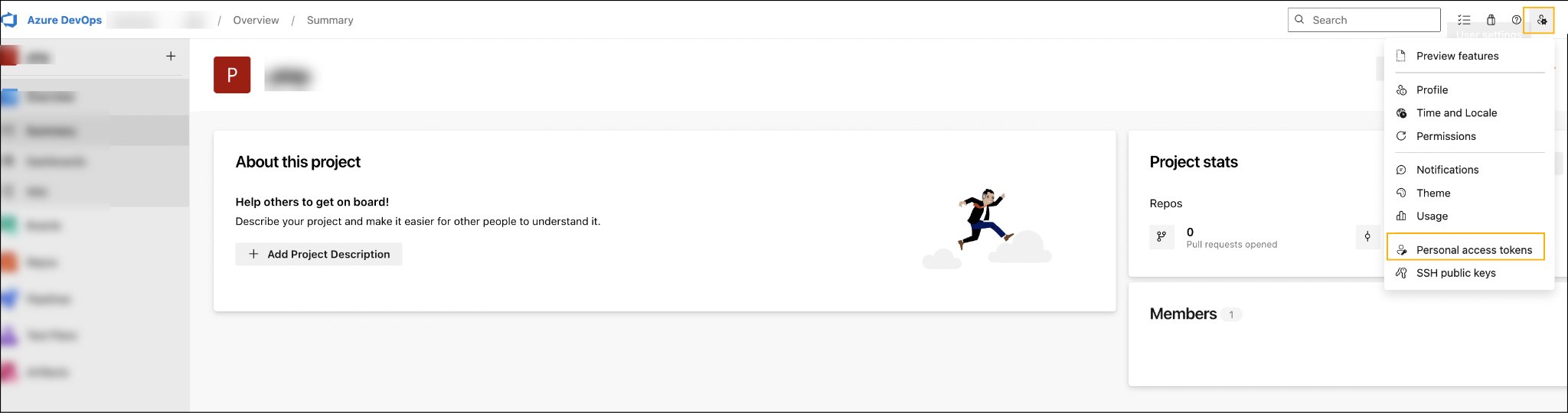
Click the profile icon available in the upper-right corner of the Azure DevOps portal.
Select Personal access tokens from the drop-down menu. The Personal Access Tokens screen is displayed.

Step 2: Create a New Personal Access Token
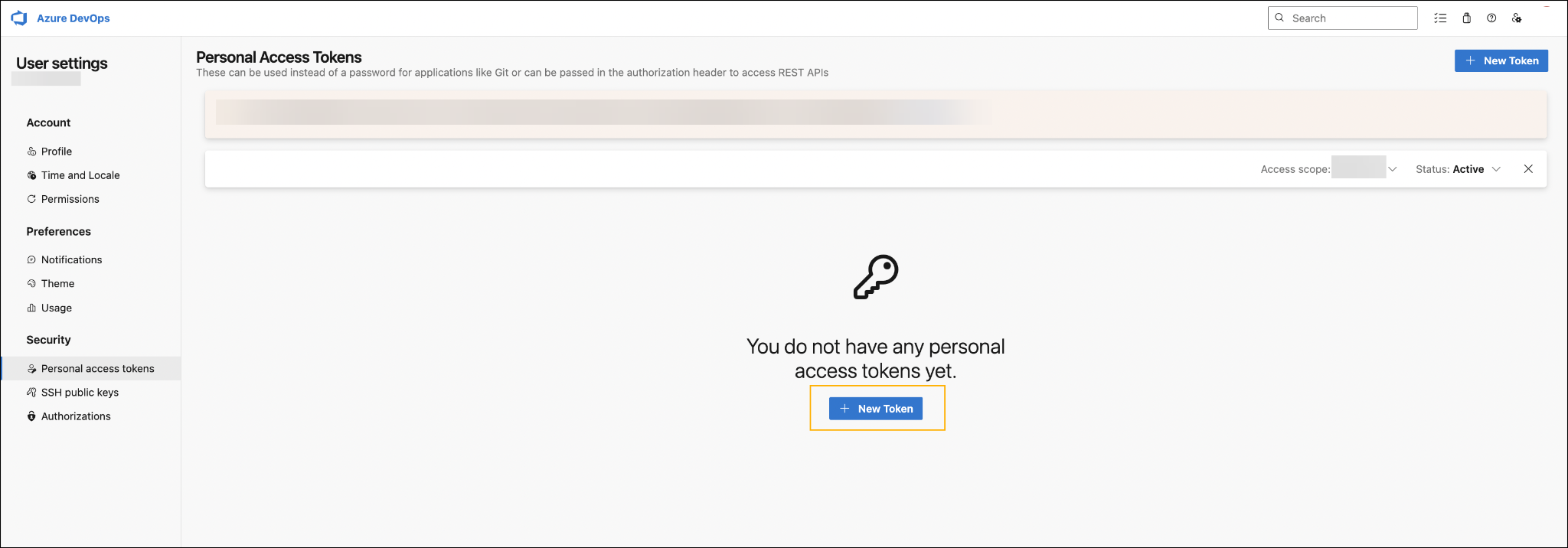
Click + New Token.

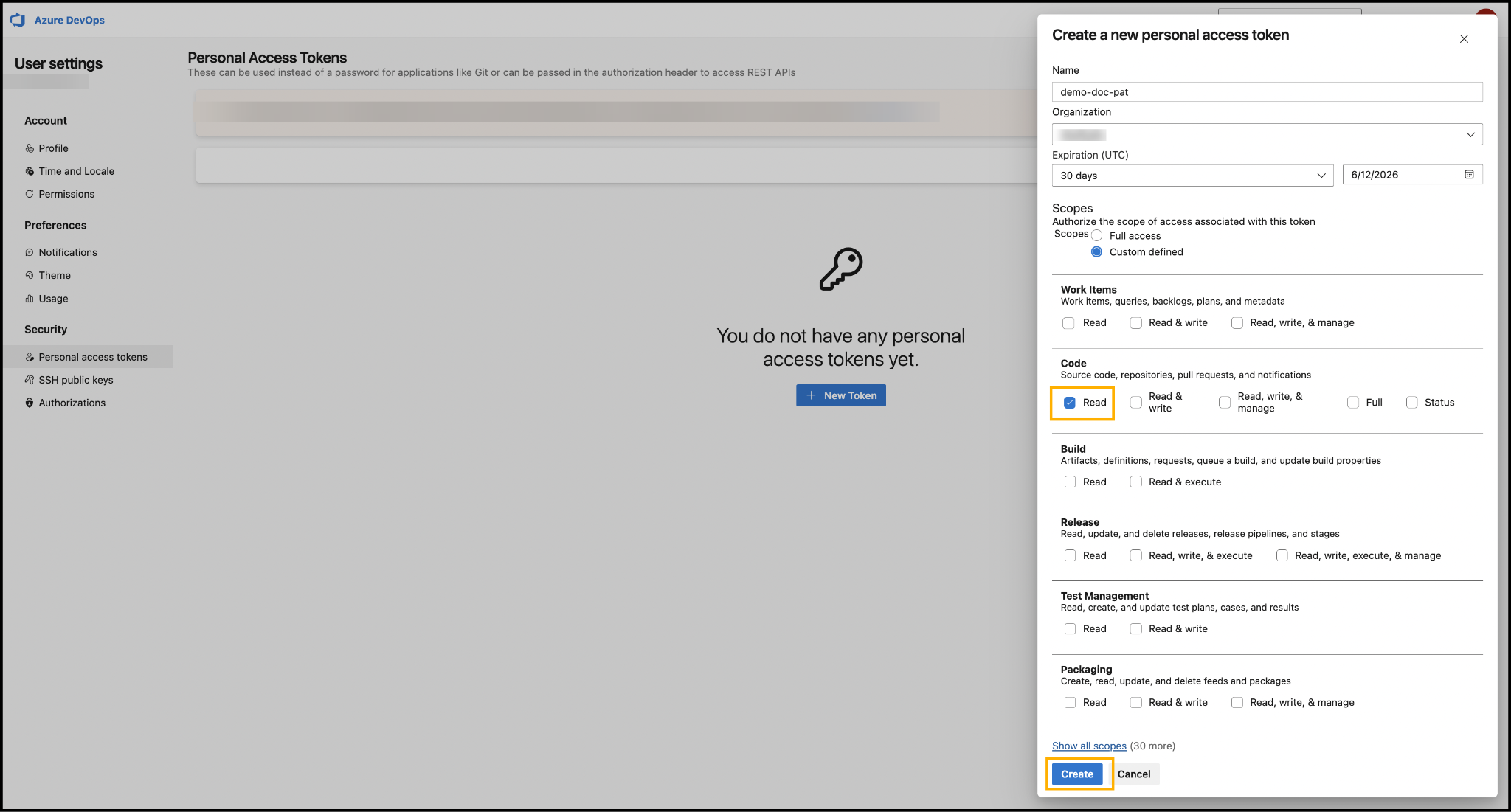
The Create a new personal access token pop-up is displayed.
Enter the required token details.
Name
Enter a meaningful name for the PAT token
Organization
Select the required Azure DevOps organization from the drop-down list
Step 3: Configure Token Scope
Under Scopes, select the Custom-defined option.
From the available permission categories, navigate to the Code section.
Enable the Read permission checkbox.

The Code > Read permission provides the minimum required access for PBIP metadata extraction operations.
Step 4: Generate the PAT Token
Click Create.
Copy and securely store the generated PAT token for future authentication and extraction operations.
Required PAT Permissions
Minimum Scope Required
The following PAT permission is sufficient for all repository and file extraction APIs used during the PBIP extraction process.
Code
Read
Equivalent OAuth Scope
The following OAuth scope corresponds to the required PAT permission.
vso.code
Grants read access to source code and metadata associated with commits, branches, repositories, and other version control artifacts. Also allows reading repository files and file contents.
APIs Covered
The following Azure DevOps REST APIs are supported using the Code > Read permission.
Get Repositories
Get Repository Items / File Paths
Get File Content
Files Accessible Using the Required Permission
A PAT token configured with Code > Read permission can retrieve the following PBIP project files:
.pbip
Power BI project configuration file
report.json
Report metadata and report definition file
model.bim
Semantic model definition file
Implementation Details
PAT Token Configuration
Configure the Azure DevOps PAT token with the following settings:
Permission Area
Code
Access Level
Read
Scope
vso.code
Access Validation Workflow
The PBIP extraction workflow performs the following operations:
Authenticates using the configured Azure DevOps PAT token
Retrieves repository details using Azure DevOps REST APIs
Enumerates repository items and file paths
Reads PBIP project files from the repository
Extracts metadata from supported PBIP files
Additional Access Requirements
In addition to the PAT scope configuration, the Azure DevOps user account or service account must have the following access permissions:
Access to the Azure DevOps organization
Access to the target project
Read access to the target repositories
Repository-level permissions remain mandatory even when the PAT token contains the required scope.
Copyright © 2026, OvalEdge LLC, Peachtree Corners GA USA
Last updated
Was this helpful?