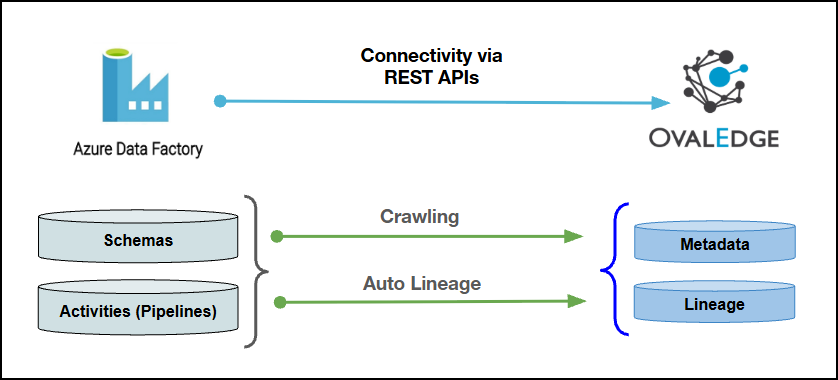
Connectivity
\[How the connection is established with Azure Data Factory]
| REST APIs | | Verified Azure Data Factory Version | V2 | {% hint style="info" %} The Azure Data Factory connector has been validated with the mentioned "Verified Azure Data Factory Versions" and is expected to be compatible with other supported Azure Data Factory versions. If there are any issues with validation or metadata crawling, please submit a support ticket for investigation and feedback. {% endhint %} ### Connector Features | Feature | Availability | | -------------------------------------------- | :---------------------------------------------------------------------------------------------------------------------------------------------------------------------: | | Crawling | ✅ | | Profiling | NA | | Query Sheet | NA | | Data Preview | NA | | Auto Lineage |✅
To learn more, click here.
| ADF Object | ADF Attribute | OvalEdge Attribute | OvaEdge Category | OvalEdge Type |
|---|---|---|---|---|
| Schemas | ADF_Schema | Note: its a static name provided in ovaledge not a real schema | Schema | Schema |
| Activities | Dataset Name | Datasets | datasets | datasets |
| Activities | Pipelines | Pipelines | Pipelines | Pipelines |
| Activities | Dataflows | Dataflows | Dataflows | Dataflows |
| Activities | PipelineRuns | PipelineRuns | PipelineRuns | PipelineRuns |
| Activities | PipelineRunParams | PipelineRunParams | PipelineRunParams | PipelineRunParams |
| Activities | Static params | Static params | Static params | Static params |
| Activities | Global Params | Global Params | Global Params | Global Params |
| Activities | Linked services | Linked services | Linked services | Linked services |
| Activities | Activity Datasets | Activity Datasets | Activity Datasets | Activity Datasets |
| Field Name | Description |
|---|---|
| Connector Type | By default, "Azure Data Factory" is displayed as the selected connector type. |
| Credential Manager* | Select the desired credentials manager from the drop-down list. Relevant parameters will be displayed based on the selection. Supported Credential Managers:
For more details, click here. |
| License Add Ons | Select the checkbox for the Auto Lineage Add-On to build data lineage automatically. For more details, click here. |
| Connector Name* | Enter a unique name for the Azure Data Factory connection (Example: "AzureDataFactorydb"). |
| Connector Description | Enter a brief description of the connector. |
| Connector Environment | Select the environment (Example: PROD, STG) configured for the connector. For more details, click here. |
| Client Id* | Enter the Application ID (also known as Client ID) of the registered application. This is a unique identifier for the app in Azure. |
| Client Secret* | Enter the client secret generated for the application. This is utilized to authenticate the application's identity during the token request process. |
| Tenant Id* | Enter the Tenant ID of the Azure Active Directory. This is used for authentication with the Azure AD tenant. |
| Subscriber Id* | Enter the Subscription ID for the Azure account. This is a unique identifier for the Azure subscription. |
| Resource Group Name* | Enter the name of the Resource Group. The name should match the project or deployment requirements. |
| API Version* | Enter the API version. |
| Pipeline Types to crawl | Select the pipeline type from the drop-down list. |
| Proxy Enabled* | Select Yes to route the connection through a configured proxy, or No to connect directly without a proxy. |
| Default Governance Roles* | Select the appropriate users or teams for each governance role from the drop-down list. All users configured in the security settings are available for selection. |
| Admin Roles* | Select one or more users from the dropdown list for Integration Admin and Security & Governance Admin. All users configured in the security settings are available for selection. |
| No Of Archive Objects* | This shows the number of recent metadata changes to a dataset at the source. By default, it is off. To enable it, toggle the Archive button and specify the number of objects to archive. Example: Setting it to 4 retrieves the last four changes, displayed in the 'Version' column of the 'Metadata Changes' module. |
| Select Bridge* | If applicable, select the bridge from the drop-down list. The drop-down list displays all active bridges that have been configured. These bridges facilitate communication between data sources and the system without requiring changes to firewall rules. |
| S. No | Error Message | Error Description & Resolution |
|---|---|---|
| 1 | Error while validating connection: authentication failed or invalid credentials | The Client ID, Secret ID, or Tenant ID entered does not match the values registered in the Azure portal for the application registration. Resolution:
|
| 2 | Validation successful but factory list returned is empty | Validation can complete successfully even when the Subscription ID or Resource Group Name entered does not correctly point to the intended data factory. Resolution:
|
| 3 | Validation successful but no pipelines, datasets, or linked services are catalogued | The service principal used for the connection may not belong to the correct tenant associated with the data factory, even though the credentials themselves are valid. Resolution:
|
| 4 | Certain factories, pipelines, or datasets do not appear after crawling | This typically occurs when the scope assigned to the credentials does not extend to the workspace containing the missing objects, or a proxy/bridge path is limiting visibility. Resolution:
|
| S. No | Error Message | Error Description & Resolution |
|---|---|---|
| 1 | Pipelines are catalogued, but no pipeline run information is available | Run-based metadata is only collected for successful triggered runs that occurred within the configured historic run window, which defaults to 30 days. Debug runs are not retrieved by the ADF API. Resolution:
|
| 2 | Trigger information is not visible in the catalog | Trigger objects are not currently supported for crawling as part of the Azure Data Factory connector. Resolution:
|
| 3 | Older API version fields do not return expected results | The connector supports only the latest officially published Azure Data Factory API version. Deprecated versions are not supported. Resolution:
|
| S. No | Error Message | Error Description & Resolution |
|---|---|---|
| 1 | Lineage graph is empty or incomplete for a pipeline | Lineage depends on the pipeline containing a copy activity with at least one successful run, and on both the source and target systems already being catalogued. Resolution:
|
| 2 | Crawl or lineage build works intermittently after previously functioning correctly | This is commonly related to secret rotation or expiry on the application registration used for the connection. Resolution:
|
| S. No | Question | Answer |
|---|---|---|
| 1 | What details are needed to set up the Azure data factory connector? | The following details are required to establish a connection:
The Client ID, Client Secret, and Tenant ID are obtained from an application registration in the Azure portal. These details are used to generate a bearer token, which allows the connector to access the data factory and its objects, including pipelines, linked services, datasets, and data flows. |
| 2 | Why does a connection validate successfully but show zero factories or pipelines after crawling? | Connection validation only confirms that the credentials are valid and Azure is reachable. It does not verify that the connection points to the correct data factory. Verify that:
These values can be verified in the Azure portal. |
| 3 | What level of permission is required for this connector? | The reader role is the minimum required permission. The role can be assigned at either:
The connector only reads metadata, such as pipeline definitions, linked service details, and run history. It does not modify or write data to Azure. Therefore, a contributor or writer role is not required. |
| 4 | Why might a connection that worked previously start failing or behave inconsistently? | The most common cause is an expired or changed Client Secret associated with the application registration. If crawling or lineage previously worked and has started failing:
|
| 5 | Can one connector instance cover multiple subscriptions or resource groups? | No. Each connector instance is scoped to one Subscription ID and one Resource Group Name. If data factories are located across multiple subscriptions or resource groups, configure a separate connector instance for each one. |
| 6 | Is a bridge deployment supported for isolated network environments? | Yes. Bridge deployment is supported for this connector. As the connector is a cloud-based, REST API driven connector, bridge deployment can be used for environments without direct outbound access. |
| S. No | Question | Answer |
|---|---|---|
| 1 | What kind of objects are catalogued when Azure data factory is crawled? | A single Azure data factory schema is created with the following objects:
These are the primary objects collected during a standard crawl. |
| 2 | Are triggers included when Azure data factory is crawled? | No. Trigger objects are not currently catalogued by this connector. Although Azure data factory supports triggers for pipeline scheduling, cataloguing trigger definitions is not currently supported. |
| 3 | Why does a pipeline appear in the catalog without run history? | Run history is collected only for successful runs within the configured historic run window, which defaults to the most recent 30 days. Run history is not shown if:
The historic run window can be adjusted in the system settings. |
| 4 | Does this connector support delta crawling? | No. Delta crawling is not currently supported. Each crawl processes the full set of selected objects rather than identifying only objects changed since the previous crawl. Therefore, a complete recrawl is required when refreshed data is needed. |
| 5 | Which Azure API version does the connector use? Are older versions supported? | The connector uses the latest officially published Azure data factory API version specified in Azure's documentation. Older API versions that are no longer actively published or supported by Microsoft are not maintained by this connector. Therefore, only the current supported API version should be expected to work. |
| 6 | Does the Azure data factory connector support profiling or previewing sample data? | No. The connector does not support:
The Azure data factory connector is an ETL and orchestration connector rather than a direct data storage connector. It supports metadata such as object structure, pipeline definitions, and lineage relationships. |
| S. No | Question | Answer |
|---|---|---|
| 1 | What needs to be in place for lineage to be built successfully for a pipeline? | The following three conditions must be met:
If any of these conditions are not met, lineage may not be created. |
| 2 | Why can a lineage graph look incomplete even though the crawl completed successfully? | A successful crawl only confirms that the pipeline objects were read successfully. It does not guarantee that lineage can be built. Check the following:
These conditions determine whether lineage can be created successfully. |
| 3 | Does the connector capture actual runtime values, such as dynamic parameters? | No. The connector captures only the static values defined in the pipeline's JSON definition at the time of crawling. Dynamic parameters set or changed at runtime are not captured because the connector reads the stored pipeline definition rather than individual execution values. |